
Audio and Visual Technology
A Step-By-Step Guide To Setting Up Dolby Atmos Speakers
Share
Overview
Most of us must have watched Christopher Nolan's 2023 biography, Oppenheimer. It won the Best Picture, Best Director, Best Actor, Best Supporting Actor and many other awards at the Oscars. Yet, it wasn't just for its gripping storytelling but also for the mind-blowing IMAX sound design.
We bet you remember that atomic bomb test scene, right?
It wasn't just loud noise that made you feel like you were in the desert with Rebert. the eerie quiet before the loud explosion and the rumbling shockwave that hit your whole body were carefully constructed sound effects.
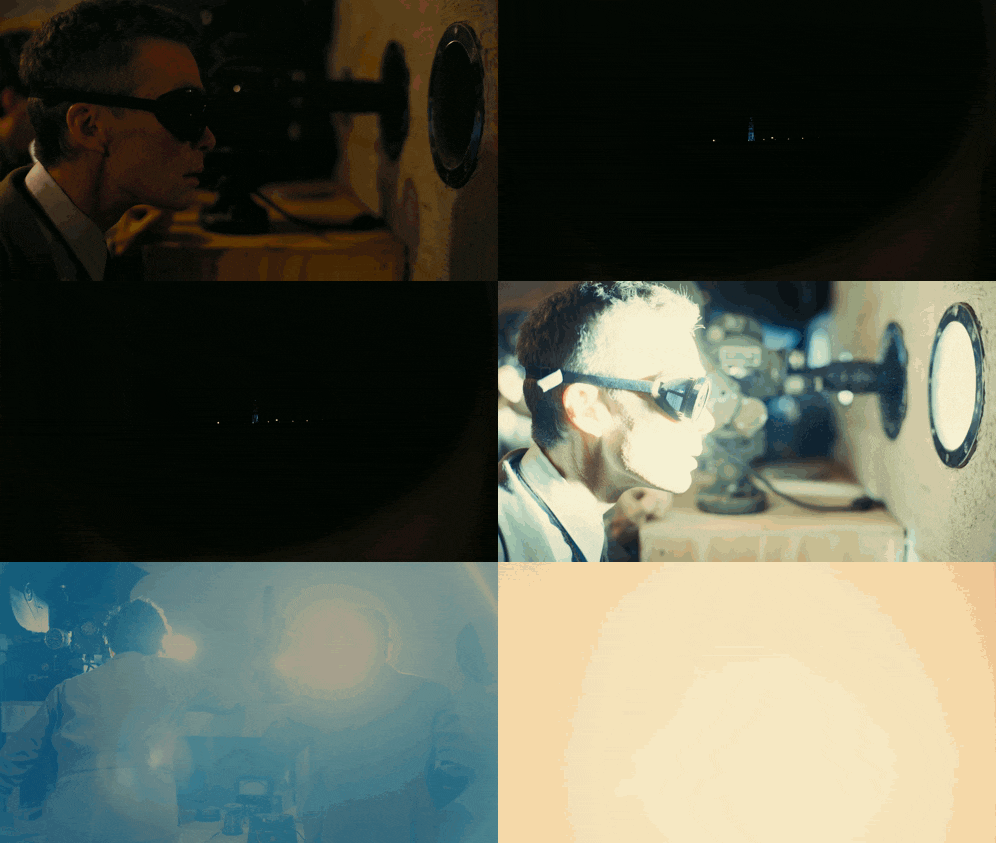
That's the magic of Dolby Atmos!
It doesn’t just play sounds but moves them around the listener, creating a three-dimensional soundscape where every explosion, whisper, or footstep is placed precisely above, behind, or beside you. It's just like listening to something in real life!
Now, this level of sound immersion in home theater systems sounds great, right? Well, we definitely would want it at our house!
You see, a recent Dolby Laboratories study found that 77% of respondents would pay more for better picture and sound quality. This truly shows that people want a better audiovisual experience.
Hence, this guide will help you set up your Dolby Atmos system at home, right from choosing the best equipment to optimizing your setup for the ultimate immersive experience.
However, before we dive in, let’s first understand what makes Dolby Atmos so revolutionary. Read on!
Understanding Dolby Atmos
Dolby Atmos refers to an advanced audio technology that creates a three-dimensional sound experience, allowing audio to be delivered from all directions around you. Here's a visualization:
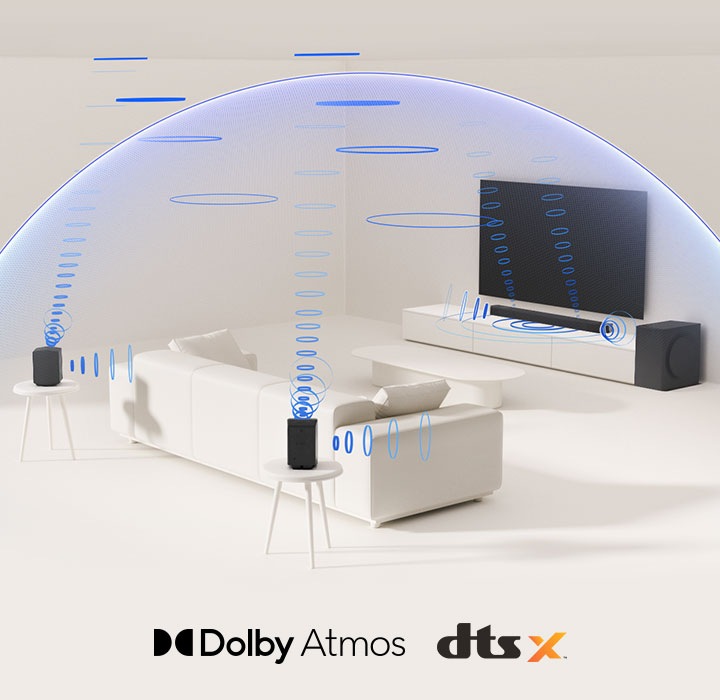
Dolby Atmos is different from traditional surround sound, that has fixed channels like left, right, and rear. This new audio technology lets sound move dynamically in a 360-degree space, mimicking how we hear in real life.
By giving sounds to different channels, the 5.1 or 7.1 surround sound systems, for example, you can move the sound of a plane from the back of the room to the front. Well, that's what Dolby is made for, right?
It uses something called "object-based audio" to move sounds around freely. This flexibility allows for precise sound placement, making your Home Theater Audio experience truly dynamic.
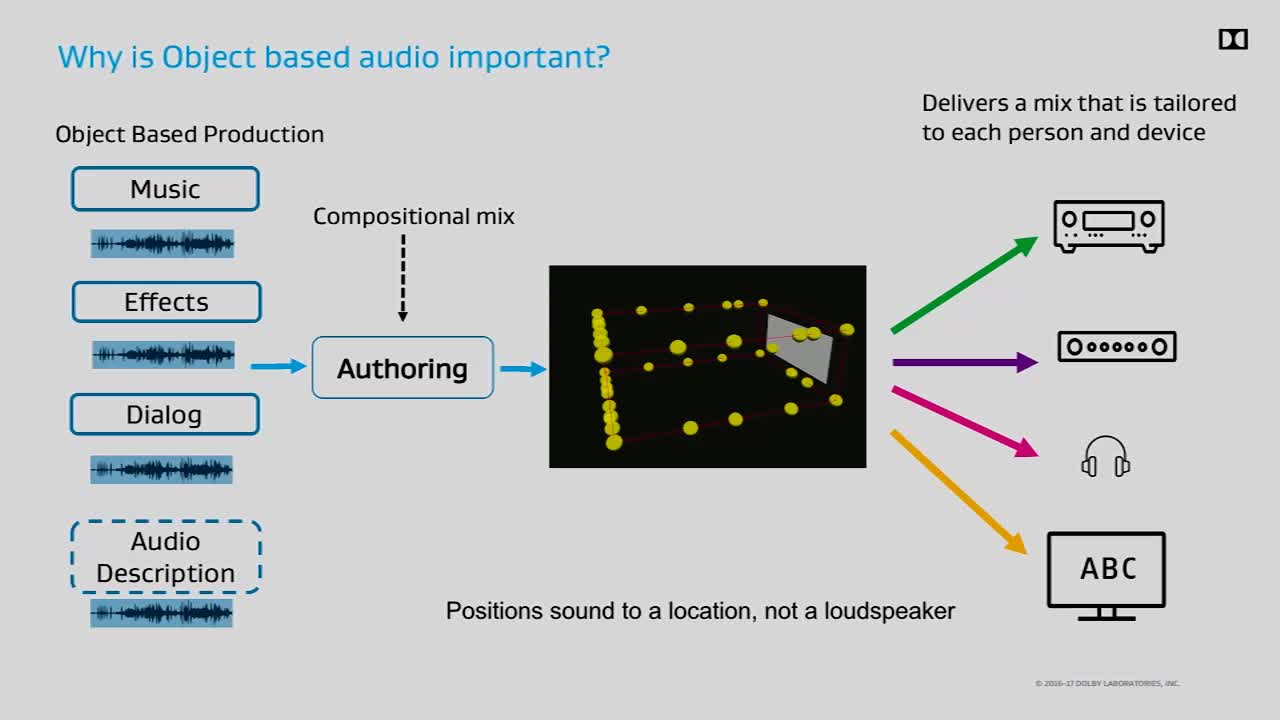
Dolby Atmos doesn't just fill the room with sound; it sculpts it. By adding height channels, it creates a dome of sound that envelops you. Whether it's rainfall from above or footsteps creeping behind, its surround sound system adapts to deliver an unparalleled audio experience.
Now that you understand what Dolby Atmos is, let's move to the next section - discussing how to set up the Dolby Atmos Speaker system at home!
Step 1: Essential Equipment For A Dolby Atmos Setup
Below is the list of essential components that, while not always necessarry, will help enhance your Dolby Atmos setup. Dive in!
1. Audio-Visual (AV) Receiver

Starting with the AV receiver, this one is the part of your home theater setup that does all the work. It decodes and boosts sound waves so that they reach your speakers and give you a full experience.
For a Dolby Atmos speaker setup, you need a compatible receiver just as you would need a Blu-ray player to watch Blu-ray discs. A receiver such as the Marantz NR1711 or any 7.1-channel receiver will do the trick.
2. Speakers
Next up, speakers!
Picture them as the actors in your audio drama, each playing a crucial role. For a basic 5.1.2 setup, you'll need:
-
Two Main Speakers: These are your leading stars, usually floor-standing or bookshelf speakers.
-
Center Speaker: The dialogue specialist, ensuring you catch every whisper and shout.
-
Left And Right Surrounds: These surrounds give the picture more depth and put you in the middle of the action.
-
Dolby Atmos-Enabled Speakers: These can connect to the ceiling or face upward, making the sound seem like it's coming from above.
Also, don't forget the subwoofer, which plays those deep, rumbling bass notes!
3. Content Source
Finally, you need a content source that speaks the Dolby Atmos language. Check to see if your devices - from 4k TVs & Blu-ray players to game devices like PlayStation or Xbox - are compatible with Dolby Atmos.
You see, putting together a Dolby Atmos setup is a lot like putting together a team where each equipment has a unique role to play, and together, they create an epic experience.
So, you don't need to spend a lot, just the right gear and a bit of patience. What's next, you ask?
Step 2: Plan Your Speaker Layout
You know that sound moves around a room based of the speakers' size, shape, and layout. Here are some things to think about:
1. Room Assessment
Before diving into the "Speaker Placement Guide," take a moment to size up your space. Is it a cozy den or a sprawling living room? Your speaker setup will depend on the size and sound of the room. It's like picking the right Hogwarts house: each has its own charm, but not everyone would be a good fit at Gryffindor!
2. Speaker Configuration Options
When it comes to configurations, the 7.1.4 setup is often hailed as the "gold standard" (Atmos 7.1.4 Recommended Layout), offering a rich audio experience. However, smaller rooms might do well with a 5.1.2 setup.

Here’s a quick breakdown:
-
5.1.2: Five traditional speakers, one subwoofer, and two overhead or upward-firing speakers.
-
5.1.4: Similar to 5.1.2 but with four overhead or upward-firing speakers.
-
7.1.2: Adds two more surround speakers to a 5.1.2 setup.
-
7.1.4: The ultimate setup with four overhead speakers, perfect for larger rooms.
3. Speaker Placement Guidelines

-
Front Speakers: Place the left and right speakers to form a triangle with your seating position, ensuring they’re at ear level. The center speaker should sit right between them, likely below your TV.
-
Surround Speakers: Put them behind and to the side of your sitting area a little. You can hang them on the wall if you want to try something new.
-
Overhead Speakers: For that "wow" factor, you need overhead speakers. In-ceiling speakers provide a direct sound path, while upward-firing options bounce sound off the ceiling. The choice depends on your room’s layout and ceiling type.
Putting your speakers together is a lot like putting together the perfect playlist. Every song has its place, and when you do it right, it sounds great.
Step 3: Connect Your System
Now that you have planned out your Dolby Atmos soundscape, it's time to bring it to life. Here's what to consider:
1. Wiring
Think of wiring as connecting the critical dots with electricity. Getting it right means clearer sound, better synchronization, and no frustrating troubleshooting later. Here's what you need to know:
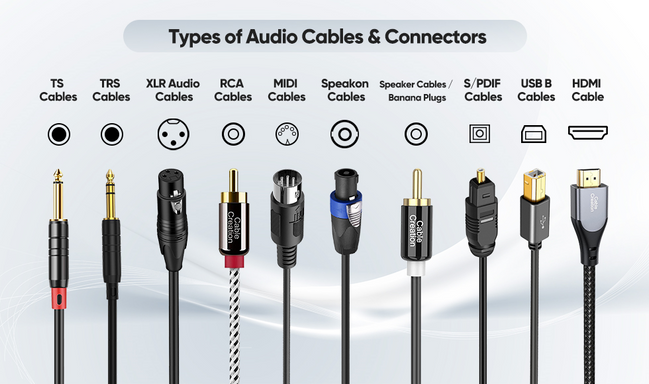
Speaker Connections:
-
Use high-quality speaker cables and connect each speaker to its corresponding terminal on your AV receiver.
-
Follow the color-coding or positive (+) and negative (-) markings to avoid phase issues.
-
Front & Surround Speakers → Connect to the labeled terminals (Front L/R, Surround L/R, Center).
-
Dolby Atmos Height Speakers → Depending on your receiver, they may be labeled as Height, Top, or Assignable channels.
Subwoofer Connection:
-
If there is a Sub Out (LFE) port on the AV receiver, you can use it to plug in your subwoofer.
-
If your TV or stereo controls the bass sounds, use it to set the subwoofer's crossover frequency to its highest level.
-
Adjust the subwoofer volume to around 50% (noon position on the dial) to allow room calibration and then fine-tune it later.
2. Remember The HDMI Connections
As HDMI is your way to high-quality sound and video, getting it right is important to make sure that audio transfers smoothly between your devices. Remember to do these things:

Connecting Your AV Receiver To The TV:
-
Connect the AV receiver's HDMI OUT (ARC/eARC) port to the TV's HDMI IN (ARC/eARC) port with a high-speed HDMI (2.1 or Premium High-Speed HDMI) wire.
-
In the settings for raw Dolby Atmos sound, if your TV supports eARC, turn it on.
Connecting External Devices (If Applicable):
For the best sound, connect external media players like Apple TV, Fire Stick, Blu-ray players, or game consoles straight to the AV receiver's HDMI inputs. Understand that:
-
Most AV receivers have HDMI ports labeled Blu-ray, Game, Media Player, Cable/Satellite, etc. For the most part, you can switch out the ports as long as you use the right ones.
-
If you use the TV’s built-in streaming apps, HDMI ARC/eARC will send sound back to the receiver, so you won't need any extra cords.
Final HDMI Check:
-
Power on all devices, AV receivers, TVs, streaming players, and game consoles.
-
To connect your TV to the right HDMI port for your AV receiver, use the TV remote.
-
Check that the Dolby Atmos sound from your source device is reaching your receiver. The receiver's screen may show you this.
3. Setup The AV Reciever (If Applicable)
Now that everything is connected, it's time to configure your speaker layout and audio processing.
Access The Setup Menu:
-
Press ‘Setup’ or ‘Menu’ on the AV receiver’s remote to access its on-screen display.
-
Navigate to ‘Speakers’ or ‘Speaker Setup’ (wording may vary).
Define Your Speaker Layout:
-
Pick the Dolby Atmos setting you want (for example, 5.1.2 or 7.1.4).
-
Assign the right height channels, such as those for in-ceiling, front-height, or up-firing speakers.
Confirm Device Inputs:
-
Make sure all HDMI devices are detected and set to bitstream or Dolby Atmos output in their audio settings.
TechDogs' Pro Tip: If you see "Dolby Atmos" or "Atmos" on the screen of your AV receiver, your setup is working right and handling the Atmos signal properly!
Voilà! With your Dolby Atmos system fully connected, the final step is calibrating and fine-tuning everything for the best sound experience possible. Let’s get into that next!
Step 4: Calibrate The System And Optimize
All right, it's time to be a sound engineer - just kidding! Yet, you do need to fine-tune your audio system in the same way that Robert Oppenheimer figured out what he needed to do to finish the Manhattan Project.
A lot of new AV speakers have calibration tools like Audyssey, YPAO, or Dirac Live built right in. A microphone in these systems checks how much sound each speaker is outputting and changes the settings automatically to make the best use of the room's size. However, if you are an audio engineer, you can always change it to suit your personal taste!
If you like to take risks and like doing things yourself, you can try to:
Measure Speaker Distances:
-
Find out how far away each speaker is from where you are listening most of the time using a tape measure.
-
To make sure the timing and synchronization are correct, enter these values into the setup menu on your receiver.
Adjust Speaker Levels:
-
Employ a Sound Pressure Level (SPL) meter, with many smartphone apps available for this purpose. This will help ensure that each speaker outputs sound at the same volume level.
-
Play the test tones through your radio and change the volume on each speaker until they all sound the same.
Remember that the point is to make you feel like you're in the middle of the action, no matter if it's a dangerous car chase or a rousing speech.
TechDogs' Pro Tip: Set your crossover frequency to around 80Hz. This allows the subwoofer to handle the deep bass, leaving the other speakers to focus on mid and high frequencies.
There you have it!
With your system calibrated, you're now ready to dive into the immersive world of Dolby Atmos.
No wait, there's more!
You still have to test the setup to ensure it works the way you want it. So, let's explore how to test your setup with some killer demo tracks and content streaming services compatible with Dolby Atmos content. Let's go!
Step 5: Test And Enjoy The Dolby Atmos Content
Now that your Dolby Atmos setup is locked and loaded, it’s time for the real fun of experiencing the magic of 3D surround sound. Think of this moment as finally taking a high-performance car for a spin, except your open road is a universe of immersive audio!

Start with some Dolby Atmos demo content specifically designed to showcase its mind-blowing capabilities. Movies, music, and games that leverage Atmos properly will make you feel like you're right in the middle of the action. Here are a few recommendations:
Movies:
-
Avengers: Endgame (explosive battle sequences and subtle dialogue clarity).
-
Free Guy (chaotic yet precise multi-directional sound effects).
-
Dune (deep, atmospheric sound with sandworms that shake the room).
-
Top Gun: Maverick (fighter jets soaring realistically across channels).
-
A Quiet Place (demonstrates how silence and spatial audio create tension).
Music (Available On Apple Music, Tidal, Amazon Music HD):
-
The Beatles – Abbey Road (immersive remastering of a classic).
-
Hans Zimmer – Live in Prague (cinematic orchestral depth).
-
Billie Eilish – Happier Than Ever (vocals and instrumentals floating around you).
-
Taylor Swift – The Eras Tour (stadium-style immersion in her live performances).
Dolby Atmos Games:
-
Cyberpunk 2077 (Night City feels alive with 360-degree sound design).
-
Call of Duty: Warzone (hear every footstep and explosion with pinpoint accuracy).
-
Forza Horizon 5 (engine roars and road surfaces feel realistic).
-
Hellblade: Senua’s Sacrifice (whispers and environmental sounds add eerie immersion).
People who like to stream content can also use Dolby Atmos across streaming services. As long as your TV, AV player, and streaming device work with Atmos, you'll be good to go.
Here are some suggestions:
-
Netflix (Atmos support is on the premium plan; look for the Atmos logo).
-
Disney+ (Star Wars, Marvel, Avatar: The Way of Water, and more).
-
HBO Max / Max (Dune, Game of Thrones, The Last of Us).
-
Apple TV+ (Foundation, Ted Lasso, Greyhound).
-
Amazon Prime Video (Jack Ryan, The Tomorrow War).
The options are endless. You can change the settings and try out different content streaming platforms and games. Remember to have fun!
How To Troubleshoot Common Issues (If Applicable!)
Well, even the best Dolby Atmos setups can run into hiccups occasionally. So, here’s how to fix common issues before they ruin your immersive Atmos experience.
Audio Dropouts
Ever been in the middle of an explosive action scene and suddenly… silence? Here's how to fix it:
-
Check Your Connections: Loose HDMI and speaker cords are often to blame, so check your connections to make sure they are tight.
-
Reduce Interference: Keep Wi-Fi routers, radios, and Bluetooth devices away from the setup to ensure your receiver and speakers are receiving a full signal.
-
Use Wired Over Wireless: Choose wired links instead of wireless ones for a more stable signal, especially for subwoofers or rear speakers.
-
Update The Firmware: Ensure that the software on your TV, AV receiver, and streaming devices is up to date, to reduce the likelihood of any glitches or bugs.
Speaker Phase Issues
If your speakers sound off, like a band playing out of sync, you might have phase issues. Here's how you should troubleshoot this issue:
-
Check The Wiring: Double-check that all speakers are connected positive (+) to positive (+) and negative (-) to negative (-). Reversed wiring often causes phase problems.
-
Test Speaker Phase: Use a phase tester app or play a simple test track (some AV receivers have built-in phase tests!), and if something sounds hollow or weak, phasing could be the issue.
-
Reposition Speakers: Moving your speakers slightly closer or farther from the listening position can fix phase alignment problems too.
Wrapping Up!
You've just navigated the wild world of Dolby Atmos speaker setup, and hopefully, you're still in one piece. It's a bit like assembling a jigsaw puzzle where but the final piece ends up making your living room an immersive audio landscape.
Now you're ready to experience sound like never before, right at home!
Whether you went all out with ceiling speakers or kept it simple with just a soundbar, the key is to enjoy the experience. Remember, it's not just about the technology but about the experience it creates. So grab some popcorn, dim the lights, and let the Dolby Atmos sound take you on a journey.
Happy listening!
Frequently Asked Questions
What Is The Main Benefit Of Dolby Atmos Over Regular Surround Sound?
Dolby Atmos adds height channels, allowing sounds to move around in a 3D space. This creates a more immersive experience compared to traditional surround sound.
Do I Need Special Speakers For Dolby Atmos?
Yes, you typically need either in-ceiling speakers or Dolby Atmos-enabled speakers that bounce sound off the ceiling to create overhead effects.
Can I Use My Existing Speakers For A Dolby Atmos Setup?
You can use your existing speakers for the main channels, but you'll need additional speakers for the height channels to fully experience Dolby Atmos.
Mon, Feb 10, 2025

Enjoyed what you've read so far? Great news - there's more to explore!
Stay up to date with the latest news, a vast collection of tech articles including introductory guides, product reviews, trends and more, thought-provoking interviews, hottest AI blogs and entertaining tech memes.
Plus, get access to branded insights such as informative white papers, intriguing case studies, in-depth reports, enlightening videos and exciting events and webinars from industry-leading global brands.
Dive into TechDogs' treasure trove today and Know Your World of technology!
Disclaimer - Reference to any specific product, software or entity does not constitute an endorsement or recommendation by TechDogs nor should any data or content published be relied upon. The views expressed by TechDogs' members and guests are their own and their appearance on our site does not imply an endorsement of them or any entity they represent. Views and opinions expressed by TechDogs' Authors are those of the Authors and do not necessarily reflect the view of TechDogs or any of its officials. While we aim to provide valuable and helpful information, some content on TechDogs' site may not have been thoroughly reviewed for every detail or aspect. We encourage users to verify any information independently where necessary.
AI-Crafted, Human-Reviewed and Refined - The content above has been automatically generated by an AI language model and is intended for informational purposes only. While in-house experts research, fact-check, edit and proofread every piece, the accuracy, completeness, and timeliness of the information or inclusion of the latest developments or expert opinions isn't guaranteed. We recommend seeking qualified expertise or conducting further research to validate and supplement the information provided.
Loading comments...