
Artificial Intelligence
All About ChatGPT Atlas: Is It Better Than Comet And Chrome?
Share
Overview
While not everyone may be on social media apps, one thing everyone does is search for things on the internet. Maybe to book movie tickets, perhaps to find a good café nearby, or to find the meaning of the latest Gen-Z slang. (Yuppers! We know)
While traditional browsers can assist us with all these and more, in the AI era, your tasks extend beyond simply reading articles on the site. You need browsers for multitasking, for content creation, for video editing. God knows what AI will be capable of tomorrow!
To ease out all this and bring everything under one roof, OpenAI has launched an AI browser altogether. It is called ChatGPT Atlas, and it seems to be the Atlas for everything you need.
However, is it better than your favourite browser? Is it better than Chrome? We will dig into that and much more. Read on!
While traditional browsers have served us well, they often fall short in terms of productivity and personalization. In today’s fast-paced, AI-driven world, you expect tools that don’t just display information but actively assist in navigating it.
That’s where the new wave of intelligent browsers steps in, redefining how we explore, search, and interact with the web, and ChatGPT Atlas is one of those AI browsers.
So, what are we waiting for? Let’s understand what ChatGPT Atlas is all about!
About ChatGPT Atlas
ChatGPT Atlas is a new AI-powered desktop browser developed by OpenAI, featuring built-in ChatGPT capabilities. It provides you with the privilege of browsing and chatting without switching tabs.
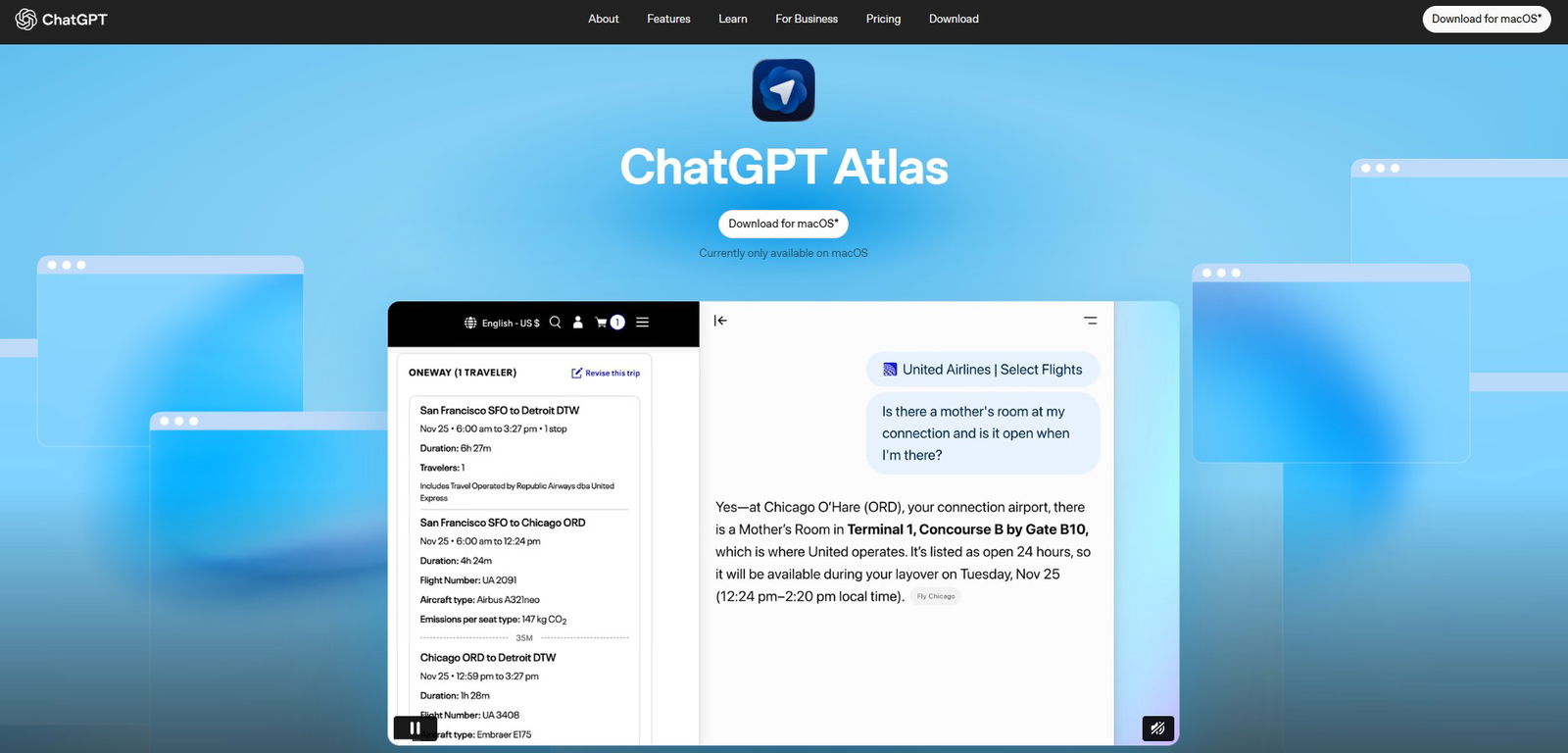
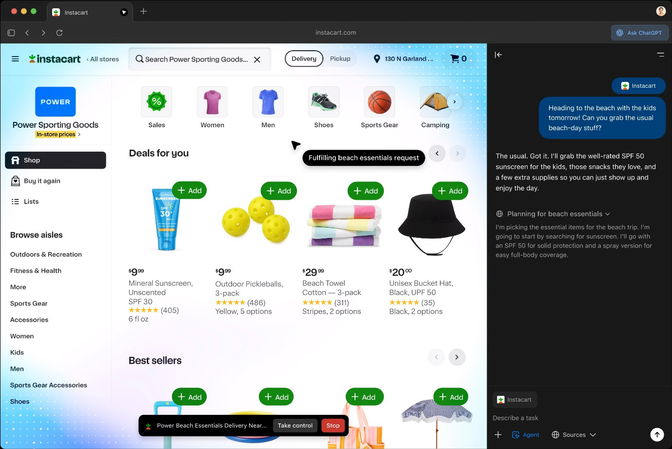
Atlas, being your companion, can comprehend the page you are viewing, answer your questions in context, and even finish your tasks. Blended with Agent Mode, it can open tabs, click buttons, or summarize content directly in your browser.
The best part is Browser Memory. It remembers the pages you visit and brings back the required information later. Now, you don’t need to go into history and search for an article you read a month ago. (Bookmark us already!)
However, the browser is currently available for free on macOS. Plus, Pro, and Business users, with Windows and mobile versions coming soon.
Let’s explore its key features.
Core Features Of ChatGPT Atlas
Here are some standout features of Atlas that make it a game-changer.
-
ChatGPT In Every Tab
Without even going back to ChatGPT, you can have AI at your fingertips, featuring dedicated search, image, and video tabs with ChatGPT integrated to help you dive deeper. Whether you want to ask a question, research a news story, or paste a link, Atlas is there to assist you.
-
Context-Aware AI Assistant
Atlas is well aware of your current webpage, open tabs and even your login status, only if you grant permission. Don’t worry! It comes with its privacy policies. Your browser will only have the context and exposure that ChatGPT had.
-
In-line Writing Help
Some of you might be writers, so you may find in-line integration helpful when editing documents, replying to emails, or filling out forms. A plus point is that Atlas will help you refine your piece directly on the web, so you won't have to copy and paste text again and again. No more going to the clipboard history. (Press Windows + V for copied clipboard history.)
-
Built In Memory
Atlas follows you everywhere, remembers pages you have visited, tasks you have started or ideas you have explored. This helps you close multiple open tabs, and they can be reopened at any time. You can edit, view, or delete memories at any time. (Thinking about the movie, Eternal Sunshine of a Spotless Mind!)
-
Natural Language Commands
Heard of “Your wish is my command”? Atlas works in the same way. You no longer need to worry about bookmark and tab management. Write prompts like “reopen the travel site from yesterday” or “close my recipe tabs,” and Atlas will take action. The natural language control promises to keep you more productive with fewer workflow interruptions.
-
Agent Mode
Agent Mode can research, plan, book things, summarize docs or even handle workflows across tabs, all autonomously. Currently, in preview for ChatGPT Plus, Pro, and Business users, Agent Mode in Atlas goes beyond chat.
-
Stay In Control
Just like ChatGPT, Atlas offers full incognito mode, memory controls, parental settings and transparency over what’s remembered. Your browsing content isn’t used to train AI models, and you can always turn memory off, so you stay in control.
Next, let’s take a closer look at the privacy concerns that Atlas is addressing.
Privacy And Control Features Of ChatGPT Atlas
OpenAI emphasises more on privacy and control over what ChatGPT can access and remember.
-
Browsing Privacy
You can clear specific pages, wipe off your entire browsing history, or use incognito mode to sign out of ChatGPT temporarily. A toggle in the address bar lets users control which sites ChatGPT can view on a page-by-page basis.
-
Memory Management
Browser memories are private to individual ChatGPT accounts. Users can view all stored memories in the settings, archive irrelevant ones, and delete them by clearing their browsing history.
-
Training Opt-In
By default, browsing content isn't used to train OpenAI's models. Users must explicitly enable "include web browsing" in data controls to opt in.

To understand whether ChatGPT Atlas is better than Comet and Chrome, we have chosen three key parameters for evaluation: Productivity, Ecosystem, and Security.
Let the game begin.
ChatGPT Vs. Comet: Comparison
Below are the three factors to compare Atlas with Comet.
-
Productivity
Each of Atlas and Comet is designed to make your work easier, but they do so in different ways. For tasks like planning trips, keeping track of projects, or automating steps, Atlas is clearly better.
Its Agent Mode and ChatGPT connection allow you to ask the browser to perform tasks, saving you time and effort. However, Comet is ideal for reading and doing research quickly. It provides quick access to verified sources, summarizes content with citations, and helps you organize insights in Workspaces. -
Ecosystem
If you are already using ChatGPT, you will find Atlas familiar, and it will be easy to integrate into your existing work routines.
On the other hand, Comet’s free entry is compelling, especially for students, independent researchers, or budget-conscious users who want a productivity browser without paying for premium subscriptions initially. -
Security
Comet has faced scrutiny over reported security risks such as prompt injections or AI agents performing unintended actions, as revealed in independent audits. For enterprise-level productivity, this raises a note of caution.
Meanwhile, OpenAI’s Atlas emphasizes privacy with clear memory controls and enterprise-grade safeguards. While no major flaws have been reported yet, its approach to transparency and confidentiality gives it a stronger trust factor for now.
Next, let’s compare your everyday browser, Chrome, with Atlas.
ChatGPT Vs. Google Chrome: Comparison
Let’s see whether Atlas can match the reliability of Chrome.
-
Productivity
Although Chrome is still the most popular browser for everyday use, it was primarily designed for browsing, not for doing. However, on the other side, Atlas has an advantage because of ChatGPT integration.
-
Ecosystem
Atlas integrates seamlessly with OpenAI, making it an ideal choice for individuals who already use ChatGPT or its Pro and Team plans. From chat to browsing, it's a smooth transition that makes the AI Assistant feel natural.
On the other hand, Chrome is fully integrated with Google's suite, including Gmail, Drive, and Meet, making it easier for users who already use these apps. -
Security
Google Chrome has a history of strong security updates and defense against phishing. Although Chrome's ad-driven data often causes privacy debates. Atlas takes a different stance, giving users control over memory and visibility.
You can choose what ChatGPT remembers, instantly forget browsing sessions, or even turn off memory altogether. It’s a more transparent approach to user privacy, although still new and evolving.
Here’s a quick snapshot of how the three browsers compare.
ChatGPT Atlas Vs. Comet Vs. Chrome: In a Nutshell
Below is a table comparing the three browsers.
| Factors | Google Chrome | ChatGPT Atlas | Perplexity Comet |
| Primary Goal | General Browsing and Stability | AI Assistance and Task Automation | Research and Knowledge Synthesis |
| AI Integration | Via Gemini or extensions | Built-in ChatGPT | Built-in AI assistant |
| Key Features | Speed, Extensions, Sync, Google ecosystem. | Agent Mode, AI chat overlay, Browser Memories. | Citations, Workspaces, Co-pilot. |
| Starting Price | Free. | Free with ChatGPT Plus at $20/user/month. | Free with Perplexity Max at $200/month. |
| Platform | All platforms. | macOS | Windows/macOS |
Conclusion
A pretty impressive browser, isn’t it? ChatGPT Atlas is more than just a traditional search browser; it actually understands what you are doing. Whether you are planning a trip, writing an email, or conducting research, Atlas feels more like an intelligent companion.
Sure, it is still new and has room to grow, but the way it blends ChatGPT into everyday browsing is something to consider. Plus, the fact that you can control what it remembers or forgets makes it even more user-friendly.
If OpenAI continues to build on this, Atlas could easily change how we all browse and work online. Let’s just say, it’s not your ordinary browser anymore!
Frequently Asked Questions
What Is ChatGPT Atlas, And How Is It Different From Traditional Browsers?
ChatGPT Atlas is an AI-powered browser developed by OpenAI that integrates ChatGPT directly into the browsing experience. Unlike traditional browsers, it understands the page you’re on, assists in multitasking, summarizes content, and even performs actions through Agent Mode — making it both intelligent and interactive.
Is ChatGPT Atlas Available For All Platforms?
Currently, ChatGPT Atlas is available for free on macOS for Plus, Pro, and Business users. However, OpenAI has announced that Windows and mobile versions will be launching soon.
How Does ChatGPT Atlas Handle Privacy And Memory Control?
Atlas prioritizes privacy by allowing users to control what it remembers and what it forgets. Browser memories are private, can be deleted at any time, and are not used to train OpenAI’s models unless users explicitly opt in. It also offers incognito mode and page-by-page control for added safety.
Mon, Nov 17, 2025

Liked what you read? That’s only the tip of the tech iceberg!
Explore our vast collection of tech articles including introductory guides, product reviews, trends and more, stay up to date with the latest news, relish thought-provoking interviews and the hottest AI blogs, and tickle your funny bone with hilarious tech memes!
Plus, get access to branded insights from industry-leading global brands through informative white papers, engaging case studies, in-depth reports, enlightening videos and exciting events and webinars.
Dive into TechDogs' treasure trove today and Know Your World of technology like never before!
Disclaimer - Reference to any specific product, software or entity does not constitute an endorsement or recommendation by TechDogs nor should any data or content published be relied upon. The views expressed by TechDogs' members and guests are their own and their appearance on our site does not imply an endorsement of them or any entity they represent. Views and opinions expressed by TechDogs' Authors are those of the Authors and do not necessarily reflect the view of TechDogs or any of its officials. While we aim to provide valuable and helpful information, some content on TechDogs' site may not have been thoroughly reviewed for every detail or aspect. We encourage users to verify any information independently where necessary.
Loading comments...