

Artificial Intelligence
Does DeepSeek-OCR Outperform Mistral OCR?
Share
Introduction
While The Office and FRIENDS have been popular sitcoms for ages, we would highly recommend Superstore for your daily 20-minute laughter.
For those who have seen the show and those who haven't, let’s recall an episode from the fourth season. Dina and Jonah, employees of the superstore, become so fearful of job losses. They even think that scanners, or worse, robots, will take their jobs.
While robots may take some time, scanners have fundamentally changed the entire e-commerce industry. Things have become digital, and managing, buying, and maintaining inventory have become so easy.
If we talk about today, AI has also jumped into this, and there are two contenders: DeepSeek-OCR and Mistral OCR. Which one is better?
Before we dive into the details, let’s first understand what DeepSeek-OCR really is, what it does differently, and why it’s suddenly being talked about as the next big leap in document intelligence.
TL; DR
-
DeepSeek-OCR
Best for complex, structured, and long-context documents where accuracy and layout fidelity matter more than speed.
-
Mistral OCR
Ideal for high-volume, clean scans where quick conversion and multilingual support take priority.
-
The Verdict
Choose DeepSeek for precision; Mistral for pace.
What Is DeepSeek-OCR?
DeepSeek-OCR is an AI-powered Optical Character Recognition model designed to read and interpret text. Developed as part of the broader DeepSeek ecosystem, this model extends conventional OCR by integrating visual understanding, layout comprehension, and semantic awareness within a single framework.
What makes it stand out is its vision-to-language compression capability. Instead of processing each pixel individually, DeepSeek-OCR condenses visual data into optimized representations, thereby significantly reducing computational load. This means faster processing, fewer tokens for large-language-model integration, and minimal loss of detail.
Now that we have understood what Deep-Seek OCR is, let’s discuss its benefits.
What Are The Benefits Of DeepSeek-OCR?
When you plug DeepSeek-OCR into your workflow, you’re unlocking many advantages:
-
Higher Accuracy And Layout Fidelity
DeepSeek-OCR preserves tables, captures multi-column layouts, identifies images and code blocks, and reconstructs documents with surprisingly high fidelity. This means fewer manual cleanup tasks and fewer layout errors.
-
Token And Cost Efficiency
Now, you know that DeepSeek-OCR uses vision-text compression; this means that it dramatically reduces how much text the next model must process. Which means, Fewer tokens → lower cost → faster end-to-end pipelines when handling big reports, books or long documents.
-
Multilingual And Handwriting Handling
Many modern workflows aren’t just English, clean and typed, but they include handwriting, annotations, and non-Latin scripts. DeepSeek-OCR is designed to handle these varied scenarios, making it more robust for global or messy document sets.
-
Scalability And Integration Ease
In enterprise settings, the ability to deploy, scale, and integrate is an important aspect. DeepSeek-OCR is designed for large-document, high-throughput use cases, enabling teams to process hundreds or thousands of pages consistently, extract structure, and feed results directly into downstream automation.
These benefits make DeepSeek-OCR an attractive choice for organizations handling heavy document volumes, complex layouts, or long-context workflows.
Now that we’ve covered what DeepSeek‑OCR does, let’s pull open the hood and see its architecture to know how it works.
What Is The Architecture Of DeepSeek-OCR, And How Does It Work?
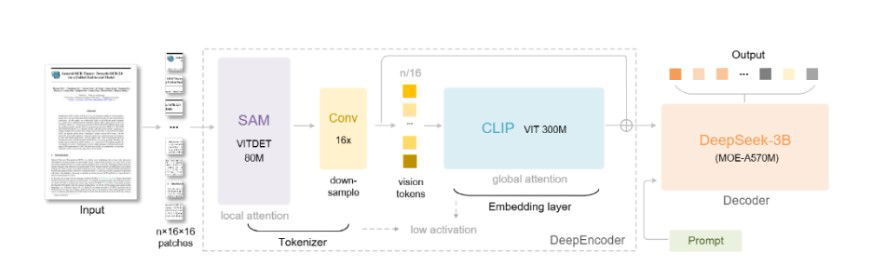
The architecture behind DeepSeek-OCR is elegantly simple yet technically innovative. At a high level, it uses a two-stage encoder-decoder structure to work:
-
Visual Encoder
-
The model first renders the document (PDF/image) as a high-resolution image, capturing layout, typography, multi-column structure, and visual cues.
-
The “DeepEncoder” module then compresses the visual input into a relatively small number of vision tokens.
-
This compression is the key, as fewer tokens mean less work for the next stage, making the system more efficient.
-
-
Language Decoder
-
Once the vision tokens are produced, they feed into a decoder called DeepSeek-3B-MoE (a mixture-of-experts model), which expands those tokens back out into structured text, markdown, tables, and other formats.
-
This is because if the input is already compressed and structured, the decoder can then focus more on understanding layout and semantics rather than just raw character recognition. That improves the fidelity of tables, equations, and multi-column layouts.
In a nutshell, here’s how DeepSeek-OCR works: - By compressing the visual document first, DeepSeek-OCR reduces how much the language model must “read”. This results in faster inference, lower per-token cost, and improved handling of long-context documents.
- The focus on layout and context makes the model better suited to documents that include tables, columns, graphs, and handwritten notes.
-
Now that you know how DeepSeek-OCR's architecture works, let’s see how it compares to its competitor, Mistral OCR.
DeepSeek-OCR Vs. Mistral OCR: Who Performs Better?
When it comes to these AI-driven OCR tools, performance is more than just accuracy. It is about how efficiently models read, reconstruct, and retain structure. While both DeepSeek-OCR and Mistral OCR promise top-tier results, their strengths show up differently when tested in real-world scenarios.
Here are the reported benchmarks as per public sources:
| Category | DeepSeek-OCR | Mistral OCR |
| Primary Strength | High layout reconstruction + aggressive token compression | Clean, reliable PDF, Markdown conversion at scale |
| Accuracy | Very high accuracy when compression is light (<10x); drops sharply when pushed higher | Consistently strong accuracy on mixed PDFs; more stable across document types |
| Handling Complex Layouts | Built for complex structures: tables, code blocks, multi-columns, math | Good with tables and structured docs, but more focused on clean text-first extraction |
| Speed | Speed depends on compression mode (fewer tokens = faster) | Generally fast and predictable in cloud pipelines |
| Cost Efficiency | Major token savings (7–20x fewer tokens), ideal for LLM pipelines | No compression: cost efficiency comes from optimized extraction workflows |
| Output Format | Markdown or JSON with structural detail | Markdown-first outputs; supports embedded images |
| Deployment | Fully open source; can self-host and tune modes | Enterprise-ready via Google Cloud + Azure; simple to integrate |
| Best For | Complex documents where structure matters, and LLM cost needs to stay low | Clean PDFs, operational pipelines, and enterprise environments needing stable extraction |
Now that the performance battle is clear, let’s move from numbers to practice: how to implement DeepSeek-OCR in real workflows.
How To Implement DeepSeek-OCR?
Below are the key steps and best practices that teams use to deploy it effectively in real-world workflows.
-
Step 1: Set Up Your Environment
-
Clone the model from the official source (for example, via Hugging Face: deepseek-ai/DeepSeek-OCR)
-
Install the required libraries: e.g., Python 3.12+, torch, transformers, einops, flash-attn.
-
Ensure you have a compatible GPU (CUDA support) if you’re doing local inference. Many users run on A100/40GB for large-scale throughput.
-
-
Step 2: Pilot With A Small Batch
-
Start by uploading a representative set of documents (scanned PDF, image + tables, handwritten notes) from your domain.
-
Use the model prompt: e.g., "Convert the document to markdown," with the image input.
-
Validate output for accuracy, layout fidelity (tables, columns), and speed/latency on your hardware.
-
-
Step 3: Scale And Integrate
-
For production use, deploy via API or batch pipeline. According to best practices, you should monitor throughput (pages/minute), tail-latency, cost per 1k pages, and reliability.
-
If using this within a larger document-processing system (e.g., ingest → OCR → LLM → insight), integrate the output format (Markdown/JSON) into downstream workflows.
-
Use batching, GPU autoscaling, fault-tolerance, and version-control to handle production load.
-
-
Step 4: Domain-Tune And Monitor
-
Even a strong model like DeepSeek-OCR benefits from domain-specific fine-tuning or fine-grained evaluation—input quality (scan resolution, skew, noise) still impacts results.
-
Monitor your model’s performance over time. Especially, the accuracy of drift, throughput cost, and token-savings realization. Use this data to adjust compression ratio, batching size, or model parameters.
-
Once configured with the appropriate compression ratio, GPU allocation, and document flow, this approach becomes a reliable engine for structured, high-volume OCR tasks.
Ultimately, implementing DeepSeek-OCR on-premises is about optimization, not just a checklist setup.
Conclusion
Ultimately, the choice between DeepSeek-OCR and Mistral OCR comes down to what your workflow values most. DeepSeek-OCR shines when precision, layout reconstruction, and long-context understanding are crucial. It is the meticulous reader who catches every line and format. Mistral OCR, meanwhile, thrives on speed and accessibility, making it the reliable go-to for rapid scanning, multilingual text, and large-scale document ingestion.
Both stand for the future of intelligent document processing, one driven by depth, the other by velocity. As AI continues to push the boundaries of perception, OCR models like these will not only read information but also understand it.
So, whether you’re after the cleaner layout or the faster scan, the message is clear: the next generation of OCR isn’t about seeing more; it’s about seeing smarter.
Frequently Asked Questions
How Does DeepSeek-OCR Differ From Traditional OCR?
Traditional OCR models often produce thousands of text tokens from a single page, which can be computationally expensive for LLMs. DeepSeek-OCR, in contrast, compresses the visual information into a few hundred dense vision tokens, drastically reducing the token count while preserving most of the original text's meaning and layout.
Is DeepSeek-OCR Open Source And Free To Use?
Yes, the code and model weights are publicly available on GitHub and Hugging Face. As of late 2025, the model is available with the permissive MIT license for both academic and commercial use.
How To Use DeepSeek-OCR Online?
The model can be accessed via the official GitHub repository or Hugging Face model card, which provide instructions and code examples for installation and usage (typically involving Python, PyTorch, and vLLM for inference).
Wed, Dec 10, 2025

Enjoyed what you read? Great news – there’s a lot more to explore!
Dive into our content repository of the latest tech news, a diverse range of articles spanning introductory guides, product reviews, trends and more, along with engaging interviews, up-to-date AI blogs and hilarious tech memes!
Also explore our collection of branded insights via informative white papers, enlightening case studies, in-depth reports, educational videos and exciting events and webinars from leading global brands.
Head to the TechDogs homepage to Know Your World of technology today!
Disclaimer - Reference to any specific product, software or entity does not constitute an endorsement or recommendation by TechDogs nor should any data or content published be relied upon. The views expressed by TechDogs' members and guests are their own and their appearance on our site does not imply an endorsement of them or any entity they represent. Views and opinions expressed by TechDogs' Authors are those of the Authors and do not necessarily reflect the view of TechDogs or any of its officials. While we aim to provide valuable and helpful information, some content on TechDogs' site may not have been thoroughly reviewed for every detail or aspect. We encourage users to verify any information independently where necessary.
Loading comments...