

Artificial Intelligence
Claude Code Hacks For Everyone
Share
TL;DR
-
Claude is an AI assistant built by Anthropic that helps developers write, debug, and refactor code more efficiently than ever before.
-
Unlike other models, Claude is trained using Constitutional AI, making it more reliable to use in high-stakes environments.
-
From delaying code generation to adversarial review, the right prompts can improve the quality of Claude’s output.
-
Agentic coding is no longer just for engineers, as even those with a non-technical background can use Claude.

Introduction
Anyone who’s ever written code knows the feeling. One minute, your application works exactly the way you want it to, and the next, it behaves like a difficult co-worker in a sitcom. Unpredictable, uncooperative, and occasionally breaking things for no apparent reason.
Bugs appear like passive-aggressive emails, and errors in JavaScript somehow manage to feel both cryptic and personal.
That frustration is exactly why AI coding assistants are becoming part of modern development workflows. One of the strongest examples is Claude, an AI assistant designed to help developers debug faster, refactor smarter, and reduce repetitive coding work.
This article explores practical Claude Code hacks that can help you use it more effectively.
This article explores practical Claude coding tips and prompt hacks that can help developers debug faster, refactor smarter, and get more reliable results from the tool.
Why Claude Is Becoming A Favorite Coding Assistant
Claude has quickly become one of the most popular AI coding assistants because it handles large codebases, long documents, and debugging workflows better than many traditional AI tools. Unlike several competing models, Anthropic built Claude using Constitutional AI principles, which helps reduce insecure outputs and makes it more reliable for enterprise use cases.
Its newer models can process extensive documentation, review large code files, and help users debug, refactor, and plan software projects with far more context than earlier AI coding assistants. For developers, and non-technical users, Claude is becoming less of a chatbot and more of a collaborative coding partner.
Understanding what makes Claude powerful is one thing, knowing how to prompt it effectively is what separates casual users from people getting real productivity gains.
Claude Code Hacks You Need To Know
Many developers know Claude can generate code quickly, but far fewer understand how to use Claude for coding effectively. Speed alone does not guarantee quality, and the real advantage comes from knowing how to guide the model properly.
-
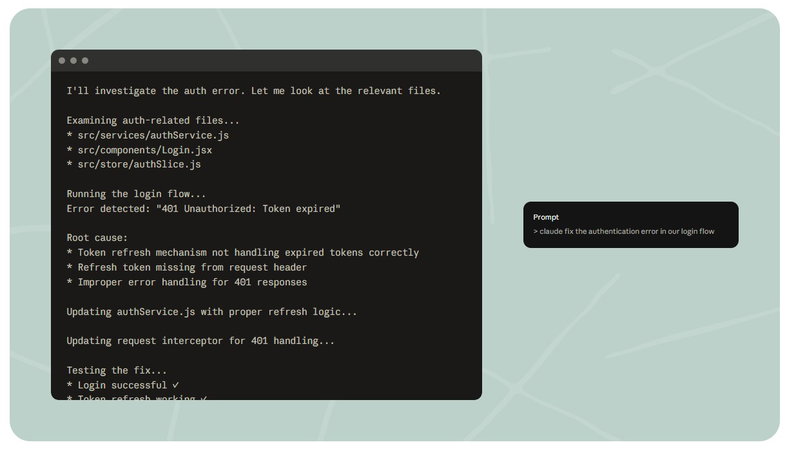
Start With Logic, Not Code
One of the biggest mistakes developers make is asking Claude to immediately generate code. For complex problems, ask it to explain the issue first before writing anything. This helps you catch flawed assumptions before implementation begins.Prompt Example:
"Don’t write any code yet. Explain the root cause of this error, list your assumptions, and suggest three possible fixes with pros and cons."
-
Ask Claude To Write Tests First
One of the biggest risks with AI-generated code is shipping something that looks correct but breaks in production. Before asking Claude to write implementation code, ask it to generate test cases first. This helps define expected outcomes before development begins and reduces hidden bugs later.Prompt Example:
"Write unit tests for this feature first. Show expected failures before writing implementation code."
-
Ask Claude To Critique Its Own Work
Claude responds well to constraints. Instead of only explaining what you want, clearly define what should be avoided to prevent unnecessary complexity.
Prompt Example:
"Add state management to this component, but don’t use Redux or global state." -
Ask Claude To Critique Its Own Work
Claude often validates its own responses unless asked to critique them. Force it to review its own output from another perspective.
Prompt Example:
"Act as a senior security engineer and identify three vulnerabilities in this code."
-
Break Big Tasks Into Steps
For large refactoring tasks, break the process into stages. Ask Claude to research first, create a plan second, and wait for approval before writing code. This reduces large-scale implementation mistakes.
Workflow:-
Research the codebase
-
Propose the plan
-
Wait for approval before execution
-
-
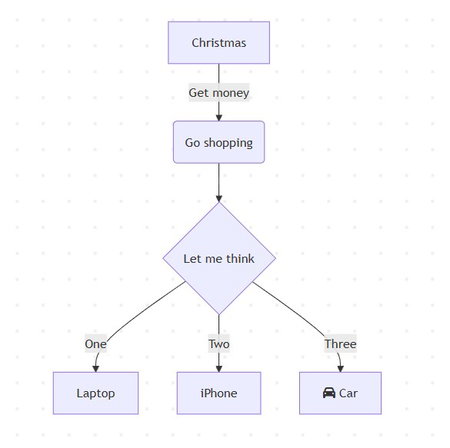
Map The System Before Building It
Before building complex systems, ask Claude to create architecture diagrams using Mermaid. It becomes easier to identify logic issues before development begins.
Prompt Example:
"Create a Mermaid diagram showing data flow between authentication, database, and notification systems."
-
Use CLAUDE.md To Keep Context
A CLAUDE.md file helps maintain consistency across longer projects. It can store coding rules, naming conventions, testing frameworks, and project progress updates.
Include:-
Tech stack details
-
Naming conventions
-
Testing standards
-
Hard development rules
-
-
Keep Your Context Window Clean
Claude performs best when its working memory stays focused. Long conversations filled with unnecessary prompts, repeated files, or unrelated tasks can reduce output quality. Start fresh sessions for new problems and only share files that are directly relevant to the task.
This helps Claude stay accurate when working across larger projects. -
Share The Full Error Message
When debugging, always share complete error logs instead of summarizing issues manually. Full stack traces help Claude identify specific line errors and dependencies faster.
These prompting techniques can improve how developers use Claude today, but AI-assisted coding is evolving far beyond debugging support and code generation. The bigger shift is happening in how teams build software with increasingly autonomous AI systems.
The Future Of Claude And Agentic Coding
According to Anthropic’s 2026 Agentic Coding Trends Report, AI coding is quickly moving beyond a single chatbot helping you fix bugs. The next phase involves multiple AI agents working together, one planning architecture, another writing code, another testing outputs, and another reviewing security risks.
Coding is also becoming far more accessible. People without traditional engineering backgrounds are already using tools like Anthropic to build internal tools, automate repetitive workflows, and solve business problems simply by describing what they need. In many ways, coding is starting to look less like a specialized skill and more like a broader business capability.
Of course, faster development comes with new risks. The same AI systems helping developers move quickly can also create security vulnerabilities when used carelessly, or worse, be exploited by attackers.
The future of coding may be more automated, but one thing is becoming very clear: the people who know how to guide AI effectively will always have the biggest advantage.
Final Thoughts
Coding has always rewarded patience, precision, and the ability to think a few steps ahead, and Claude helps amplify those skills when used correctly. Whether you are debugging a messy refactor, reviewing large codebases, or simply trying to automate repetitive work, the right prompts can save hours of frustration.
It won’t magically fix every broken application overnight, and your codebase probably won’t stop throwing surprises at 2 a.m., but it can make those debugging sessions far less painful, and a lot less lonely.
As AI coding tools continue evolving, the future won’t belong to developers who resist them. It will belong to those who know exactly how to use them better.
Frequently Asked Questions
What Are The Best Claude Code Hacks For Developers?
Some of the most effective Claude Code hacks include asking the tool to explain problems before writing code, generating tests before implementation, reviewing its own output for vulnerabilities, and using files like CLAUDE.md to maintain project memory. These workflows help developers reduce errors and improve coding efficiency.
How Do You Use Claude For Coding Effectively?
Learning how to use Claude for coding starts with writing better prompts. Developers should provide clear instructions, define constraints, share complete error logs, and break complex tasks into smaller steps. These Claude coding tips help improve output quality and reduce unnecessary debugging time.
Is Claude AI Good For Beginner Developers?
Yes, Anthropic has made Claude increasingly useful for both experienced engineers and beginners. While it is not a complete Claude Code tutorial, it can help users write code, debug issues, review architecture decisions, and automate repetitive development tasks more efficiently.
Fri, Apr 24, 2026
Enjoyed what you read? Great news – there’s a lot more to explore!
Dive into our content repository of the latest tech news, a diverse range of articles spanning introductory guides, product reviews, trends and more, along with engaging interviews, up-to-date AI blogs and hilarious tech memes!
Also explore our collection of branded insights via informative white papers, enlightening case studies, in-depth reports, educational videos and exciting events and webinars from leading global brands.
Head to the TechDogs homepage to Know Your World of technology today!
Disclaimer - Reference to any specific product, software or entity does not constitute an endorsement or recommendation by TechDogs nor should any data or content published be relied upon. The views expressed by TechDogs' members and guests are their own and their appearance on our site does not imply an endorsement of them or any entity they represent. Views and opinions expressed by TechDogs' Authors are those of the Authors and do not necessarily reflect the view of TechDogs or any of its officials. While we aim to provide valuable and helpful information, some content on TechDogs' site may not have been thoroughly reviewed for every detail or aspect. We encourage users to verify any information independently where necessary.
Loading comments...