

Cyber Security
X Users Locked Out After Update Amid Phishing Scams
Updated on Thu, Nov 13, 2025
Share
Since Twitter’s transformation into X, the birdie hasn’t seen a clean sky. It had a fair share of turbulence, and this week’s is no different. A messy security update has locked users out of their accounts, while new phishing scams are spreading fast across Europe. It’s been a hectic few days for both X and users trying to stay safe online.
Let’s see what’s been flying one after another. Read on!
Elon Musk’s X platform is back in the spotlight after a security update went wrong, leaving many users locked out of their accounts.
Over the past few days, people across social media have reported getting stuck in endless login loops after X rolled out a mandatory two-factor authentication change.
X advised users who rely on passkeys or hardware security keys, such as YubiKeys, to re-enroll using the new x.com domain. The update was part of the company’s shift away from twitter.com, which now redirects to x.com.

What went wrong is that these security keys are tied to specific domains, so the old ones linked to twitter.com no longer work. Users had to manually re-enroll by November 10 to avoid losing access.
Now that the deadline has passed, many are finding themselves completely locked out, unable to reset or re-enroll their keys. It’s another setback for X under Musk’s leadership, following months of technical hiccups, layoffs, and policy changes.
The company hasn’t issued an official response yet. However, Musk seems to be unaffected as he has been posting on X like any other day.
While X struggles with its security update, cybercriminals are launching new types of attacks.
It’s not even been a week since hotels were hit by a phishing scam, and now another one is going after organizations across Central and Eastern Europe.
The campaign is using familiar global brands to trick employees into handing over login credentials.
Sectors like agriculture, automotive, construction, and education are being targeted, particularly in the Czech Republic, Slovakia, Hungary, and Germany.
The attackers are sending HTML files as email attachments, so there’s no suspicious link or external server to trigger traditional security tools.
Once opened, these attachments present convincing login pages for services like Microsoft 365, Adobe, WeTransfer, FedEx, and DHL. Emails often come from trusted partners or clients, with filenames such as RFQ_4460-INQUIRY.HTML, mimicking normal business workflows.
According to Cyble, the pages use embedded JavaScript to capture credentials, which are then sent directly to attacker-controlled Telegram bots rather than traditional command-and-control servers. Some variants even encrypt stolen data, block keyboard shortcuts, and employ modern coding methods to avoid detection.
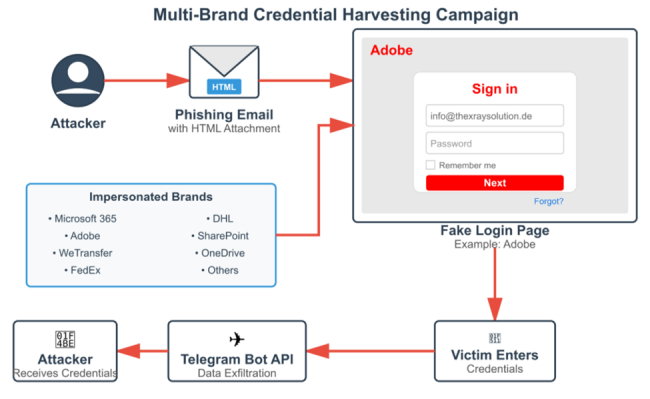
The campaign highlights a deep understanding of regional business practices and the lengths attackers will go to bypass security. Organizations are advised to block or sandbox HTML attachments, monitor for unusual api.telegram.org POST, and conduct retroactive threat hunts to ensure credentials have not been compromised.
This campaign shows that even familiar brands can be used as bait, so staying alert and using strong security measures is essential.
Well, cybercriminals aren’t slowing down. Just after the Telegram bot phishing scam, another round of fake security alert emails is now tricking users into handing over their logins.
These emails look real, often come from the victim’s own company, and warn about “blocked messages” and request users to click on a link to fix the issue.
Once users click the link, they are taken to a fake login page that looks almost similar to the real one. To make it seem trustworthy, the page is even pre-filled with the person’s actual email address. When they type in their password, attackers steal the information.
According to Unit 42 security analysts, this scam is more convincing than usual because it imitates genuine internal warnings. The emails also include HTML attachments with hidden JavaScript that capture login details when opened.
Experts warn that these scams use fear and urgency to push people into taking quick action.
Would you trust an email that demands that you do something?
Will X stop slipping on its own updates and fly like a bird as it once was?
Let us know what you think in the comments section below!
First published on Thu, Nov 13, 2025

Enjoyed what you read? Great news – there’s a lot more to explore!
Dive into our content repository of the latest tech news, a diverse range of articles spanning introductory guides, product reviews, trends and more, along with engaging interviews, up-to-date AI blogs and hilarious tech memes!
Also explore our collection of branded insights via informative white papers, enlightening case studies, in-depth reports, educational videos and exciting events and webinars from leading global brands.
Head to the TechDogs homepage to Know Your World of technology today!
Disclaimer - Reference to any specific product, software or entity does not constitute an endorsement or recommendation by TechDogs nor should any data or content published be relied upon. The views expressed by TechDogs' members and guests are their own and their appearance on our site does not imply an endorsement of them or any entity they represent. Views and opinions expressed by TechDogs' Authors are those of the Authors and do not necessarily reflect the view of TechDogs or any of its officials. While we aim to provide valuable and helpful information, some content on TechDogs' site may not have been thoroughly reviewed for every detail or aspect. We encourage users to verify any information independently where necessary.
Loading comments...