
Google has officially introduced its Gemini AI assistant to Apple CarPlay, allowing iPhone users to access Gemini Live directly through their vehicle's dashboard. The integration brings hands-free conversations, email summaries, calendar assistance, and personalized recommendations to drivers.
The rollout follows Gemini's introduction to Android Auto and vehicles with Google built-in, extending Google's conversational AI capabilities to Apple's in-car platform.
Here's what's new.
TL;DR
- Google began rolling out Gemini on Apple CarPlay globally on November 11, 2026.
- Drivers can use Gemini Live for hands-free conversations, email summaries, calendar updates, and brainstorming.
- The integration supports Gmail and Google Calendar, with conversations automatically syncing to iPhones.
- Users need the latest Gemini app, microphone permissions, and a previous Gemini Live session.
- Some personalized features have regional and age restrictions.
Google Brings Gemini Live To Apple CarPlay
Google announced the arrival of its Gemini app on Apple CarPlay, allowing iPhone users to interact with its AI assistant directly from their vehicle's infotainment display.
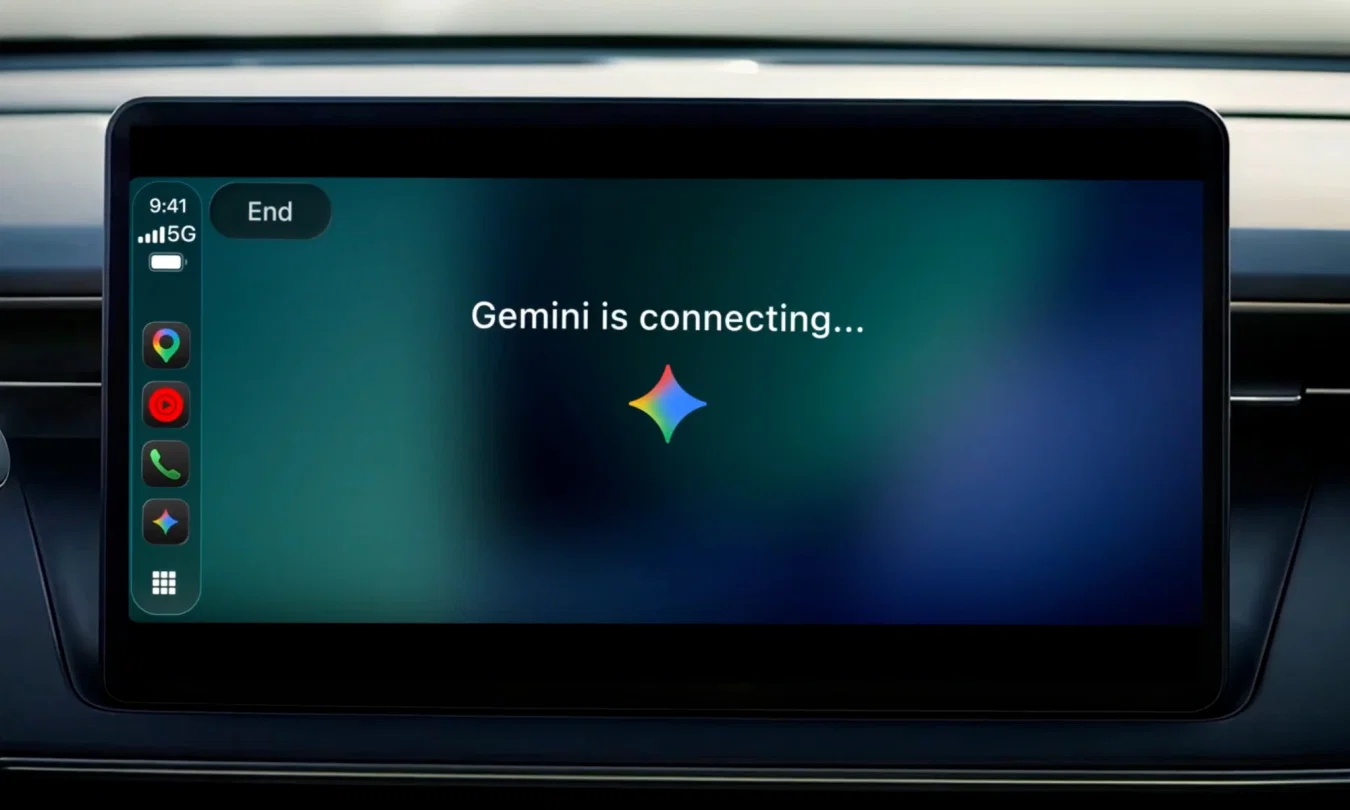
According to Google's official announcement, the integration enables natural, hands-free conversations through Gemini Live, allowing drivers to ask questions, receive assistance, and continue ongoing discussions without needing to operate their phones.
Karan Daryanani, Senior Product Manager at Google, explained that the company designed the integration to support more conversational interactions while minimizing distractions during driving.
Unlike traditional voice assistants that primarily handle individual commands, Gemini Live supports extended conversations where users can interrupt responses, add details, change topics, or pause when necessary.
Drivers can access the experience by tapping the Gemini app icon on their CarPlay display or side rail.
Once activated, they can begin a new conversation or resume an existing one.
As Digital Trends reported, the feature brings Google's conversational AI capabilities to the dashboard, making it possible for users to catch up on daily activities while commuting.
What Can Gemini Do On Apple CarPlay?
The new integration offers several productivity and information-focused features through voice interactions.
One of the primary capabilities is its connection with Google Workspace applications, including Gmail and Google Calendar.
Users can ask Gemini about upcoming meetings, check their schedules, summarize unread emails, and review lengthy email conversations without manually opening those applications.
For example, drivers can ask Gemini to provide a daily briefing, summarize a particular email thread, or help them prepare for an upcoming meeting.
Google also highlighted the assistant's ability to help users prepare responses to emails through conversational interactions.
Beyond workplace productivity, Gemini Live can recommend nearby restaurants, provide information about local landmarks, and help users explore topics while traveling.
The AI assistant can also act as a brainstorming partner, helping drivers rehearse presentations, practice difficult conversations, or understand complex subjects.
Google noted that users can ask Gemini to simulate professional discussions or explain technical concepts during their commute.
Another important addition is conversation synchronization.
According to Google, conversations initiated through CarPlay automatically sync with the Gemini app on the connected iPhone.
This means summaries, notes, and brainstorming discussions remain accessible through the user's chat history after the journey ends.
Digital Trends also highlighted that the interface displays visual indicators showing whether Gemini is listening, processing a request, or responding.
How To Use Google Gemini On Apple CarPlay
Google has outlined a straightforward setup process for users looking to access Gemini Live through their vehicles.
To get started, iPhone users need to:
- Update the Gemini app to the latest available version.
- Enable microphone permissions for the application.
- Open and use Gemini Live on their iPhone at least once.
- Connect their iPhone to a compatible Apple CarPlay system.
- Tap the Gemini icon on the vehicle's display to begin or resume a conversation.
Once connected, drivers can interact with Gemini using voice commands and continue conversations without repeatedly entering prompts.
Google confirmed that the feature is rolling out globally to Gemini users on iOS across all languages supported by Gemini Live.
However, the company noted that certain personalized capabilities have restrictions.
For instance, Daily Brief must be enabled before use and is unavailable to users under 18 or those located in the European Economic Area (EEA) and Nigeria.
The global rollout also means that availability may vary as the feature reaches supported users.
Google Expands Gemini's Reach Across Connected Vehicles
The Apple CarPlay integration represents another step in Google's efforts to expand Gemini beyond smartphones and desktop applications.
Previously, Google introduced Gemini capabilities to Android Auto and vehicles featuring Google's built-in automotive software.
Topics For More Insights
Now, bringing Gemini Live directly to CarPlay allows the company to serve iPhone users through a dedicated in-car conversational experience.
Digital Trends noted that other AI assistants, including OpenAI's ChatGPT, Microsoft's Copilot, and Perplexity, have already introduced CarPlay-compatible experiences.
The move therefore expands the range of conversational AI assistants accessible through Apple's vehicle interface.
However, Google's announcement focuses on conversational assistance and productivity features rather than direct control over vehicle systems.
For drivers, the most immediate benefit is the ability to access information, manage parts of their workday, and carry on conversations using voice interactions.
Still, the hands-free interface does not eliminate the need for drivers to remain attentive to road conditions.
With Gemini Live now rolling out on Apple CarPlay, Google is extending its AI assistant into another everyday environment, connecting conversations across smartphones, workplace applications, and vehicle dashboards.
