
Networking Solutions
Top 5 Network Monitoring Systems Of 2026
Share
TL;DR
-
Dynatrace: Provides advanced AI-powered automation to trace performance issues across complex multi-cloud environments.
-
NinjaOne: Integrates network tracking directly into its RMM platform for simplified, all-in-one IT operations management.
-
Auvik: Offers automated network mapping and real-time visibility to help teams resolve connectivity issues faster.
-
Pandora FMS: Delivers highly customizable monitoring and observability for organizations with large-scale, distributed infrastructure.
-
Site24x7: Serves as a unified platform for tracking applications, servers, and cloud devices in one place.
Introduction
Have you ever been to a concert?
While the performers usually get the attention, much of the credit belongs to the sound engineers working behind the scenes. They constantly adjust levels, monitor equipment, and catch problems before the audience even notices them. Without that oversight, even a great performance can quickly fall apart.
Business networks work similarly. Modern organizations rely on stable infrastructure to support communication, applications, cloud services, and day-to-day operations. Even a small outage or unnoticed bottleneck can create problems that spread across the entire business surprisingly fast.
That is where network monitoring software becomes important. These platforms help IT teams monitor performance, detect failures early, analyze traffic, and keep infrastructure running reliably before minor issues become major disruptions.
Before we dive into the list, let’s understand what network monitoring software actually is.
What Is A Network Monitoring System?
A Network Monitoring System is a platform that helps businesses track the performance, availability, and overall health of their network infrastructure. It continuously monitors components such as servers, routers, switches, firewalls, and connected devices to identify slowdowns, outages, traffic spikes, or potential failures.
By providing real-time alerts, performance analytics, and visibility into network activity, these tools help IT teams resolve issues before they begin affecting users or business operations. Many modern platforms also include automation, traffic analysis, security monitoring, and cloud infrastructure support to help organizations manage increasingly complex environments more efficiently.
Now, let’s get into the list we’re all here for: the Top 5 Network Monitoring Software solutions of 2026.
Top 5 Network Monitoring Systems Of 2026
We’ve curated the list of top Network Monitoring Systems of 2026 to help you find the right system to optimize your network performance and reliability. Here are the best Network Monitoring Solutions of 2026!
 |
 |
 |
 |
 |
Dynatrace: Best AI Features
Modern infrastructure rarely exists in one place anymore. Applications move across environments. Dynatrace positions itself around solving that visibility problem through AI-assisted observability and automated dependency mapping.
The platform supports more than 4,000 organizations globally and is widely used across multi-cloud, hybrid, and on-premises environments. Alongside network monitoring, Dynatrace combines infrastructure observability, application performance monitoring, runtime security, and automation into a unified monitoring ecosystem. Its industry positioning remains strong through recognition in G2’s Network Monitoring category and Gartner’s Observability Platforms research.
Why We Chose Dynatrace In 2026
Dynatrace stands out for the depth of context it provides during troubleshooting. Rather than simply generating alerts when something slows down, the platform traces relationships across applications, infrastructure layers, network paths, routers, firewalls, and cloud services to help teams isolate where problems are actually originating.
Its AI engine continuously analyzes telemetry across environments and automatically maps dependencies between services and infrastructure components. That becomes particularly valuable in distributed systems where identifying root causes manually can consume an enormous amount of engineering time.
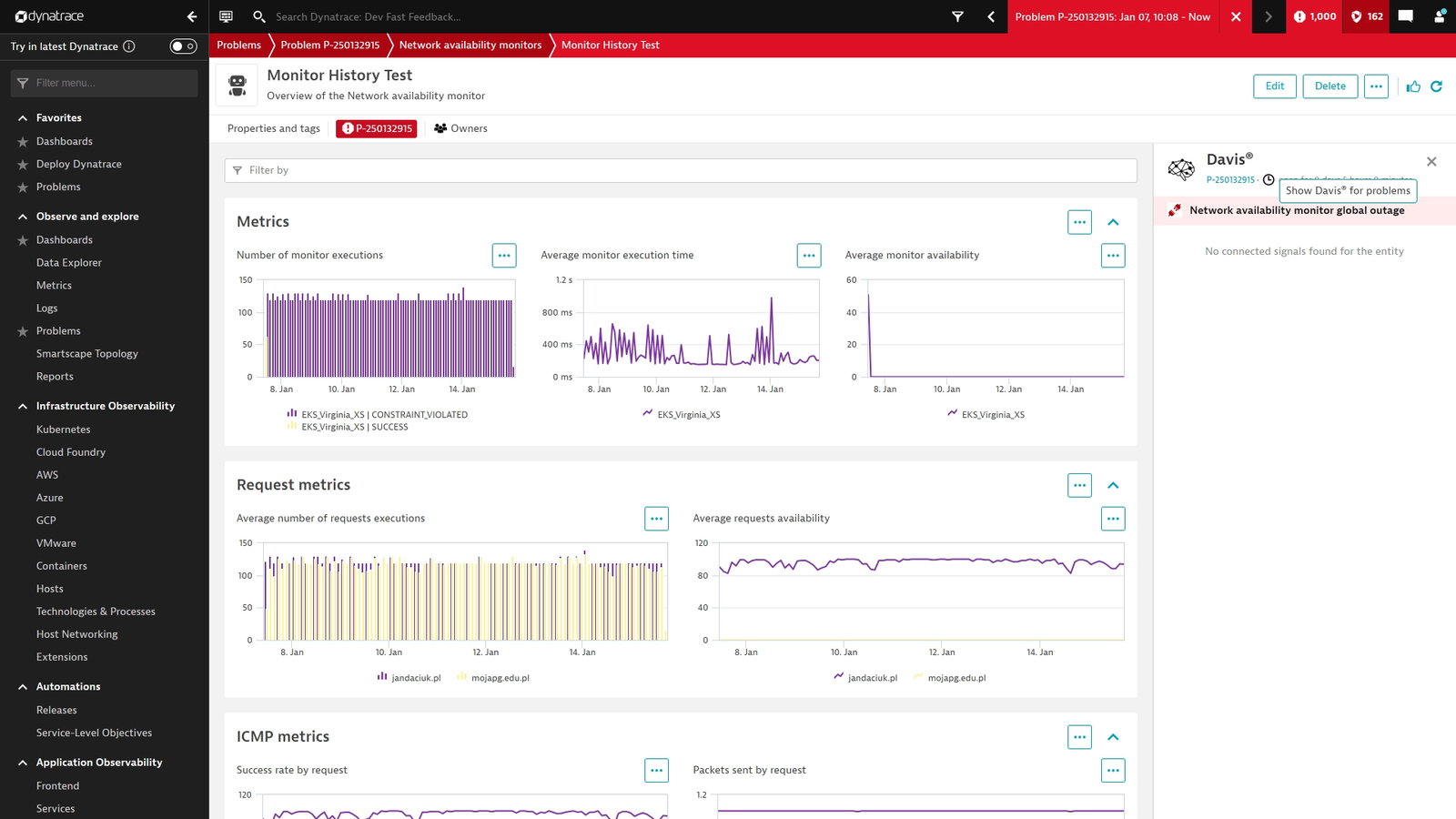
Another advantage is automation. Device discovery, monitoring configuration, and initial incident response workflows require far less manual setup compared to many traditional monitoring systems. The platform also continuously evaluates network health trends to help teams anticipate capacity issues before they begin affecting performance.
Pricing
Dynatrace uses a tiered pricing structure based on monitoring depth and infrastructure visibility. Plans begin at approximately $7/month per host for foundational monitoring, while deeper infrastructure observability starts around $29/month per host.
Its full-stack monitoring tier, which includes advanced application visibility and code-level diagnostics, starts at approximately $58/month per host.
What Works And What Doesn’t
| Pros | Cons |
| Strong AI-assisted troubleshooting | Premium pricing |
| Detailed service mapping | Initial deployment can feel complex |
| Broad integration ecosystem | Dashboard customization limitations |
Our Final Take
Dynatrace is particularly effective in large, distributed environments where visibility gaps can become expensive very quickly. Teams running simpler infrastructure may find the platform more advanced than necessary, but for organizations dealing with multi-cloud complexity and large-scale observability demands, its automation and AI-driven analysis are difficult to overlook.
NinjaOne: Best Customer Support
Some network monitoring platforms feel like they were built primarily for specialists. NinjaOne takes a more operational approach by focusing heavily on usability, centralized management, and reducing the number of disconnected tools IT teams need to maintain every day.
The platform now supports nearly 40,000 customers across more than 140 countries and continues to expand its presence within IT operations and endpoint management. Its recognition in G2’s Top 50 IT Management Products of 2026 and Leader rankings reflects how strongly it resonates with managed service providers and internal IT teams alike.
Why We Chose NinjaOne In 2026
NinjaOne keeps network monitoring closely tied to day-to-day IT operations instead of treating it as a completely separate system. Since capabilities are built directly into its Remote Monitoring and Management platform, teams avoid many of the integration headaches that come from stitching multiple monitoring tools together.
The platform provides visibility into SNMP-enabled devices such as switches, routers, and firewalls while continuously tracking device health and network activity. Its automated discovery wizard also helps keep infrastructure inventories updated without requiring constant manual maintenance, which can quietly save teams a significant amount of administrative effort over time.
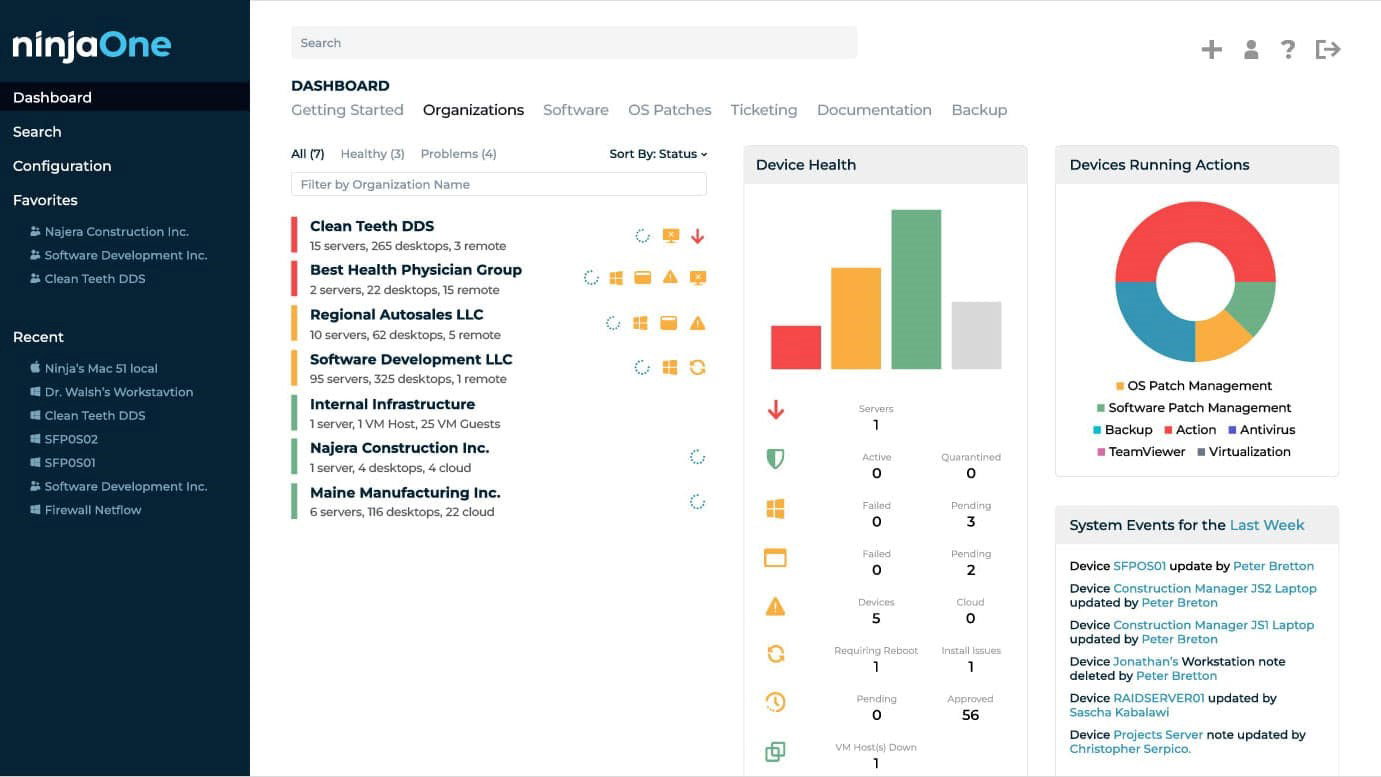
Another area where NinjaOne feels particularly practical is incident response. Real-time alerts, traffic visibility, and centralized monitoring help teams react faster when unusual behavior appears across the network. Combined with features like MFA support, encryption, and compliance-oriented controls, the platform balances operational simplicity with broader infrastructure oversight.
Pricing
NinjaOne uses custom pricing based on endpoint count, deployment scale, and feature requirements. Businesses can contact the company directly to receive tailored pricing based on their infrastructure and monitoring needs.
What Works And What Doesn’t
| Pros | Cons |
| Excellent customer support | Ticketing capabilities can feel limited |
| Easy remote management | Interface consistency varies in some areas |
| Strong automation features | Advanced configurations require onboarding time |
Our Final Take
NinjaOne fits particularly well for IT teams that want monitoring, remote management, and operational visibility consolidated into a single environment. Organizations running extremely small networks may not need its broader management depth, but for growing IT operations trying to reduce tool sprawl, it delivers a refreshingly streamlined experience.
Auvik: Best User Experience (UX)
Network monitoring tools have a reputation for being noisy, overly technical, and unnecessarily difficult to navigate once environments start growing. Auvik has built much of its appeal around reducing that friction.
Used by more than 80,000 IT professionals and managed service providers, the cloud-based platform focuses heavily on visibility and usability rather than forcing teams to spend hours manually piecing network information together. Its continued recognition in G2’s Fall 2025 reports reflects how strongly it resonates with IT teams looking for simpler day-to-day monitoring workflows.
Why We Chose Auvik In 2026
Auvik is particularly effective at making complex networks feel easier to understand. Once deployed, the platform automatically maps network devices and relationships in real time, giving teams a much clearer picture of how infrastructure is connected without requiring extensive manual configuration.
The platform also comes with more than 50 pre-configured alerts covering issues such as bandwidth spikes, packet loss, jitter, and connectivity instability. That proactive visibility helps teams identify unusual behavior early instead of waiting for outages or user complaints to escalate.
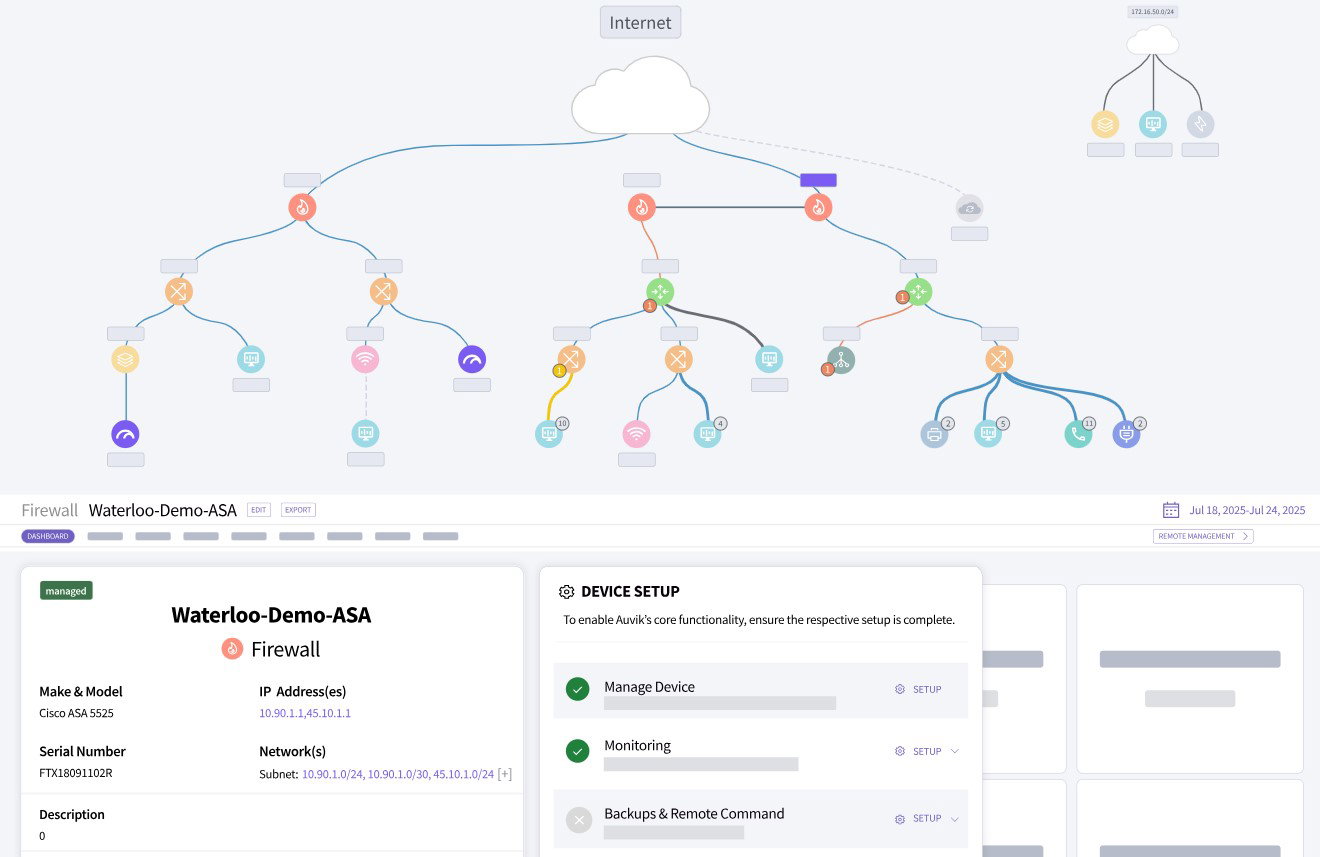
Auvik also handles several operational tasks quietly in the background, including VPN monitoring, ISP tracking, failover visibility, and asset inventory management. Having all of that accessible from one interface removes a surprising amount of day-to-day troubleshooting overhead, especially for distributed environments supporting remote users.
Pricing
Auvik uses device-based pricing centered around managed infrastructure components rather than charging per interface or IP address. Pricing scales automatically as devices are discovered, while custom quotes are available directly through the company based on deployment requirements.
What Works And What Doesn’t
| Pros | Cons |
| Excellent real-time visibility | Navigation can feel layered initially |
| Fast automated network discovery | Setup still requires planning |
| Reliable alerting capabilities | Mapping inconsistencies may occasionally appear |
Our Final Take
Auvik feels especially well-suited for IT teams managing multi-site environments that need faster visibility without adding operational complexity. Smaller environments may not fully benefit from its broader monitoring depth, but for teams trying to simplify network oversight while staying proactive, it delivers one of the cleaner user experiences in this category.
Topics For More Insights
Pandora FMS: Best Customization
Some monitoring platforms prioritize simplicity. Others lean toward depth and flexibility, even if that means a steeper learning curve. Pandora FMS clearly falls into the second category.
The platform is used by more than 100,000 users across 60+ countries and is built to support highly varied infrastructure environments, including on-premises systems, hybrid deployments, cloud infrastructure, and distributed enterprise networks. Its positioning has continued to strengthen through recognition as both a Momentum Leader and High Performer in G2’s Winter 2026 reports.
Why We Chose Pandora FMS In 2026
Pandora FMS is designed for teams that want deeper control over how monitoring is configured, structured, and scaled. Instead of locking users into rigid workflows, the platform offers extensive flexibility across monitoring logic, reporting, infrastructure visibility, and alert management.
It supports monitoring across routers, firewalls, servers, switches, IoT devices, and cloud infrastructure while combining technologies such as SNMP, NetFlow, and cloud-native integrations for Amazon Web Services, Microsoft Azure, and Google Cloud environments. That breadth becomes especially valuable for organizations managing mixed infrastructure that has gradually expanded over time rather than existing inside one clean ecosystem.
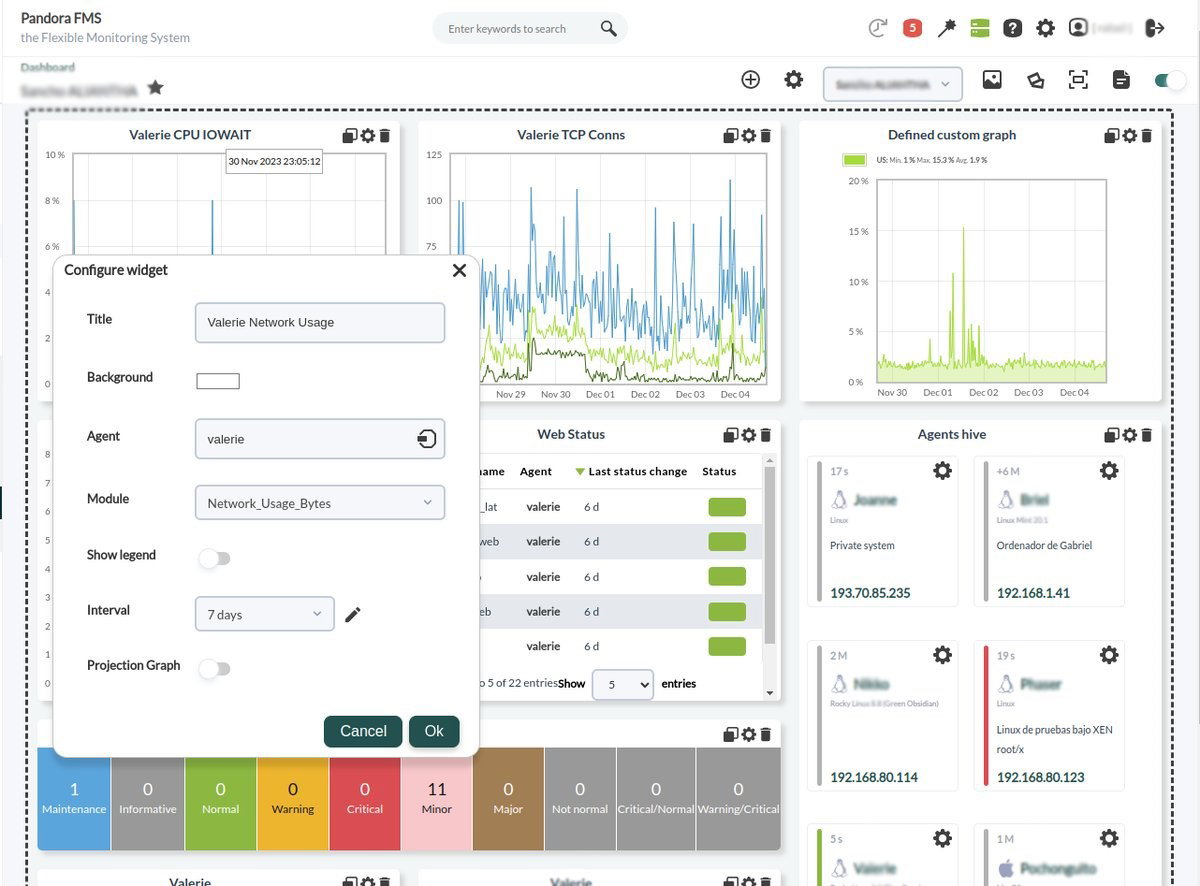
Another area where Pandora FMS stands out is operational visibility. Features like IP management, SLA reporting, log collection, configuration tracking, and AI-assisted analysis help teams move beyond simple monitoring into long-term infrastructure planning and performance optimization. The platform is also capable of scaling across thousands of devices from a centralized deployment, which makes it attractive for larger distributed environments.
Pricing
Pandora FMS pricing begins at approximately €590/year for workstation monitoring deployments. Network monitoring plans start around €1,530/year, while broader infrastructure monitoring packages begin at approximately €2,352/year, depending on deployment size and monitoring scope.
What Works And What Doesn’t
| Pros | Cons |
| Extensive customization flexibility | Interface design can feel dated |
| Strong real-time alerting | Version upgrades may require effort |
| Broad infrastructure monitoring coverage | The template ecosystem feels smaller than some competitors |
Our Final Take
Pandora FMS makes the most sense for IT teams that want highly configurable monitoring across complex environments. Smaller teams or first-time administrators may find the platform more demanding initially, but for organizations that value customization and infrastructure control, its flexibility is one of its strongest advantages.
Site24x7: Best Overall
Developed by ManageEngine, Site24x7 is trusted by more than 13,000 businesses worldwide and continues to maintain strong visibility within the observability and infrastructure monitoring market. Alongside recognition in Gartner research, ManageEngine was also positioned as an Overall Challenger in the 2024 Leadership Compass for network monitoring capabilities.
Why We Chose Site24x7 In 2026
Site24x7 stands out because of how broadly it approaches monitoring without making the platform feel completely disconnected. Rather than focusing only on network hardware, it combines infrastructure visibility, application monitoring, cloud observability, and user experience tracking into one centralized system.
The platform collects both synthetic monitoring data and real user metrics to help teams understand how applications and services are actually performing across regions, devices, and network conditions. That combination becomes especially valuable when issues are difficult to reproduce internally but still affect end users in production environments.
Its monitoring coverage is also extensive. Site24x7 supports servers, containers, virtualization environments, public cloud infrastructure, and more than 450 network device vendors while incorporating NetFlow analysis and configuration management capabilities. For organizations operating across a hybrid infrastructure, having all of that visibility consolidated into one platform can remove a substantial amount of operational overhead.
Pricing
Site24x7 pricing begins at approximately $9/month for basic monitoring deployments. Higher tiers start around $35/month, while MSP-focused plans begin near $45/month. Larger infrastructure environments with expanded monitoring, logging, and user requirements can scale to plans starting at approximately $89/month.
What Works And What Doesn’t
| Pros | Cons |
| Unified infrastructure visibility | Initial configuration can feel involved |
| Reliable real-time alerting | Interface occasionally feels crowded |
| Broad monitoring coverage | Pricing structure becomes layered at scale |
Our Final Take
Site24x7 works particularly well for organizations trying to centralize infrastructure, cloud, and network monitoring without juggling multiple disconnected tools. Smaller environments may not fully need its broader monitoring depth, but for IT teams managing growing infrastructure across different systems, it delivers one of the more complete monitoring ecosystems available in this category.
Top 5 Network Monitoring Systems Comparison
P.S. Always remember to visit the vendor's site for the latest information!
| Criteria |  |
 |
 |
 |
 |
| Starting Price | $7/month/host | NA | NA | €590/year | $9/month |
| Avg. User Rating | 4.5 | 4.7 | 4.5 | 4.6 | 4.6 |
| Free Trial/Demo | 15 Days | 14 Days | 14 Days | 30 Days | 30 Days |
| Key Features | AI problem tracing, unified observability platform, and cross-layer insights | RMM-based monitoring, SNMP device tracking, and an integrated alerting system | Automated network mapping, NetFlow traffic analysis, and VPN session monitoring | IP asset management, distributed scalability support, and configuration change tracking | Synthetic transaction monitoring, multi-cloud infrastructure monitoring, and unified alert dashboard |
| Integrations | Amazon Linux 2, NetFlow, Azure Virtual Networks, and more | ServiceNow, Okta, PagerDuty, and more | Cisco, Dropbox, Fortinet, and more | SAP, MySQL, Google Cloud, and more | Freshservice, Moogsoft, BigPanda, and more |
Wrapping Up
Modern networks rarely operate in predictable environments anymore. Between cloud infrastructure, remote access, distributed systems, and constantly shifting traffic patterns, even small issues can escalate quickly if teams lose visibility into what is happening behind the scenes.
That is why network monitoring platforms have evolved far beyond simple uptime tracking. Some tools now lean heavily into AI-assisted observability and automation, while others focus more on usability, operational control, or large-scale infrastructure visibility.
There is no universal fit here. The right platform depends on how complex your environment is, how much operational depth your team actually needs, and whether your priority is speed, customization, automation, or centralized oversight.
At its core, effective network monitoring is really about reducing uncertainty. When monitoring systems are working properly, teams spend less time reacting to outages and more time keeping infrastructure stable before problems start becoming visible to everyone else.
Frequently Asked Questions
Which Are The Top Network Monitoring Systems Of 2026?
Some of the best Network Monitoring tools of 2026 include Dynatrace, NinjaOne, Auvik, Pandora FMS, and Site24x7. Each offers different strengths like automation, visibility, scalability, and real-time monitoring for varied IT environments and business needs.
How Do I Choose The Right Network Monitoring Tool?
Choosing the right network monitoring tool depends on your network size, complexity, and goals. Look for features like real-time alerts, scalability, ease of use, and integration support to ensure it fits your IT setup and long-term requirements.
Why Do Businesses Need Network Monitoring Tools?
Businesses use network monitoring tools to maintain network stability, improve performance, and reduce downtime. They provide real-time alerts and insights, helping IT teams quickly identify issues and keep systems running efficiently across cloud, on-prem, and hybrid environments.
Tue, May 12, 2026

Enjoyed what you've read so far? Great news - there's more to explore!
Stay up to date with the latest news, a vast collection of tech articles including introductory guides, product reviews, trends and more, thought-provoking interviews, hottest AI blogs and entertaining tech memes.
Plus, get access to branded insights such as informative white papers, intriguing case studies, in-depth reports, enlightening videos and exciting events and webinars from industry-leading global brands.
Dive into TechDogs' treasure trove today and Know Your World of technology!
Disclaimer - Reference to any specific product, software or entity does not constitute an endorsement or recommendation by TechDogs nor should any data or content published be relied upon. The views expressed by TechDogs' members and guests are their own and their appearance on our site does not imply an endorsement of them or any entity they represent. Views and opinions expressed by TechDogs' Authors are those of the Authors and do not necessarily reflect the view of TechDogs or any of its officials. While we aim to provide valuable and helpful information, some content on TechDogs' site may not have been thoroughly reviewed for every detail or aspect. We encourage users to verify any information independently where necessary.
Loading comments...