
Customer Engagement
Exploring Key Features Of Nutshell CRM
Share
Overview
That’s when a tool like Nutshell CRM becomes valuable. It helps teams keep contacts, opportunities, tasks, emails, and meetings organized in a single place.
In this article, we explore the top features of Nutshell CRM and what makes it a strong, well-rounded option for growing sales teams.
From pipeline management and automation to email marketing, reporting, and an AI tool, Nutshell brings all of that into one connected platform.
What’s Nutshell CRM? Let’s understand.
TL;DR
-
Nutshell CRM features include pipelines, automation, email, forms, reporting, and scheduling inside one connected sales workflow.
-
Its pipeline tools support custom stages, multiple views, draft testing, and ready-made templates.
-
Marketing features include forms, landing pages, audience-based email campaigns, attribution, and website visitor identification.
-
Reporting and AI tools help teams review activity, summarize interactions, and act faster daily.
What Is Nutshell CRM?
Nutshell CRM is an all-in-one sales and marketing platform built around three interconnected layers: sales execution, marketing assistance, and customer engagement. For teams looking for Nutshell CRM details, the platform covers everything from pipeline management and automation to email marketing, reporting, and AI tools.
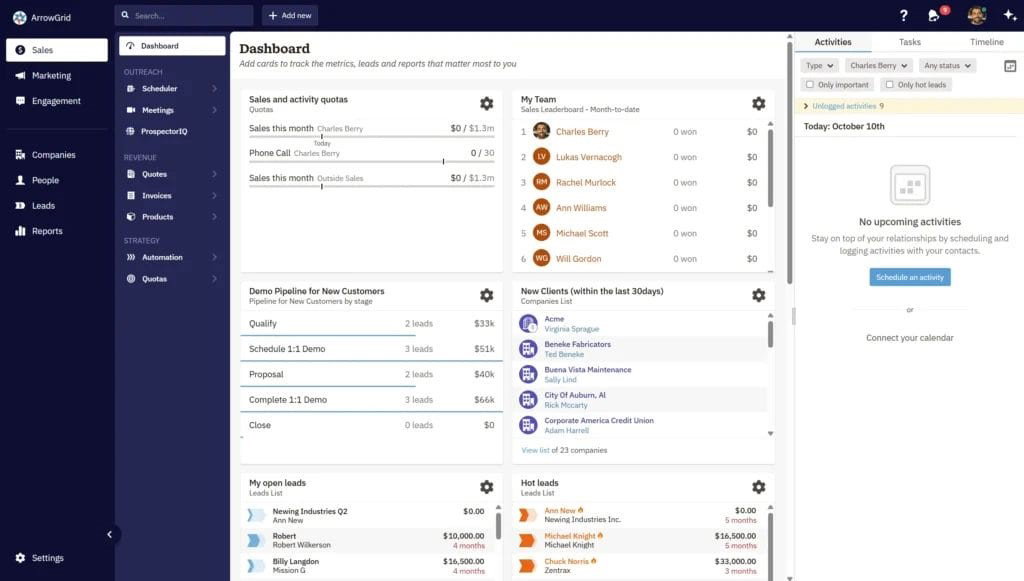
On the sales side, Nutshell covers the full cycle. From managing pipelines and automating follow-ups to tracking performance and syncing email and calendar activity. It also includes contact management, prospecting tools, and AI features built directly into the workflow.
That combination gives Nutshell a well-rounded profile because it puts lead generation, deal movement, and outreach in one place. Teams do not have to rebuild context when switching tasks, whether that means creating audiences from CRM data, syncing meetings, or pulling reports, because everything runs from the same system. For sales teams that value continuity, that is one of the platform's most practical strengths.
Pipeline Management
Before looking at automation or marketing, it helps to start with the part of the CRM most sales teams touch every day: the pipeline. This is also where Nutshell shows one of its clearest strengths, because its official pipeline materials focus on flexibility rather than forcing every business into one fixed process.
-
Custom Pipelines
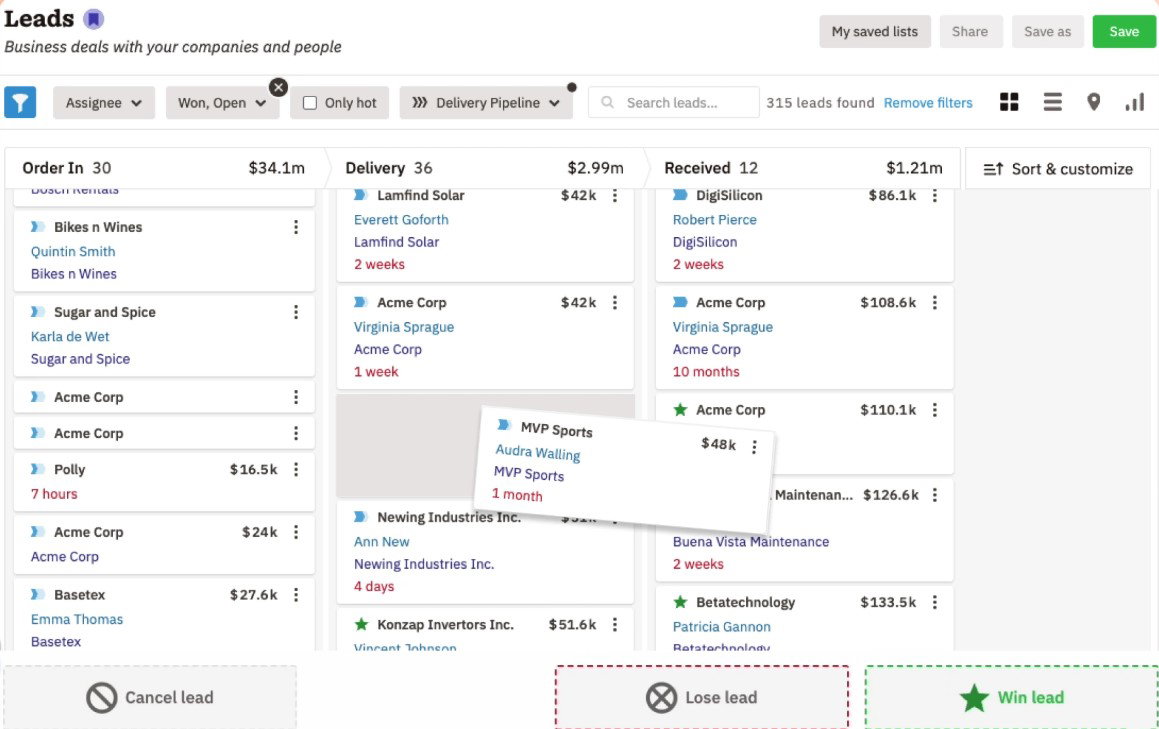
Teams may adjust pipelines to meet their sales process and use pre-made templates instead of starting from scratch.
-
Draft Pipelines
Teams can test new processes with draft pipelines before going live, which is excellent for refining phases or automating tasks.
-
Multiple Views
Nutshell documents drag-and-drop board, list, map, and chart views, so teams can track opportunities in the format that suits them best.
That combination offers Nutshell's pipeline tools a clean appearance. Together, these pipeline tools give teams more than a place to store deals. They give teams a system that adapts to how they actually sell, whether that means testing a new process safely, switching between views, or building from a ready-made template instead of starting from scratch.
Its value grows further when repetitive sales tasks start running automatically.
Sales Automation
Once the pipeline is in place, Nutshell's automation tools take over the repetitive work that would otherwise slow teams down.
It can auto-assign leads, trigger follow-ups, send sales emails in response to events such as new leads or answers, score prospects based on confidence, and send SMS messages to contacts at various phases of the sales process.
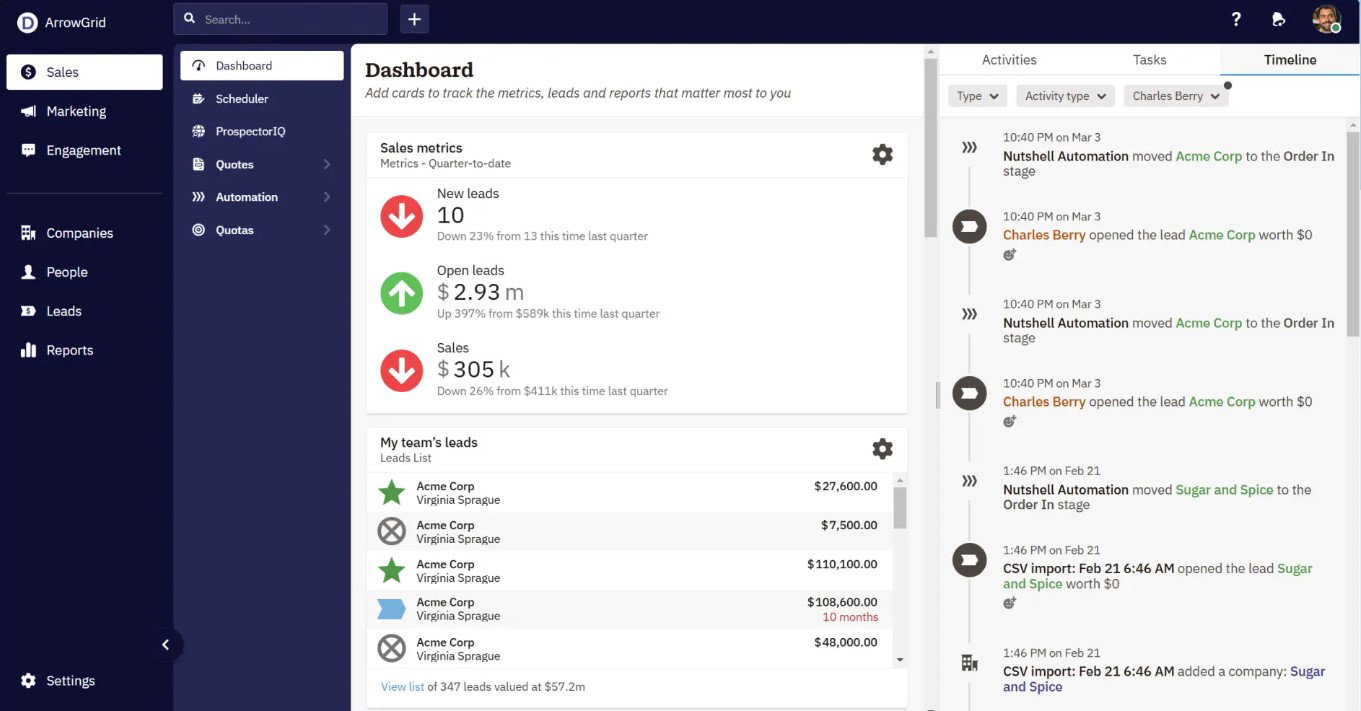
It also states that leads can be moved from stage to stage automatically based on the goals specified by the team, with lead confidence updated along the way. That makes sales automation more useful for busy sales teams that want less manual work and more time for selling.
One of the most useful parts of the procedure is Nutshell's personal email address sequences. Those sequences can start at any step of the pipeline and stop on their own when the prospect responds.
That level of detail makes the platform more than simply feature-rich on paper; it reveals that Nutshell is meant to cut down on the little activities that eat up selling time without anyone noticing.
Once the pipeline is running smoothly, the next thing to think about is how well the CRM manages everything that goes on before and around the sale.
Topics For More Insights
Marketing Tools
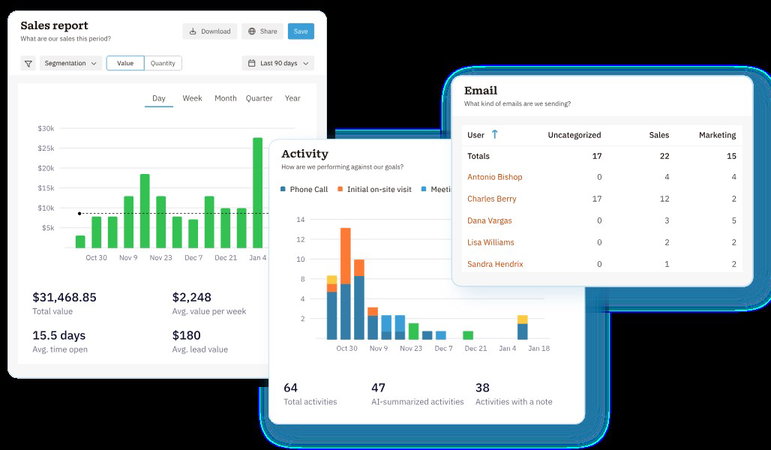
Nutshell's marketing tools are built directly into the same platform as the CRM, which means sales and marketing teams work from the same customer data without switching systems.
-
Forms
Nutshell Forms lets teams build no-code customizable forms or connect existing ones. Submissions automatically create contacts and leads, map fields, and route entries into the right pipeline. Teams can also add tags, build audiences, and trigger automations directly from form responses without leaving the CRM.
-
Performance Tracking
It monitors the number of page visits, form submissions, and the conversion rate from page visits to submissions originating from within the CRM.
-
Connected Email Marketing
With Nutshell’s email marketing tools, sales teams can create audiences from tagged contacts, trigger drip campaigns at specific funnel stages, track opens and clicks, and run A/B tests on campaigns.
-
Landing Pages
Nutshell keeps track of no-code landing pages, automatically gathers source data on new leads, and identifies website visitors to help spot companies and individuals checking out the site.
What makes this section stand out is that Nutshell treats marketing as part of the same workflow rather than a separate module. Forms, audiences, lead source data, and campaign tracking all connect back to the same customer records, which keeps the platform consistent from first touch to closed deal.
The next advantage becomes clear when teams need faster insight, not just more data.
Reporting And AI
Good data is only useful if teams can act on it quickly. Nutshell's reporting and AI tools are built around that idea, turning activity and performance data into something teams can actually use day to day.
-
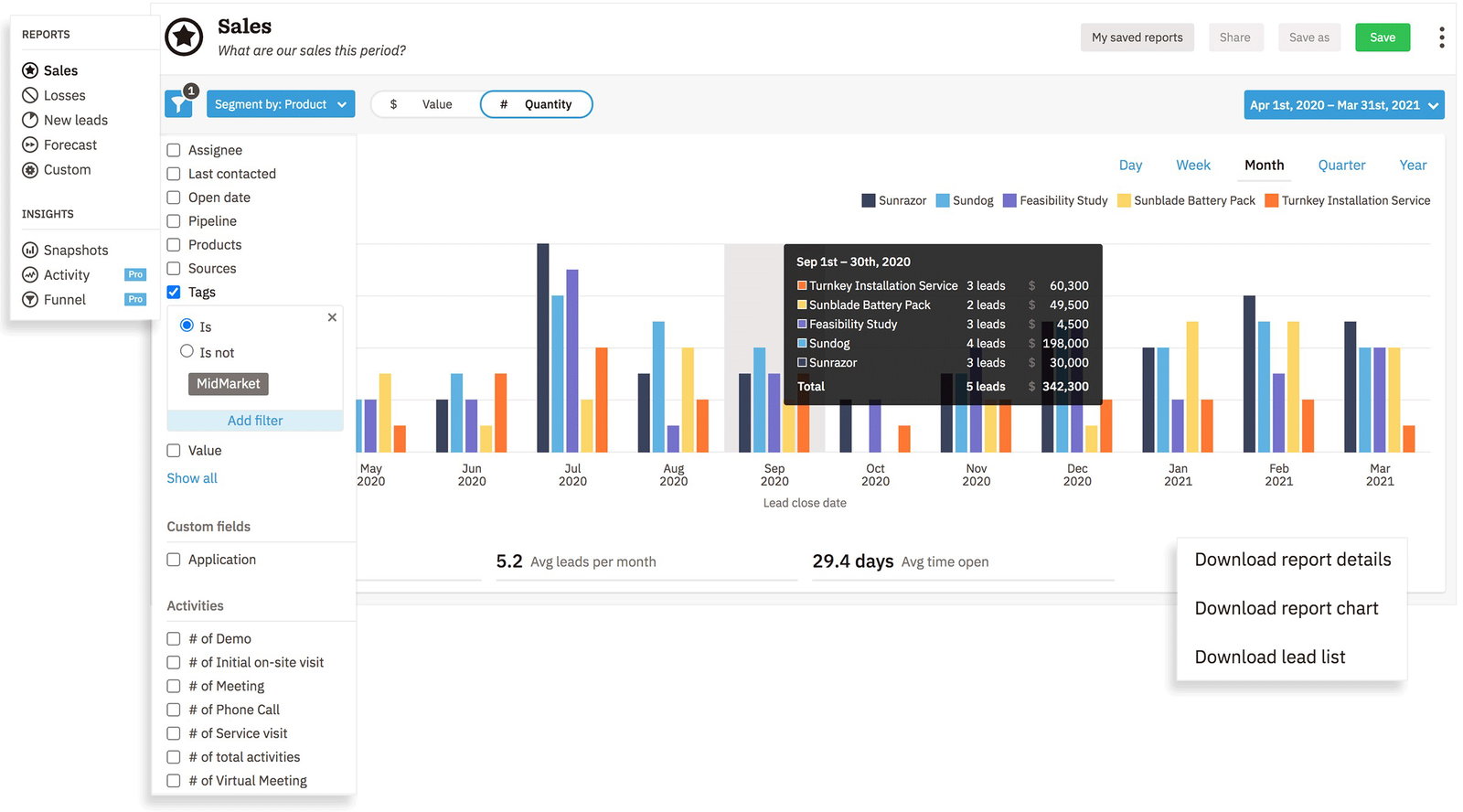
Sales And Performance Reporting
Nutshell turns sales, losses, leads, forecasts, and attribution into structured reports rather than just keeping records. Users can build, save, share, and download reports while admins monitor activity, email, and task performance from the same system. The platform also offers daily business snapshots, funnel reporting, and marketing insights covering website traffic, email performance, forms, and landing pages. Custom reports can be filtered by outcome, product, assignee, territory, source, tag, competitor, and stage for more precise visibility.
-
AI Support For Faster Work
Nutshell offers some pretty cool AI features like timeline summaries, meeting summaries, AI email replies, notetakers, lead recaps, next actions, Smart Reports, and daily or weekly summaries. These tools make it easier for teams to go over conversations, create outreach drafts, and gather insights quickly, all without piling on extra manual tasks.
Taken together, these features show why Nutshell feels complete and well connected.
Conclusion
Nutshell CRM is built for teams that want their sales and marketing work happening in one place rather than scattered across separate tools.
The top features of Nutshell CRM include pipeline management, automation, forms, email marketing, landing pages, reporting, AI tools, and meeting scheduling, covering the main jobs sales teams deal with every day.
Frequently Asked Questions
What Are The Top Features Of Nutshell CRM?
The top features of Nutshell CRM include pipeline management, sales automation, email marketing, web forms, landing pages, reporting, AI tools, meeting scheduling, and contact management, all connected inside one platform.
Does Nutshell Include Marketing Tools As Well As CRM Features?
Yes. Nutshell documents forms, email marketing, landing pages, lead attribution, website visitor identification, and audience-based campaign automation inside its broader platform.
Can Nutshell Connect Forms, Meetings, And Email Activity Back To The CRM?
Yes. Nutshell says forms can auto-create contacts and leads, its meeting scheduler can sync meetings with the calendar from inside the CRM, and its email/calendar sync connects communication activity to the platform.
Fri, Mar 13, 2026

Liked what you read? That’s only the tip of the tech iceberg!
Explore our vast collection of tech articles including introductory guides, product reviews, trends and more, stay up to date with the latest news, relish thought-provoking interviews and the hottest AI blogs, and tickle your funny bone with hilarious tech memes!
Plus, get access to branded insights from industry-leading global brands through informative white papers, engaging case studies, in-depth reports, enlightening videos and exciting events and webinars.
Dive into TechDogs' treasure trove today and Know Your World of technology like never before!
Disclaimer - Reference to any specific product, software or entity does not constitute an endorsement or recommendation by TechDogs nor should any data or content published be relied upon. The views expressed by TechDogs' members and guests are their own and their appearance on our site does not imply an endorsement of them or any entity they represent. Views and opinions expressed by TechDogs' Authors are those of the Authors and do not necessarily reflect the view of TechDogs or any of its officials. While we aim to provide valuable and helpful information, some content on TechDogs' site may not have been thoroughly reviewed for every detail or aspect. We encourage users to verify any information independently where necessary.
Loading comments...