
Human Resources Solutions
Top 5 Workforce Management Software Of 2026
Share
TL;DR
Workforce management software streamlines operations by automating scheduling, time tracking, and compliance to boost overall team productivity.
-
Rippling: Provides an all-in-one platform that centralizes HR, IT, and payroll functions for global businesses.
-
Workday Workforce Management: Uses AI-powered insights to optimize team performance and control labor costs effectively.
-
UKG Pro: Focuses on massive scalability and global compliance for mid-sized to large enterprise organizations.
-
Connecteam: Offers a mobile-first solution specifically designed to manage and engage deskless or frontline teams.
-
BambooHR: Delivers an intuitive user experience that simplifies people management and compensation for growing teams.
Introduction
Rocky Balboa and modern businesses share a surprising connection through the legendary anthem Eye of the Tiger. Just as that song provided the grit and focus for Rocky to conquer his opponents in the ring, Workforce Management software empowers organizations to face their operational hurdles with unmatched resilience. This drive is not merely about physical strength but involves deep discipline, careful preparation, and the ability to stay several steps ahead of the competition. By embracing this champion mindset, companies can transform their daily grind into a coordinated strategy for success.
These digital tools go far beyond basic human resource functions by automating repetitive tasks and consolidating real-time data into actionable insights. In an era where adaptability is the ultimate advantage, leveraging automation allows managers to strategically assign tasks and optimize worker productivity. This technical edge ensures that your team is always ready to meet the evolving demands of a modern workforce while lowering operating costs. Here are the Top 5 Workforce Management Software Solutions designed to help your business rise to the challenge.
What Is Workforce Management (WFM) Software?
Workforce Management (WFM) Software is essential for maximizing worker productivity, guaranteeing efficient resource allocation, and streamlining company operations. It supports labor activity management, including scheduling, planning, labor forecasting, employee scheduling, time and attendance tracking, and compliance management.
Businesses can increase their productivity and lower operating expenses by automating certain procedures. With this software, managers can strategically assign tasks to workers based on company requirements, ensuring an appropriate number of workers are available when needed.
With the "what" of Workforce Management Software covered, it's time to look at the "who." The market is buzzing with solutions, but not all are created equal. To help you cut through the clutter, here are the Top 5 Workforce Management Software of 2026 that stand out for their features, usability, and impact.
Top 5 Workforce Management (WFM) Software Of 2026
Here are the Top 5 Workforce Management Software Solutions of 2026, recommended by leading workforce management system software vendors, listed in no particular order. Explore the features and benefits of each to find the best fit for your needs!
 |
 |
 |
 |
 |
Rippling: Best Overall
Retaining its place in our list this year, Rippling has been developed by Rippling, Inc. It is a leading Workforce Management (WFM) Software designed to simplify HR, IT, and payroll processes for businesses of all sizes. Rippling has quickly become a trusted tool for thousands of organizations across 140-plus countries and is recognized as a Grid Leader in G2's Summer 2025 report.
Why We Chose Rippling In 2026
Rippling comes in with an all-in-one platform that streamlines HR, IT, payroll, spend management, and other key HRM (Human Resource Management) functions, which makes it an essential tool for global businesses. It also helps businesses automate onboarding, payroll, benefits, and device management. Its unified platform reduces administrative workload, ensures compliance, and provides real-time visibility across finance, HR, and IT operations, further enhanced by integrations with over 500 third-party apps.
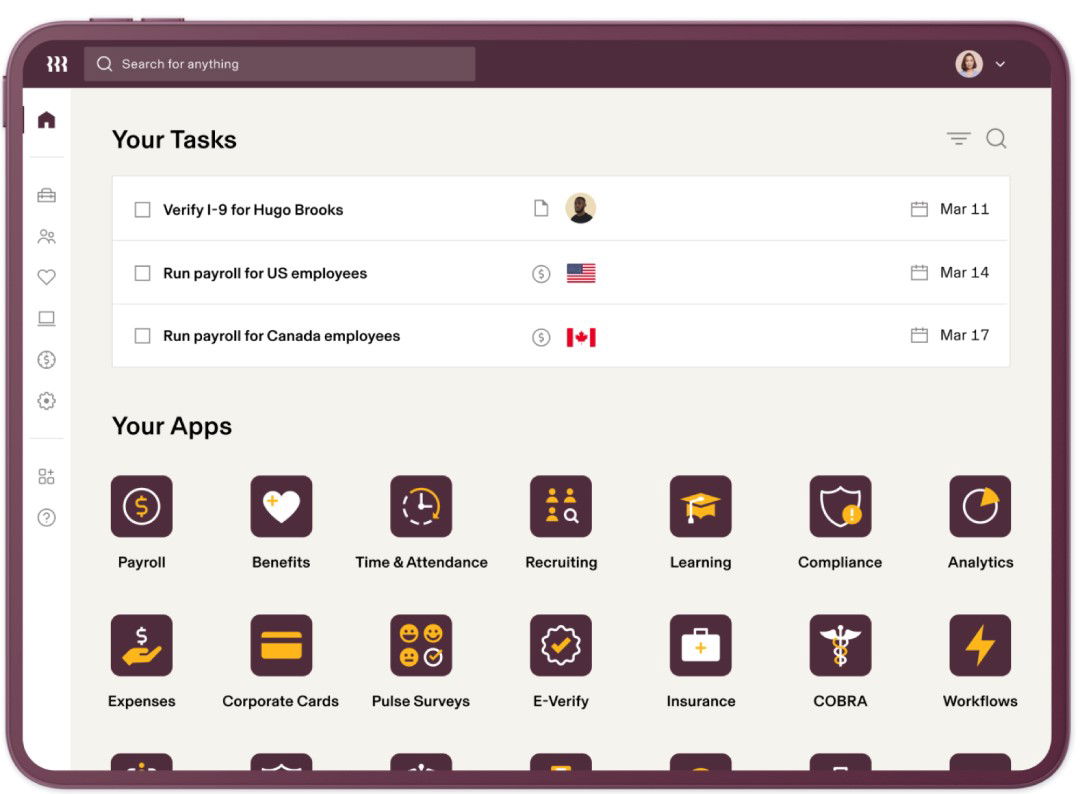
Rippling offers advanced workforce management capabilities through scalable solutions, robust security, encryption, audits, and customer support across multiple channels. Furthermore, the platform's automated expense controls, centralized device management, and real-time payroll visibility boost operational efficiency.
Pricing
Rippling offers interested parties customized pricing based on their business size and specific requirements. However, before committing, customers can also schedule a demo to evaluate the features.
What Works & What Doesn't
| Pros | Cons |
| Easy-to-use and intuitive interface | Missing features |
| Seamless navigation | Limited customization options |
| Strong accessibility and user experience | Challenging learning curve |
Our Final Take
Rippling is a great workforce management tool for enterprises and mid-market companies that want to reliably centralize functions such as HR, IT, and payroll, and access them on a unified platform. It might be tougher for smaller teams to set up. However, it can be effective in the long run, as it offers robust integrations, automation, and compliance features.
Workday Workforce Management: Best For Enterprise
A debutant on our list this year, Workday is known worldwide for its exceptional office management suite, spanning HR, Finance, IT, Legal, and more. The company's products integrate comprehensive features with AI-powered capabilities and collaborative AI agents to simplify business management. It's no wonder that the company was named a Leader in the 2025 Gartner Magic Quadrant for Cloud HCM Suites.
Why We Chose Workday Workforce Management In 2026
Workday's Workforce Management platform helps businesses unify HR, time, and scheduling data into one AI-powered platform. Its UI is designed with workers in mind—it offers mobile-first access to pay, time, and schedules, helping businesses improve retention. Furthermore, it blends real-time AI-driven insights with automation to optimize team performance and help organizations control labor costs from a single dashboard.
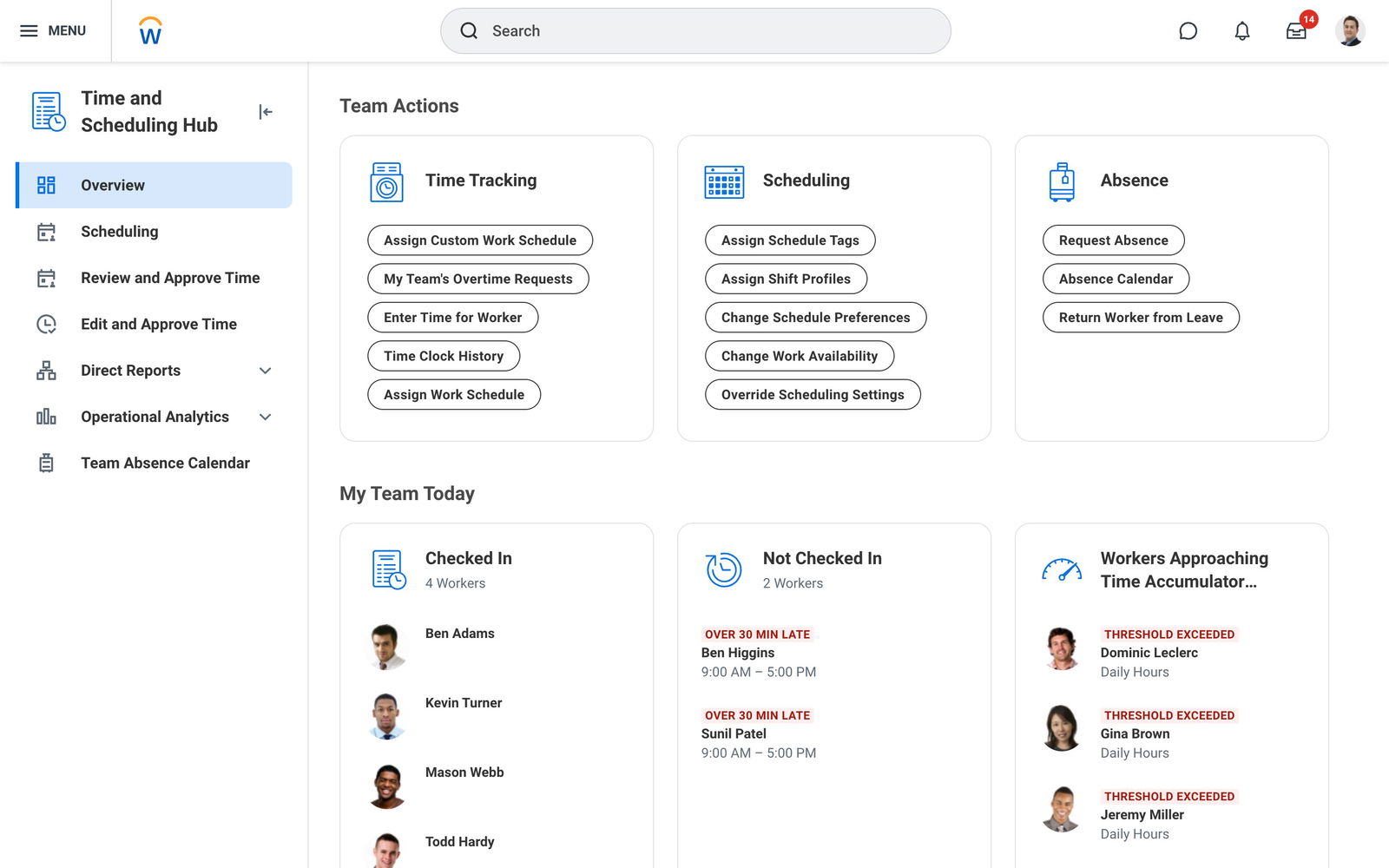
Workday offers demand forecasting, absence management, and frontline worker empowerment tools. Its flexible design can adapt to changing business needs. With secure, data-driven analytics, businesses can visualize labor costs, identify trends, and ensure compliance, supported by a wide range of integrations across HR and operational systems. It also includes Workday Illuminate, which helps both workers and managers automate tasks.
Pricing
Looking for a quote? Workday provides customized pricing based on a business's requirements and team size. However, it offers a free demo of its platform's capabilities.
What Works & What Doesn't
| Pros | Cons |
| Easy-to-use and intuitive interface | Clunky mobile interface |
| Convenient multipurpose platform | Some features lack customization |
| Good payroll management features | Complex workflows |
Our Final Take
Workday's Workforce Management solution is best suited for enterprises and large organizations that need deep insights or AI-powered scheduling capabilities. On the flip side, it might become a little complex for smaller businesses. However, for scaling operations and frontline management with automation and insights, Workday is apt.
UKG Pro: Best For Scalability
Returning to our list in 2026 is Ultimate Kronos Group's UKG Pro. This globally leading Workforce Management (WFM) Software is designed to simplify HR, payroll, and talent management processes for businesses of all sizes. The company caters to clients in more than 100 countries and is consistently rated amongst the top solutions providers. Its UKG Pro was named a Leader in the 2025 Gartner Magic Quadrant.
Why We Chose UKG Pro In 2026
UKG Pro brings together HR, payroll, talent, and workforce management into a single, comprehensive platform. This helps businesses put their people at the center of workforce-related strategies. It includes AI-driven scheduling, succession planning, and career development tools, making it an industry favorite. Furthermore, its intuitive interface enables employees and employers to seamlessly navigate its wide range of features, functions, and integrations.
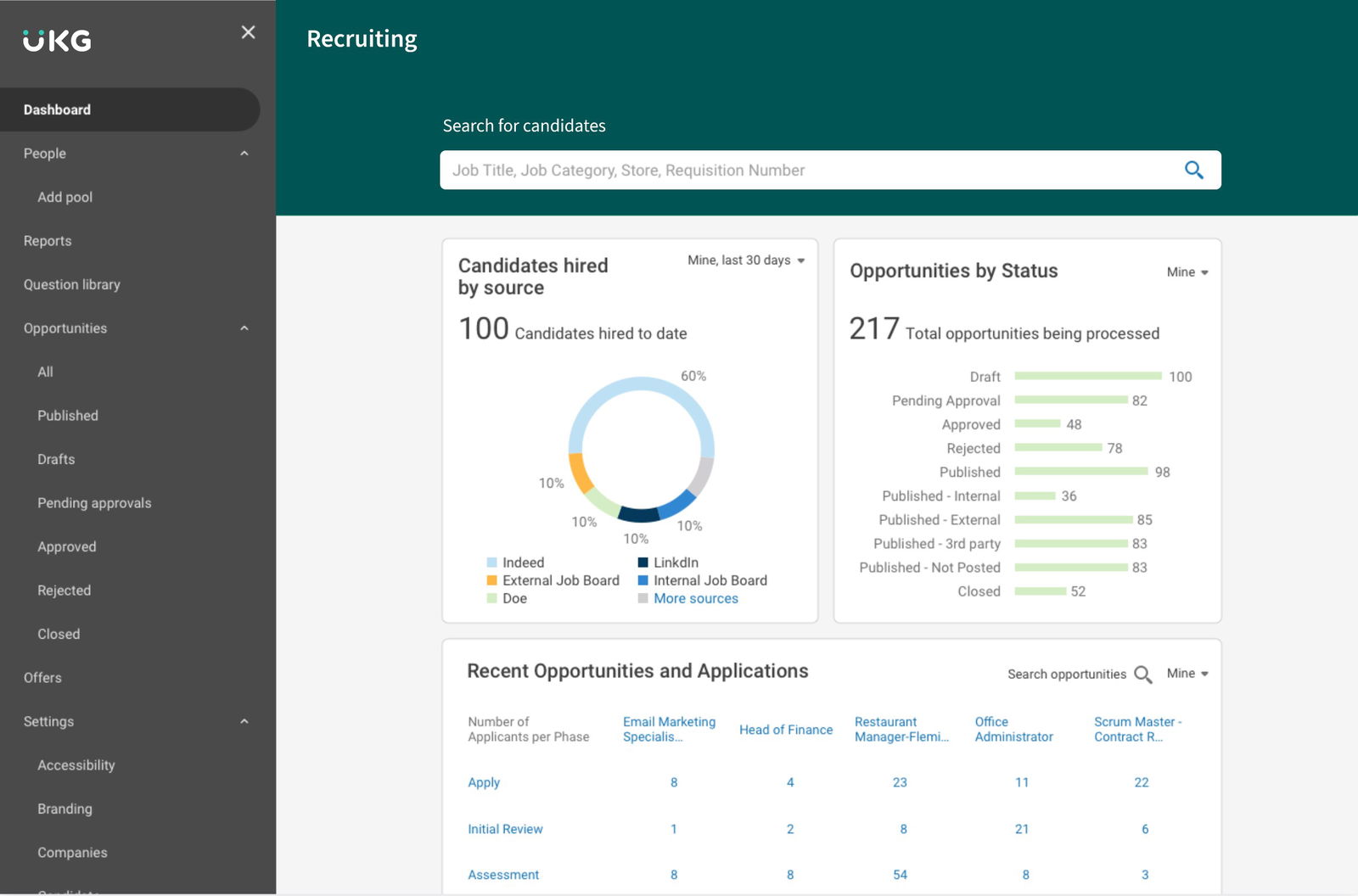
UKG Pro's true power lies in its scalability and ability to serve mid-sized to large enterprises. It streamlines time tracking, attendance, and payroll while providing global compliance support to help organizations stay compliant and ahead of regulations. It comes with seamless integrations with platforms such as Microsoft Teams, Salesforce, SAP, and QuickBooks, ensuring businesses enjoy strong, connected, and efficient workflows.
Pricing
UKG Pro offers customized pricing plans that are tailored to a business's specific needs. However, it offers a demo for interested parties to get a better understanding of its capabilities and how to operate the platform.
What Works & What Doesn't
| Pros | Cons |
| Intuitive and easy-to-learn interface | Occasional login and clock-in issues |
| Quick access to key features | Limited reporting customization |
| Reliable payroll tools | Poor customer support |
Our Final Take
UKG Pro is one of the best integrated workforce management systems for mid-sized to large enterprises seeking advanced workforce management capabilities that deliver global compliance and a range of robust integrations. However, its pricing complexities may not make it ideal for smaller businesses. Still, it's a powerful solution that prioritizes scalability and people-first design.
Topics For More Insights
Connecteam: Best Mobile Functionality
New to our list this year is Connecteam, which boasts over 1 million active users across 80 countries. The company also boasts a strong record of recognition and awards, including a spot in G2's Best Software Awards as one of the Top 100 Highest Satisfaction Products. It was further recognized as a Leader in both the Mid-Market and Small Business categories in G2's Winter 2025 report. Impressive considering the company was founded in 2014, right?
Why We Chose Connecteam In 2026
Connecteam stands out as a unique choice, thanks to its mobile-first nature that brings powerful workforce management solutions for deskless teams. Yet this comprehensive platform combines employee scheduling, time tracking, communication, task management, and training into a single, intuitive solution. It even comes with AI-powered tools—from auto-scheduling to instant course creation—which help reduce routine admin work. It even keeps employees engaged and aligned on the go.
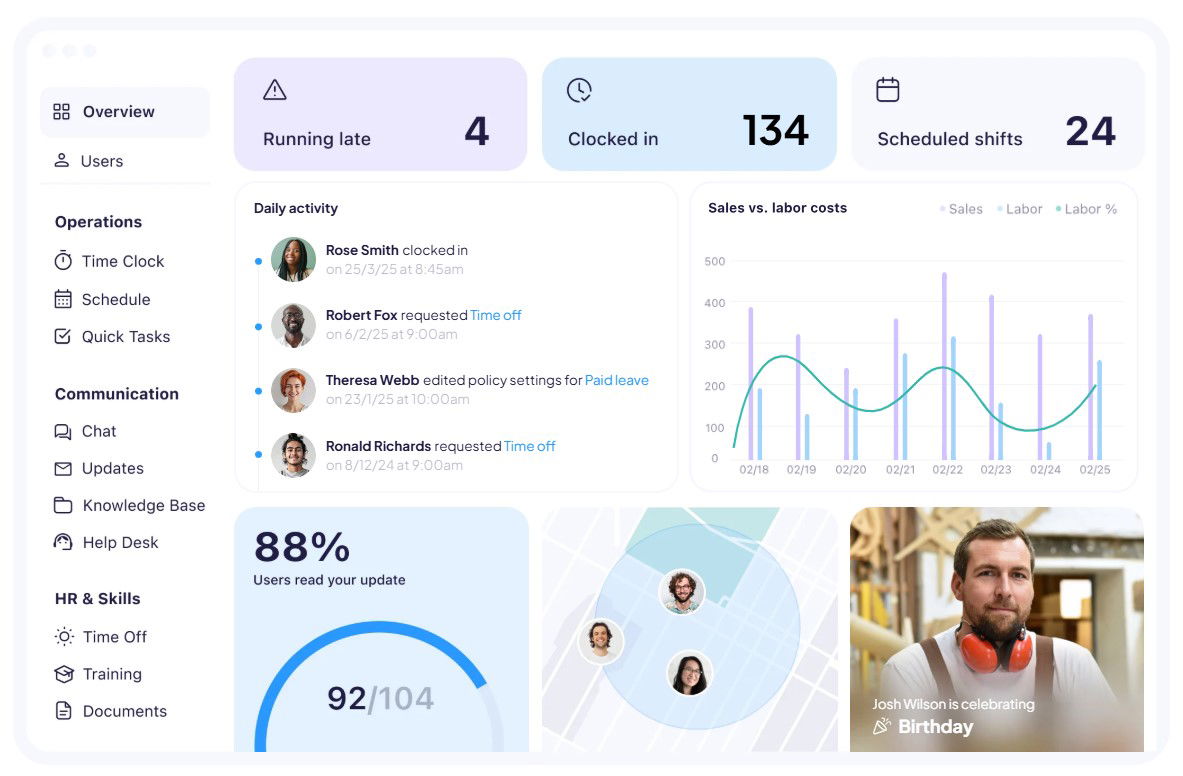
Connecteam's core strengths include customizable digital forms, GPS-enabled time tracking, its Active Directory SSO, and AI-driven features such as automated updates, multilingual team communication, and speech-to-text reporting. The platform blends frontline-ready workflows with automation, all of which helps businesses reduce costs, maintain compliance, and give managers real-time visibility into operations.
Pricing
Connecteam offers a free plan for small teams. Its paid plans start at $29 per month for the Basic plan, where Advance costs $49 per month, Expert at $99 per month, and Enterprise at a customized cost. However, all payment plans (except Enterprise) are applicable for the first 30 users. It also comes with a 14-day free trial and demo.
What Works & What Doesn't
| Pros | Cons |
| Easy to use and learn daily basics | Missing or limited advanced features |
| GPS/time clock improves accuracy | Overwhelming setup/customization |
| Good, organized all-in-one platform | Slow mobile app under heavy use |
Our Final Take
Connecteam is best suited for industries of all sizes. With its free plan for small companies and customized pricing for large workforces, it brings AI-powered scheduling and communication to industries such as retail, construction, healthcare, field services, and more. While its complex setups may require onboarding time, its mobile-first design and automation make it a standout choice.
BambooHR: Best User Experience (UX)
Once again, on our list in 2026, BambooHR, developed by BambooHR LLC, is a leading HR software that simplifies human resource management for small- and medium-sized businesses. It has grown to become a trusted tool for over 34,000 organizations worldwide, from startups to enterprises. With a global presence in 150 countries, BambooHR continues to innovate and expand its offerings, making it an essential tool for businesses that aim to enhance their HR management efficiency.
Why We Chose BambooHR In 2026
BambooHR is recognized for its exceptional ability to streamline payroll, benefits, time tracking, and onboarding, all through one secure platform. It brings innovative tools such as electronic signatures, automated workflows, and in-depth reporting, which help eliminate manual and routine work, putting people management on autopilot. One of its notable superpowers includes unifying data to boost efficiency and accuracy across the employee lifecycle.
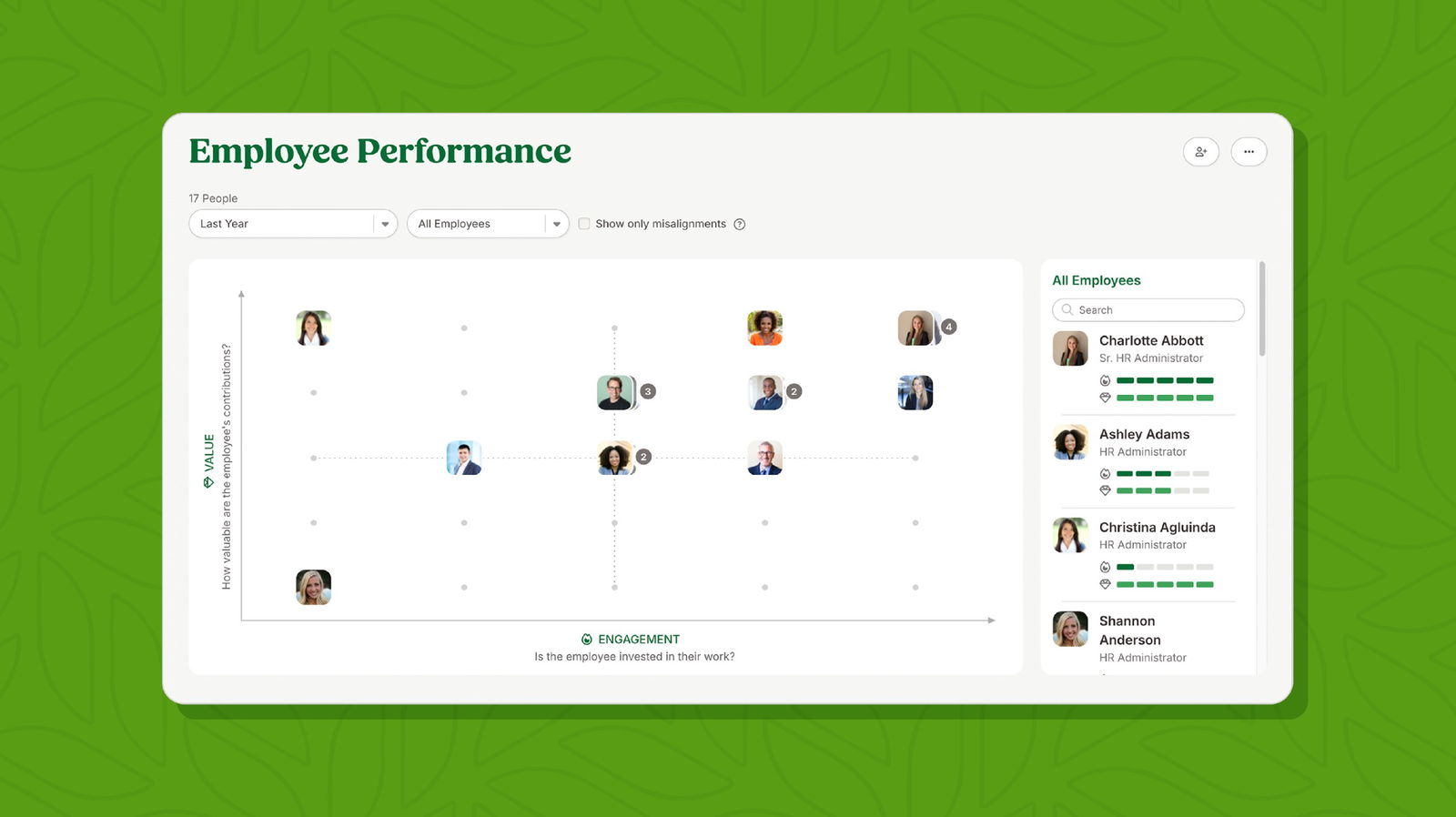
The platform's practical value lies in its employee experience features, from satisfaction surveys to performance management, all designed to nurture growth and retention. Add to that its new compensation module with benchmarking and planning tools, and BambooHR now goes beyond HR basics to empower fair pay practices. With support for eight languages and integrations across industries, it's a reliable choice for scaling teams.
Pricing
BambooHR offers interested users a free trial to experience its magic as well as a free demo for guided tours of its powerful product. BambooHR pricing starts at $10 per month per employee, but its three pricing plans—Core, Pro, and Elite—offer customized quotes.
What Works & What Doesn't
| Pros | Cons |
| Clean and intuitive interface | Reporting customization is limited |
| Seamless workflows | Loose integrations with payroll and benefits |
| Good self-service tools | Lack of admin functions in the mobile app |
Our Final Take
BambooHR is ideal for small and medium businesses (SMBs) and mid-sized companies looking to replace spreadsheets with a clean, automated HR suite. While some users have reported that its integrations could be a bit tighter or more effective, BambooHR's people-first design, seamless workflows, and compensation insights make it a good choice.
Top 5 Workforce Management Software Comparison
| Criteria |  |
 |
 |
 |
 |
| Starting Price | NA | NA | NA | $29/month | $10/month |
| Avg. User Rating | 4.8 | 4.3 | 4.4 | 4.6 | 4.4 |
| Trial Period/Demo | Free Demo | Free Demo | Free Demo | 14-day free trial | Free Demo |
| Key Features | Payroll benefits, device management, and workflow automation | Time tracking, absence management, and scheduling, | Scheduling, time tracking, and compliance management | GPS time clock, task management, and communication tools | Employee database, onboarding, and performance management |
| Integrations | Adobe, Canva, Microsoft 365, and more | Asana, Microsoft Teams, Salesforce, and more | Azure Portal, Looker, SAP Concur, and more | ClickUp, Google Workspace, QuickBooks, and more | Google Workspace, NetSuite, Slack, and more |
Conclusion
Choosing the right Workforce Management Software in 2026 is all about aligning tools with your business size, industry, and future goals. Whether you need AI-driven scheduling, mobile-first solutions, or people-first HR platforms, it's important you pick a solution that will bring powerful performance, fabulous flexibility, and exceptional efficiency. Ultimately, the right choice will help you deliver streamlined operations, happier employees, and long-term growth.
Frequently Asked Questions
What Are The Top 5 Workforce Management Software Solutions Of 2026?
The top five Workforce Management Software solutions for 2026 are Rippling, Workday, UKG Pro, Connecteam, and BambooHR. Each platform brings unique features ranging from AI-driven scheduling and payroll management to mobile-first tools for deskless teams. Businesses can explore their offerings based on company size, industry, and specific workforce needs.
How Does Workforce Management Software Help Businesses Improve Productivity?
Workforce Management Software improves productivity by automating repetitive tasks, streamlining employee scheduling, and ensuring compliance across operations. It provides managers with real-time insights into labor costs, workforce allocation, and employee engagement, helping businesses optimize resources while reducing administrative burden. This allows employees to focus on higher-value tasks, leading to better efficiency and overall growth.
Which Type Of Business Benefits The Most From Workforce Management Software?
Businesses of all sizes can benefit from Workforce Management Software, but its impact varies. Enterprises gain from advanced integrations and global compliance, mid-market firms use it for centralized HR and payroll management. At the same time, small businesses benefit from free or affordable plans with basic scheduling and time tracking. Industries with large frontline or deskless workforces, such as retail, healthcare, construction, and field services, also find these tools particularly valuable.
Thu, Dec 11, 2025

Enjoyed what you've read so far? Great news - there's more to explore!
Stay up to date with the latest news, a vast collection of tech articles including introductory guides, product reviews, trends and more, thought-provoking interviews, hottest AI blogs and entertaining tech memes.
Plus, get access to branded insights such as informative white papers, intriguing case studies, in-depth reports, enlightening videos and exciting events and webinars from industry-leading global brands.
Dive into TechDogs' treasure trove today and Know Your World of technology!
Disclaimer - Reference to any specific product, software or entity does not constitute an endorsement or recommendation by TechDogs nor should any data or content published be relied upon. The views expressed by TechDogs' members and guests are their own and their appearance on our site does not imply an endorsement of them or any entity they represent. Views and opinions expressed by TechDogs' Authors are those of the Authors and do not necessarily reflect the view of TechDogs or any of its officials. While we aim to provide valuable and helpful information, some content on TechDogs' site may not have been thoroughly reviewed for every detail or aspect. We encourage users to verify any information independently where necessary.
Loading comments...