
Artificial Intelligence
ChatGPT Record Mode Vs. AI Meeting Assistants
Share
TL;DR
-
ChatGPT Record can transcribe and summarize meetings, brainstorms and voice notes without a visible meeting bot.
-
Record sessions currently support up to four hours per session.
-
Otter and Fireflies can automatically join scheduled meetings across platforms such as Zoom, Google Meet and Microsoft Teams.
-
Microsoft and Zoom increasingly build meeting AI directly into their collaboration platforms.
-
ChatGPT is stronger when meeting notes need to become emails, plans or other work. Dedicated assistants remain stronger for recurring meeting capture and analytics.
Introduction
Remember those college lectures where one person wrote everything down while everyone else quietly hoped they would share the notes afterward?
AI has industrialized that person.
Meeting assistants can now record conversations, identify action items, summarize decisions and answer questions about what happened. Yet ChatGPT approaches the problem differently. ChatGPT Record Mode captures meetings and voice notes directly inside ChatGPT before letting users transform them into emails, project plans or even code.
Meanwhile, platforms such as Otter and Fireflies specialize in the meeting itself, often joining calls automatically and building searchable archives of conversations.
So, ChatGPT Record Mode vs. AI meeting assistants: which is actually better?
The answer depends on whether you want an AI note-taker or an AI workspace that happens to understand your meeting.
What Is ChatGPT Record Mode?
ChatGPT Record Mode is a meeting and voice-note capture feature built into the ChatGPT desktop experience.
It can record microphone and system audio, create a live transcript and generate structured notes when the recording ends. Those notes can then become something else inside ChatGPT, such as an email, project plan, summary or code scaffold.
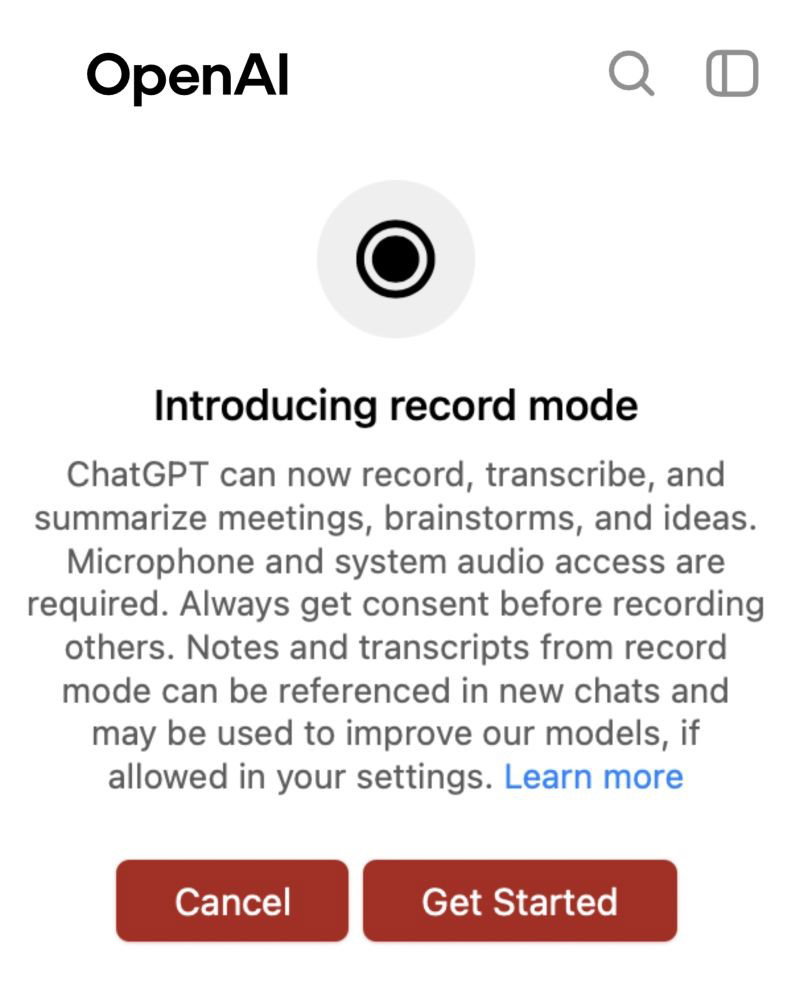
A few details define how it works today:
-
Record Mode is available on the ChatGPT macOS desktop app for eligible Plus, Pro, Business, Enterprise and Edu workspaces.
-
Individual recording sessions are capped at four hours.
-
Audio is used for transcription and deleted afterward.
-
English currently provides the strongest transcription performance while accuracy in other languages can vary.
-
Users can enable Reference record history so ChatGPT can use previous meeting notes and transcripts when answering later questions.
That last capability changes the value proposition.
Instead of asking, “What did we discuss?” immediately after a call, you can later ask something closer to, “What did we decide in Monday’s roadmap meeting?” and ChatGPT can use past record history when that feature is enabled.
Wait, Does ChatGPT Have A Separate Meetings Tool Too?
Yes, and this distinction matters in 2026.
OpenAI now also offers a separate Meetings plugin in beta for eligible ChatGPT Pro and Business users on macOS. Meetings can capture online calls or in-person conversations without placing a bot inside the meeting.
It goes beyond the older Record workflow by combining transcripts with manual notes and authorized context from connected apps. ChatGPT can then generate personalized summaries and suggest actions such as drafting an email or updating a project plan.
OpenAI explicitly states that Meetings is separate from the older Record feature.
That makes ChatGPT’s direction clearer: meeting capture is becoming less about producing notes and more about turning conversations into work.
How Are Dedicated AI Meeting Assistants Different?
Dedicated AI meeting assistants were built around meetings first.
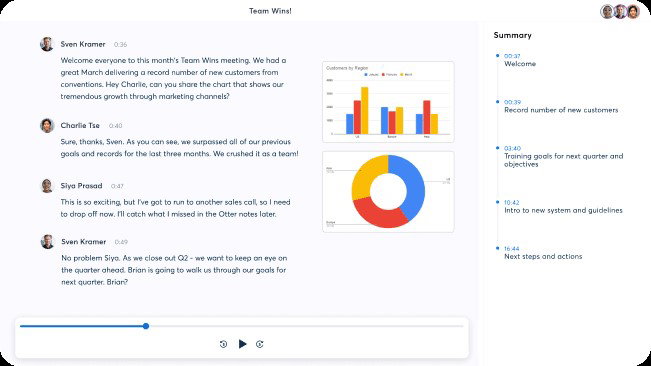
OtterPilot can connect to a Google or Microsoft calendar and automatically join Zoom, Microsoft Teams and Google Meet calls. It produces live transcription, summaries and action items while also capturing presentation slides when they are shared.
Fireflies takes a similarly platform-agnostic approach. Users can invite its bot to meetings, capture Google Meet through a browser extension, record system audio through its desktop app, record in-person conversations through mobile or upload existing audio and video.
Fireflies has also pushed further into live assistance. Its desktop app can now provide real-time notes, transcripts, contextual answers and meeting suggestions while a conversation is happening.
These products behave less like general-purpose AI tools and more like permanent meeting infrastructure.
ChatGPT Record Mode Vs. AI Meeting Assistants
Here is where the differences become easier to see.
| Capability | ChatGPT Record Mode | Dedicated AI Meeting Assistants |
| Meeting bot required | No | Often optional or commonly used |
| Automatic meeting joining | Limited compared with dedicated tools | Common with calendar integrations |
| Live transcription | Yes | Yes |
| AI summaries | Yes | Yes |
| Action items | Yes, especially through Meetings | Core feature |
| Cross-meeting search | Available through record history | Usually a core workspace feature |
| Speaker and conversation analytics | Limited | Often more advanced |
| CRM and workflow integrations | ChatGPT ecosystem and connected tools | Often extensive |
| Turn notes into new content | Major strength | Available but varies |
This is why calling one category “better” without considering the workflow misses the point.
Where ChatGPT Record Mode Wins
ChatGPT’s biggest advantage comes after the meeting.
A transcript is not usually the final goal. Someone still needs to turn what happened into deliverables.
Imagine a product meeting ending with three decisions. With Record Mode, you can ask ChatGPT to turn those notes into:
-
A follow-up email.
-
A project brief.
-
Tasks organized by owner.
-
A product requirements document.
-
A client-facing summary.
-
Talking points for the next meeting.
That is where a general-purpose AI system has an advantage over a specialist recorder.
The newer Meetings experience pushes this even further by using relevant connected-app context when generating summaries and suggested actions.
ChatGPT also avoids one social friction point: the mysterious AI participant sitting inside the call with a name like “Dinesh’s Notetaker.”
Both Record Mode and the Meetings plugin can capture system and microphone audio locally from the user’s Mac without adding a bot participant to the meeting.
Where Dedicated AI Meeting Assistants Win
Automation is where dedicated platforms still look stronger.
Otter can automatically join scheduled meetings after connecting to a calendar. Fireflies supports meeting bots, browser capture, desktop recording, mobile recording and uploaded calls. That flexibility matters for people who spend much of their week moving between Google Meet, Teams, Zoom and in-person conversations.
They also tend to provide deeper meeting-specific organization.
Otter allows teammates to work directly inside live transcripts by highlighting points, adding comments and assigning action items. Its newer AI Chat can also work across meeting history and, through its Work experience, create Jira tickets, Notion pages, Google Drive files or email drafts.
Fireflies emphasizes searchable conversation archives, analytics and workflows across customer, sales and internal meetings. It can also surface action items and search across historical transcripts from within ChatGPT through its plugin.
If your organization treats meetings themselves as a major dataset, those features matter.
What About Zoom And Microsoft Teams?
The comparison becomes more complicated because meeting platforms are building AI directly into their products.
Microsoft Copilot in Teams can summarize key discussion points, identify who said what, suggest action items and answer questions during or after meetings. Its Intelligent Recap can also generate chapters, speaker markers, tasks and personalized timeline highlights.
Zoom has followed a similar path. The capabilities previously grouped under the AI Companion name are now built directly into Zoom Workplace, including meeting summaries, transcription and writing assistance. Zoom’s newer agentic product, ZoomMate, is designed to go beyond summarization and act on meeting context.
That creates a third option: instead of adding ChatGPT or a specialist note-taker, businesses can use the AI already built into the meeting platform they pay for.
What About Privacy And Consent?
No meeting assistant removes the responsibility to tell people they are being recorded.
OpenAI tells users to obtain appropriate consent and follow applicable recording laws before using Record Mode or Meetings. Its Meetings feature does not notify participants or collect consent on the user’s behalf.
With Record Mode, OpenAI says the audio itself is deleted after transcription. Transcripts and generated notes can remain in ChatGPT and their use depends on account type and data-control settings.
Dedicated meeting assistants have their own retention, sharing and administrator policies.
Whichever platform you choose, the privacy question should therefore come before the productivity question.
So, Which Is Better?
Choose ChatGPT Record Mode if your priority is turning a conversation into broader work.
It makes particular sense for individual professionals, researchers, writers, developers and managers who already use ChatGPT and want meetings to flow directly into drafting, planning and analysis.
Choose a dedicated AI meeting assistant if your organization needs automatic meeting attendance, cross-platform capture, searchable conversation archives, meeting analytics or deeper calendar and CRM workflows.
Choose the native AI inside Teams or Zoom if most of your meetings already live inside one collaboration ecosystem and reducing additional software matters more than having another specialist tool.
Conclusion
The best AI meeting assistant is increasingly not the one that writes the prettiest summary.
It is the one that reduces what happens after everyone says, “Great meeting.”
ChatGPT Record Mode is strongest when the transcript is merely raw material for the next task. Otter and Fireflies remain compelling when capturing, organizing and searching meetings is the task itself. Teams and Zoom offer another advantage by putting AI directly where the conversation already happens.
Think back to that heroic college note-taker. AI can finally replace the notebook.
The bigger question is whether you also want it to finish the assignment.
Frequently Asked Questions
Can ChatGPT Record Mode Identify Different Speakers In The Same Meeting?
Yes. ChatGPT Record Mode can distinguish multiple speakers in a transcript. If it cannot identify someone by name, it assigns a generic label such as “Speaker 1,” which users can rename after the recording is created.
What Happens To A ChatGPT Meeting Transcript If You Delete The Conversation?
If you delete the conversation containing the recording, the associated transcript and generated notes are also removed from OpenAI’s systems within 30 days, unless retention is required for legal or security reasons. The original audio is deleted automatically after transcription.
Can ChatGPT Record Mode Automatically Join Scheduled Meetings?
Yes, but currently only in a limited setup. ChatGPT can automatically join scheduled Google Meet sessions when Google Calendar is connected. For Zoom, Microsoft Teams, Webex, and other meeting platforms, users currently need to start Record manually through the ChatGPT macOS app.
Wed, Oct 14, 2026

Liked what you read? That’s only the tip of the tech iceberg!
Explore our vast collection of tech articles including introductory guides, product reviews, trends and more, stay up to date with the latest news, relish thought-provoking interviews and the hottest AI blogs, and tickle your funny bone with hilarious tech memes!
Plus, get access to branded insights from industry-leading global brands through informative white papers, engaging case studies, in-depth reports, enlightening videos and exciting events and webinars.
Dive into TechDogs' treasure trove today and Know Your World of technology like never before!
Disclaimer - Reference to any specific product, software or entity does not constitute an endorsement or recommendation by TechDogs nor should any data or content published be relied upon. The views expressed by TechDogs' members and guests are their own and their appearance on our site does not imply an endorsement of them or any entity they represent. Views and opinions expressed by TechDogs' Authors are those of the Authors and do not necessarily reflect the view of TechDogs or any of its officials. While we aim to provide valuable and helpful information, some content on TechDogs' site may not have been thoroughly reviewed for every detail or aspect. We encourage users to verify any information independently where necessary.
Loading comments...