

Artificial Intelligence
All You Need To Know About Meta AI's New Search And Editing Tools
Share
TL;DR
-
Meta AI brings conversational search and AI-powered editing tools directly to Facebook.
-
Users can discover answers from public posts, Groups, and Reels instead of relying only on web links.
-
AI photo and video editing features help create, enhance, and share content with less effort.
-
Meta emphasizes opt-in controls, but AI-powered search and editing also raise important privacy questions.
-
By combining search, creation, and sharing in one place, Meta aims to make Facebook a smarter everyday platform.

Introduction
You know that feeling when you're planning something simple, like a weekend trip, looking for a good local cafe, or putting together a birthday post for a friend? This is how a quick task often turns into a journey across multiple apps. You check reviews in one place, browse photos in another, ask for recommendations in a group, and then open a separate editing app to polish the perfect picture before sharing it.
None of these steps is particularly difficult, but they can feel disconnected. Well, it looks like Meta has found what it was searching for!
With its latest AI updates, the company is bringing search, discovery, content creation, and editing closer together on Facebook. The idea is to make it easier to move from finding information to creating and sharing content.
In this article, we'll explore Meta AI's new search engine capabilities and editing tools, how they work, their key features, and what they could mean for the future of Facebook. Let's dive in!
What Are Meta AI’s New Search And Editing Tools?
Meta AI’s new search and editing tools are part of Facebook’s broader move toward AI-powered social discovery. The biggest update is AI Mode, a search experience that uses Meta AI to answer questions using public Facebook content, including public posts, Reels, Groups, and other visible community discussions.
In simple terms, Facebook search is becoming more conversational. Instead of typing a keyword and scanning through posts, users can ask natural questions and receive AI-generated answers based on what people are publicly sharing across Facebook.
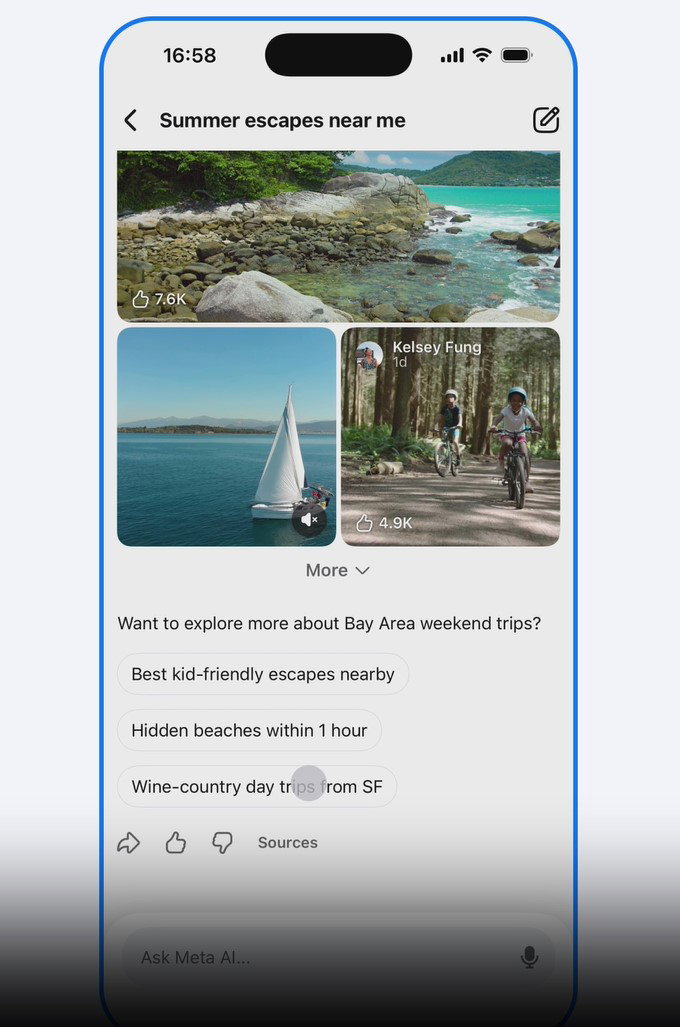
Alongside this, Meta is also expanding AI-powered editing tools. These tools can suggest photo edits, create collages, offer video ideas, and help users make content more polished without needing advanced editing skills.
With these updates, Meta wants Facebook to be more than a social network and help users search, discover, and create with AI.
Why Is Meta Adding AI Tools To Facebook Search?
Meta AI is growing quickly. According to The Guardian, CEO Mark Zuckerberg recently shared that it now has nearly 1 billion monthly active users. Well, Facebook has years of community conversations, public recommendations, reels, marketplace listings, and posts. For a long time, that content has been useful but not always easy to search through.
Meta’s new AI Mode tries to solve that. With Facebook generative search, users can ask more natural questions, such as “What are people saying about the best hiking trails near me?” or “Which budget phone is popular right now?” Instead of only showing links or matching keywords, Meta AI can summarize public posts and surface useful answers.
This is important because search behavior is changing. People do not always want ten blue links anymore. They want direct answers, quick summaries, real experiences, and community-backed suggestions. Meta already has a huge social content graph, and this Meta LLM search update gives it a new way to turn that content into answers.
For Meta, this could also increase time spent on Facebook. If users can search, discover, edit, and share without leaving the platform, Facebook becomes more useful in everyday digital life.
The idea sounds simple enough, but what happens behind the scenes when someone asks Meta AI a question? Let's see.
How Does Meta AI Mode Work?
Meta AI Mode works like a conversational search layer inside Facebook. Let’s see how.
Answers Based On Public Facebook Content
One of the biggest questions is how Meta AI answers questions using public Facebook posts. Instead of relying solely on traditional web results, the AI can draw insights from public posts, group discussions, reels, and other visible content across the platform.
When users ask a question, Meta AI identifies relevant information from these sources and turns it into a conversational response. This allows answers to reflect real discussions, experiences, and recommendations shared by Facebook users.
Search Results From Groups, Reels, And Posts
As Meta AI can access content from Groups, Reels, and public posts, searches become more contextual and community driven. Users can discover local recommendations, travel tips, product opinions, hobby communities, food suggestions, and trending topics based on what people are actively discussing on Facebook.
Rather than functioning like a traditional search engine that mainly indexes websites, Meta AI aims to help users find insights from conversations happening across the Facebook ecosystem.
Natural Language Search Instead Of Keyword Search
Traditional search often depends on exact words. AI search is more flexible. You can ask, “What are parents recommending for school laptops?” instead of trying different keywords like “best laptop for students Facebook group.”
That is the real difference in how the new Facebook generative search engine works. It understands the intent behind a question and tries to return a useful answer, not just a list of matching posts.
Search may be getting most of the attention, but Meta's latest AI update goes beyond finding answers.
What Can Users Do With Meta AI’s New Editing Tools?
Meta is not only updating search. It is also making content creation easier with AI photo and video tools. Some of the most exciting features include:
AI Photo Editing
Meta's AI photo editing tools can suggest improvements, effects, collages, and creative versions of photos. Users can also apply AI-powered presets to change clothing, hairstyles, accessories, or even restyle their profile pictures with just a few taps. For everyday users, this means they can turn normal camera roll pictures into more shareable posts. A simple family photo, food picture, vacation shot, or pet photo can become a polished update with less manual work.

AI Video Editing
Video is where social platforms are competing hardest. Meta’s editing tools can help users turn short clips into more engaging content. AI can suggest trims, transitions, styles, or formats that work better for Reels and Stories. This is helpful for people who want to post more but do not want to spend time learning complex editing apps.
Collages, Transitions, And Creative Suggestions
Meta is also leaning into creative suggestions. These may include collages from related photos, transitions for clips, and ideas for turning ordinary media into something more expressive. Basically, Facebook wants to reduce the gap between taking a photo and sharing it.
AI-Powered Content Creation And Sharing Suggestions
Coming up with something to post can sometimes take longer than creating the content itself. Meta AI aims to make that easier by suggesting posts, collages, or other shareable content from photos and videos already on your device.
Of course, these suggestions are optional. Users can choose whether to enable them, which makes transparency important. People should know what content Meta AI can access, what gets uploaded, and how to turn the feature off if they prefer.
Features like these are built around convenience, but they also rely on access to user content. That makes privacy an important part of the conversation.
What Are The Privacy Concerns Around Meta AI Tools?
The privacy conversation is central to this update. Any tool that uses social content for AI search will raise questions about visibility, consent, and control. Let’s see how it works for Meta. To understand the impact, it's worth looking at how Meta handles user data and permissions:
Public Content Used For AI Search
Meta says AI Mode uses public Facebook content. That means posts already visible publicly may become part of AI-powered answers. However, users may still wonder whether they fully understand how public their posts are and how AI systems may use them.
Opt-In Camera Roll Suggestions
Camera roll suggestions are another sensitive area. The feature is optional, but users should still pay attention before enabling it. Photos that are not posted publicly may still be analyzed for creative suggestions if the user opts in.
User Control And AI Transparency
The main question many users will ask if meta AI indexes private Facebook group posts. Based on the current positioning, Meta is focusing on public content. Private content, private messages, and private groups should not be treated the same as public posts. Still, Meta will need to keep communication clear because confusion around AI and privacy can quickly damage trust.
Privacy concerns matter, but so do the opportunities. Let's look at who these new AI features are designed for.
Who Will Benefit Most From Meta AI’s Search And Editing Tools?
The interesting thing about these features is that they are not built just for people who are interested in AI. In fact, many of the biggest benefits may be felt by everyday Facebook users.
Of course, not everyone will use these tools in the same way. It’s worth knowing who could get the most value from them:
Everyday Facebook Users
People who use Facebook for recommendations, memories, family updates, and community information may benefit the most. AI Mode can make finding answers easier, while editing tools can make posting feel less effortful.
Content Creators
Creators can use AI editing tools to speed up content production. Search can also help them understand what people are discussing in public communities, which may inspire new posts, Reels, or explainers.

Small Businesses And Community Managers
Small businesses can benefit from better discovery and faster content creation. A local cafe, boutique, fitness studio, or service provider could use AI tools to create posts, edit visuals, and understand what customers are asking in public conversations.
Community managers may also find AI-powered social discovery useful for spotting trends, questions, and common discussions.
The value of these tools depends on what you're trying to do. That also makes it worth asking how Meta AI stacks up against traditional search engines and editing platforms.
Meta AI Vs. Traditional Search Engines And Editing Tools
Meta AI belongs somewhere between a search engine, a social listening tool, and a content creation assistant. To better understand its strengths and limitations, let's compare Meta AI with the alternatives most users know well:
Meta AI Vs. Google Search
Google is stronger for web-wide information, official sources, news, and research. Meta AI Search may be stronger for social recommendations, public conversations, and community-based answers.
So, if you ask for a product’s official price, Google may be better. If you ask what people in a Facebook Group think about that product, Meta AI may be more useful.
Meta AI Vs. Standalone AI Editing Platforms
Standalone AI editing platforms may still offer better control, especially for professional creators. However, Meta’s advantage is convenience. Users can edit and share inside the same platform where their audience already exists.
Key Differences, Strengths, And Limitations
The strength of Meta AI is its connection to social content. The limitation is that social content can be messy, opinion-heavy, or incomplete. AI summaries based on public posts may be useful, but users should still think critically before treating them as final answers.
Ultimately, convenience wins, and Meta is betting that having search, creation, and sharing in one place is exactly what users want.
Final Thoughts
There is something funny about needing three apps, two searches, and one editing tool just to make a simple post look effortless.
That is where Meta’s new AI search and editing tools start to make sense. They are surely here to make the platform more useful in the moments when people want answers, ideas, edits, and posts without feeling like they are managing a mini production studio.
While Meta AI may not replace every search engine or editing app overnight, it could make everyday digital tasks feel less scattered.
So, don’t worry! The cafe hunt, the birthday post, the photo touch-up, and the quick share may no longer need a full app-hopping workout!
Frequently Asked Questions
Can Meta AI Edit Photos And Videos?
Yes. Meta AI can suggest creative edits, collages, transitions, and video improvements to help users turn everyday media into more shareable Facebook content.
Are Meta AI’s New Tools Available To Everyone?
The rollout may vary by region and account. Meta typically expands AI features gradually, so availability can differ based on location, platform, and update status.
Is Meta AI Search Different From Google Search?
Yes, Meta AI search is different from Google search. Google Search indexes the open web, while Meta AI Search focuses on Facebook’s ecosystem, including public posts, Reels, Groups, and community discussions.
Mon, Jun 29, 2026

Enjoyed what you read? Great news – there’s a lot more to explore!
Dive into our content repository of the latest tech news, a diverse range of articles spanning introductory guides, product reviews, trends and more, along with engaging interviews, up-to-date AI blogs and hilarious tech memes!
Also explore our collection of branded insights via informative white papers, enlightening case studies, in-depth reports, educational videos and exciting events and webinars from leading global brands.
Head to the TechDogs homepage to Know Your World of technology today!
Disclaimer - Reference to any specific product, software or entity does not constitute an endorsement or recommendation by TechDogs nor should any data or content published be relied upon. The views expressed by TechDogs' members and guests are their own and their appearance on our site does not imply an endorsement of them or any entity they represent. Views and opinions expressed by TechDogs' Authors are those of the Authors and do not necessarily reflect the view of TechDogs or any of its officials. While we aim to provide valuable and helpful information, some content on TechDogs' site may not have been thoroughly reviewed for every detail or aspect. We encourage users to verify any information independently where necessary.
Loading comments...