
Human Resources Solutions
Top 5 User Activity Monitoring Software Of 2026
Share
TL;DR
-
Teramind: Best for security-conscious enterprises looking for deep behavioral analytics to prevent data loss and insider threats.
-
Hubstaff: Top choice for remote team management, connecting field and office workflows through a unified time tracking platform.
-
ActivTrak: A powerful workforce analytics solution featuring burnout prevention and capacity planning for real-time optimization.
-
Insightful: Excels with AI-powered time mapping and the flexibility to manage large teams through automated productivity classification.
-
Time Doctor: Built for performance and profitability, offering robust distraction management and measurable ROI frameworks for service-based businesses.
Introduction
If there is one movie that can make almost anyone emotional, it is Hachi: A Dog’s Tale (2009). Based on the true story of Hachiko, the film follows a loyal dog that continues waiting at a train station for its owner long after he is gone. It is a story people remember because loyalty feels rare and deeply valuable.
The same idea applies in business. Building reliable teams takes time, and replacing skilled employees is often far more expensive than retaining productive ones. Yet many organizations still struggle to understand how work actually happens across remote, hybrid, and distributed teams.
That is why you need software to monitor user activity. It can help you solve that visibility gap. These platforms track productivity patterns, application usage, workflow bottlenecks, and security risks, helping businesses make better decisions without relying on constant manual oversight.
We have curated the Top User Activity Monitoring tools of 2026, but before exploring the list, let’s understand what these platforms actually do.
What Is User Activity Monitor Software?
User Activity Monitoring Software is a digital solution that helps businesses track how employees interact with applications, systems, and digital workflows during work hours. These platforms provide visibility into app usage, productivity trends, idle time, file activity, and potential security risks across company devices.
For organizations managing remote, hybrid, or distributed teams, this data helps identify workflow bottlenecks, improve operational efficiency, and strengthen compliance without relying on constant manual supervision. Some platforms also integrate with payroll, workforce management, and reporting tools to simplify day-to-day operations.
As businesses look for better productivity insights while balancing accountability and employee trust, we have curated the Top 5 User Activity Monitoring Software of 2026 to help you find the right solution.
Top 5 User Activity Monitor Software Of 2026
Each platform on this list offers a different approach to productivity tracking, workforce visibility, and operational oversight. Here are the top user activity monitoring software solutions businesses should consider in 2026.
 |
 |
 |
 |
 |
Teramind: Best Overall
Teramind helps businesses monitor employee activity, detect insider threats, and protect sensitive data across digital environments. Since launching in 2014, it has earned the trust of more than 10,000 organizations, including banks and government agencies.
Its credibility remains strong in 2026, with recognition as a Leader in G2’s Spring 2026 Enterprise and Security categories.
Why We Chose Teramind In 2026
Teramind earns its place for combining workforce visibility with deeper security controls. It helps organizations create customized monitoring policies using behavioral analytics and AI-driven insights, making it particularly useful for companies with stricter compliance requirements.
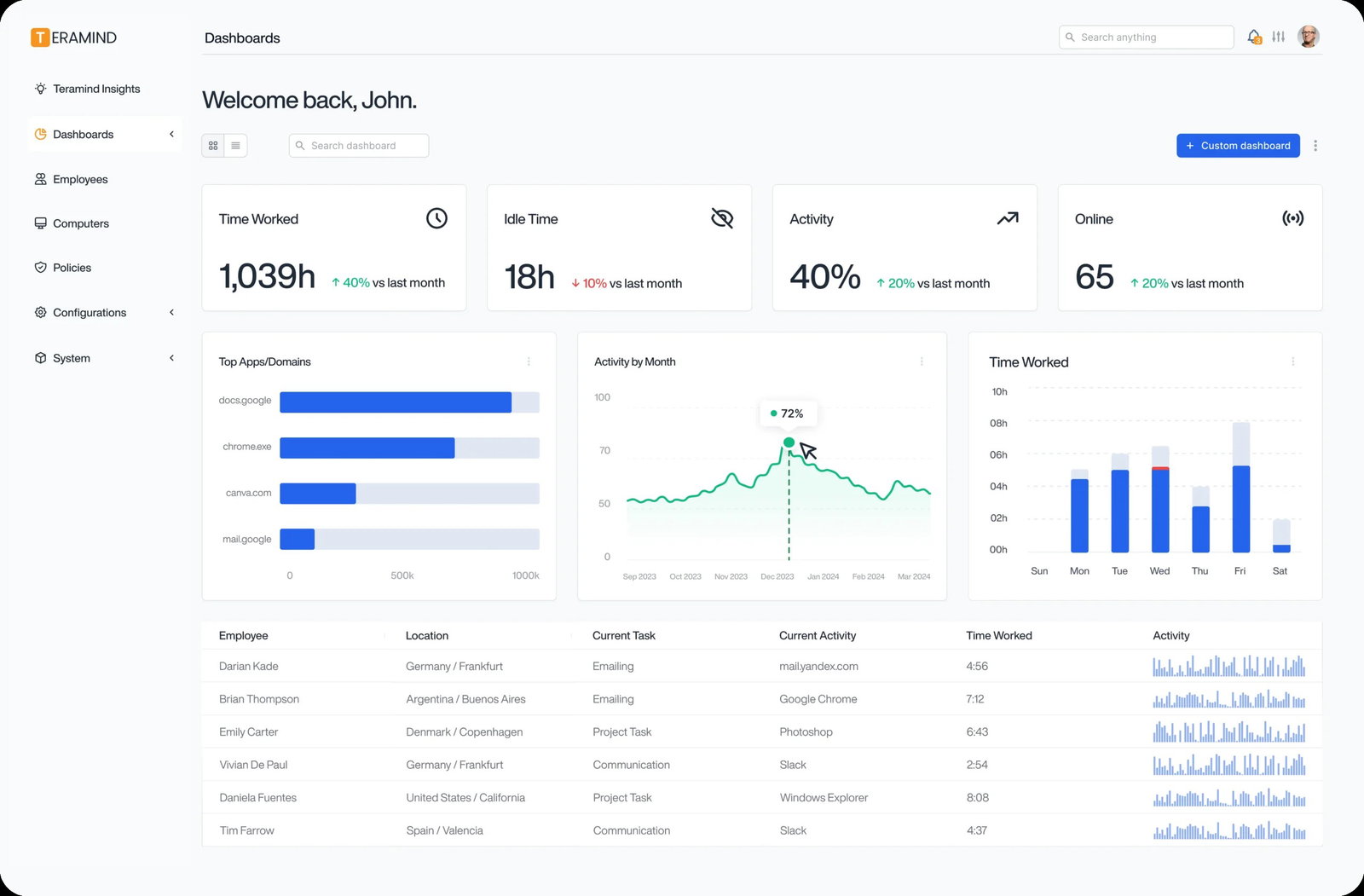
Its platform includes live session monitoring, keystroke logging, screen recording, OCR search, and content-based behavior rules. It also offers forensic-level visibility, which can be valuable when security teams need to investigate incidents without piecing together fragmented activity logs.
Its AI-powered threat detection helps organizations identify unusual user behavior and improve monitoring strategies over time.
Pricing
Teramind offers tiered pricing based on monitoring needs. Plans start at approximately $14 per user per month for basic monitoring, while advanced plans with behavioral analytics, SIEM integrations, and real-time content protection can cost up to $32 per user per month. A minimum of five seats is required.
What Works & What Doesn't
| Pros | Cons |
| Strong forensic visibility | Steeper learning curve |
| Real-time threat prevention | Minimum seat requirement |
| Strong compliance tools | Higher technical complexity |
Our Final Take
Teramind works particularly well for organizations that need deeper oversight across security, compliance, and employee activity. Teams looking for lightweight productivity tracking may find its forensic capabilities more advanced than necessary.
Hubstaff: Best Mobile Functionality
Hubstaff was launched in 2012 to improve transparency across remote workforces. Since then, it has built a strong customer base across industries such as technology, construction, and professional services. Its market credibility remains strong, with recognition as a Leader in G2’s Spring 2026 report.
Why We Chose Hubstaff In 2026
Hubstaff earns its place for helping businesses manage employees who do not spend their day behind a desk. Remote teams, field workers, contractors, and distributed teams often create visibility challenges, and Hubstaff helps solve that with a combination of time tracking and mobile workforce tools.
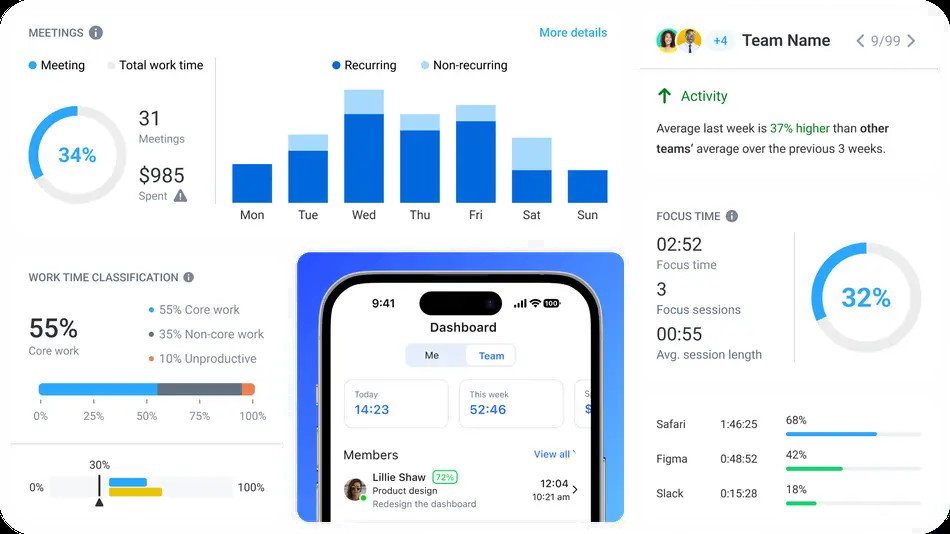
Its GPS tracking and geofencing capabilities help businesses monitor field teams more accurately, while automatic clock-ins reduce manual time tracking issues. It also includes payroll integrations, which can save managers from manually calculating hours every week.
Features like mobile payments, receipt scanning, analytics dashboards, and reporting tools make it easier to manage both online and offline teams from a single platform.
Pricing
Hubstaff offers a free plan for one user with basic time tracking features. Paid plans start at $4.99 per user per month, while higher-tier plans range up to $25 per user per month and include features such as HIPAA compliance and dedicated support.
What Works & What Doesn't
| Pros | Cons |
| Strong mobile app | Integration limits on lower plans |
| Seamless payroll integration | No GPS on basic plans |
| Excellent field tracking | Limited reporting customization |
Our Final Take
Hubstaff works particularly well as a remote user monitoring software solution for managing remote employees, contractors, and field teams that require stronger visibility beyond traditional office environments. However, organizations with stricter compliance or surveillance requirements may prefer more security-focused alternatives.
ActivTrak: Best AI Features
ActivTrak was founded in 2009 with a focus on ethical workforce visibility. Today, it serves more than one million users across 9,500 organizations in industries such as healthcare, finance, and professional services.
Why We Chose ActivTrak In 2026
ActivTrak earns its place for helping companies improve productivity without making employees feel constantly watched. That balance can be difficult to maintain, especially as businesses try to monitor performance without damaging trust.
Its platform provides real-time productivity analytics, workload planning, and workforce intelligence tools that help managers understand how teams are performing. It can also identify workload imbalances and burnout risks before they become larger retention problems.
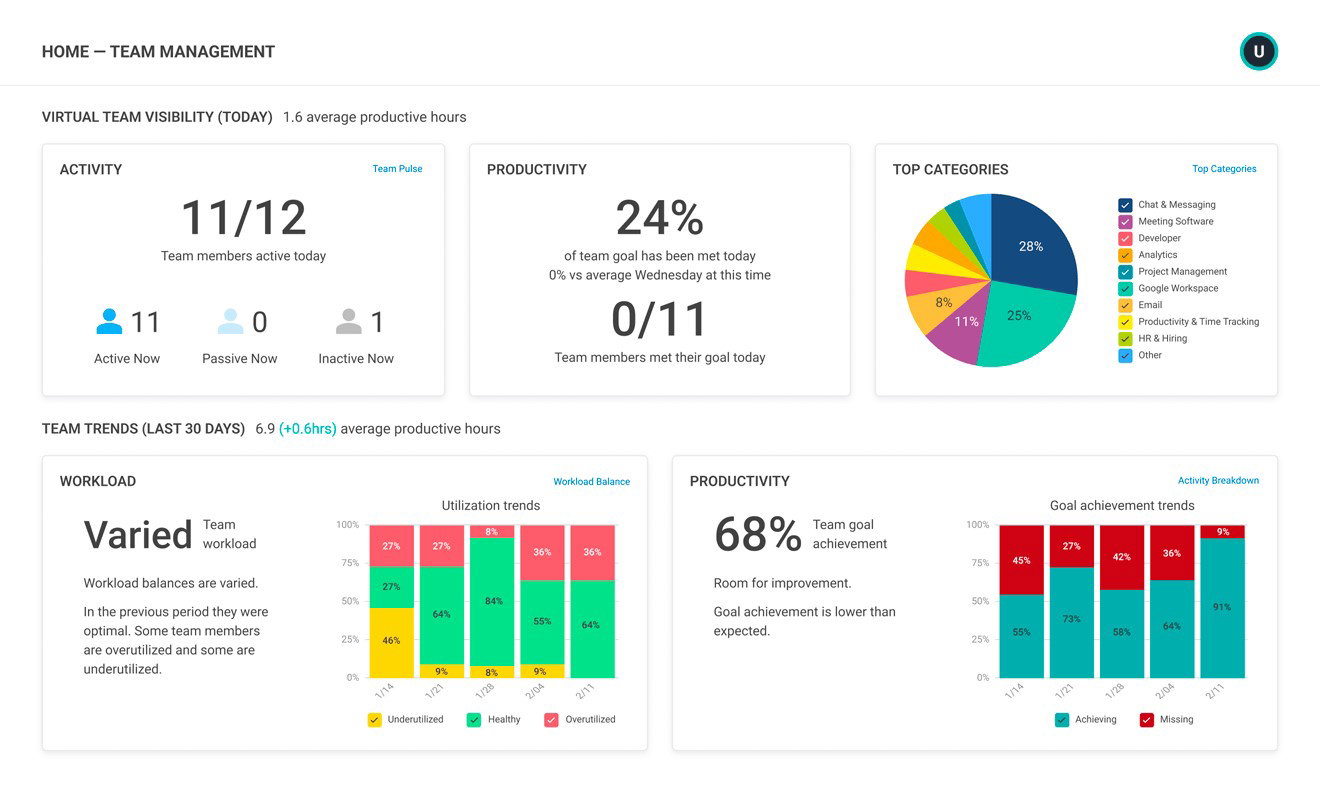
Its biggest differentiator is the Work Wisdom engine, which uses machine learning to identify productivity trends, engagement patterns, and coaching opportunities. Features like productivity goal tracking and workload analysis help businesses make smarter staffing decisions over time.
Pricing
ActivTrak offers a free plan for up to three users. Paid plans start at $10 per user per month, while higher-tier plans go up to $19 per user per month for advanced analytics, capacity planning, and longer data retention.
What Works & What Doesn't
| Pros | Cons |
| Strong employee wellness focus | Screenshots require add-ons |
| Ethical monitoring approach | No monthly billing |
| Easy-to-read dashboards | Limited offline tracking |
Our Final Take
ActivTrak works well for businesses that want productivity insights without relying on overly invasive monitoring practices. Teams focused on workforce planning, employee wellness, and long-term productivity trends may find it particularly useful.
Topics For More Insights
Insightful: Best Customization
Insightful was founded in 2016 and is headquartered in San Francisco. It supports a global workforce and serves more than 210,000 users across thousands of organizations that rely on its productivity monitoring tools.
Why We Chose Insightful In 2026
Insightful earns its place for giving businesses more flexibility in how they monitor productivity across different teams. Managing office employees, remote workers, and support teams often requires different workflows, and Insightful allows businesses to customize those processes without switching between multiple platforms.
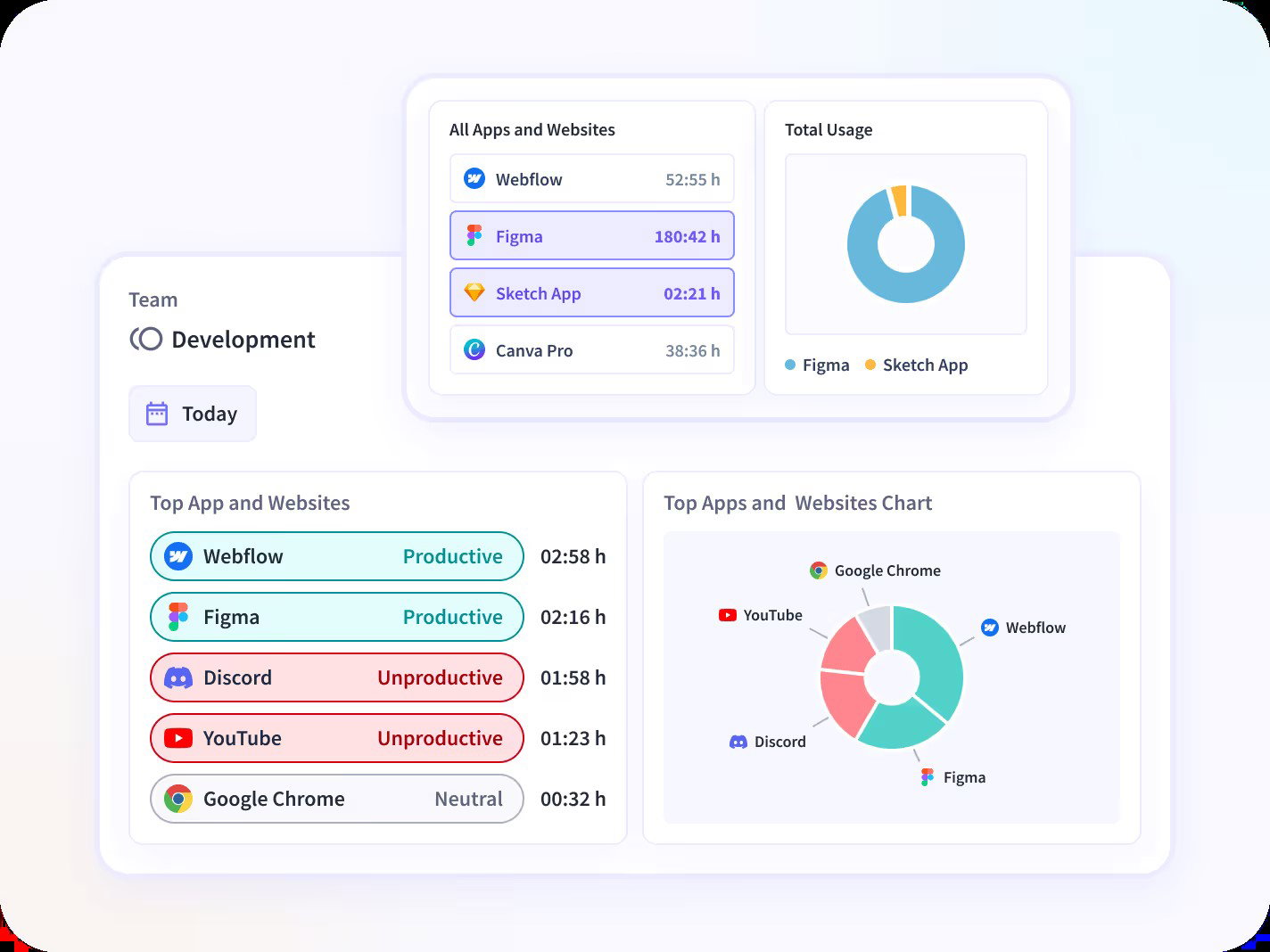
Its platform includes AI-powered time mapping, automated activity tracking, ERP integrations, project management tools, and performance analytics. These features help businesses build monitoring systems that align better with how their teams actually work.
Its ability to support large BPO teams and high-volume operations makes it particularly useful for businesses managing multiple departments from one centralized platform.
Pricing
Insightful offers multiple pricing tiers based on workforce visibility needs. The Workforce Analytics plan starts at $10 per seat per month and focuses on productivity insights. Its Combo Plan costs $20 per seat per month and combines workforce analytics with workflow optimization features. Businesses with more complex requirements can opt for custom enterprise pricing with tailored deployments and dedicated support.
What Works & What Doesn't
| Pros | Cons |
| Fast implementation | Reporting limitations |
| Automatic time mapping | No employee mobile app |
| Easy-to-use interface | Manual setup for live view |
Our Final Take
Insightful works well for organizations that need more flexibility across hybrid teams, support teams, and larger operational workflows. Businesses looking for simpler plug-and-play monitoring tools may not need this level of customization.
Time Doctor: Best For Integration
Time Doctor was founded in 2012 and serves approximately 250,000 active users across industries such as technology, consulting, and creative services. Its credibility remains strong, with recognition as a Leader in G2’s Spring 2026 report.
Why We Chose Time Doctor In 2026
Time Doctor earns its place for helping businesses connect productivity tracking with broader operational workflows. Teams managing billable work often need clearer visibility into where time is being spent, and Time Doctor helps improve that accuracy.
Its platform supports automatic timesheets, project tracking, productivity dashboards, and performance analytics. Managers can view employee activity trends in one place and identify where productivity gaps may be affecting project timelines.
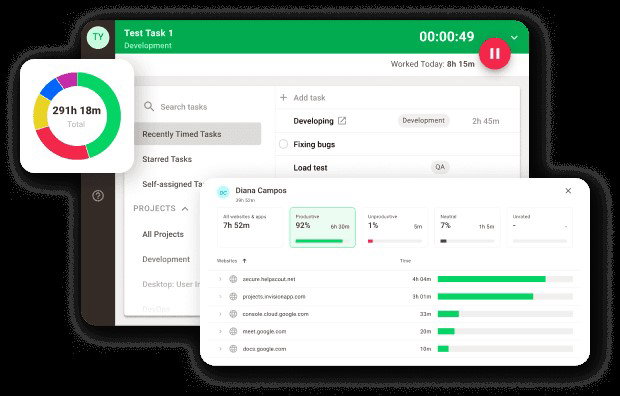
Its distraction management features stand out by helping teams reduce unproductive work habits through focus alerts and real-time insights. Combined with more than 60 integrations, it fits well into existing business workflows.
Pricing
Time Doctor offers tiered pricing based on feature depth. Plans start at approximately $6.70 per user per month, while premium plans reach $16.70 per user per month and include advanced features such as video screen recording and VIP support. Enterprise pricing is available through custom quotes.
What Works & What Doesn't
| Pros | Cons |
| 60+ integrations | Learning curve |
| Strong focus alerts | Limited mobile experience |
| Detailed reporting | No native website blocking |
Our Final Take
Time Doctor works well for businesses that need productivity tracking to connect smoothly with project management and billing workflows. Teams looking for lightweight employee monitoring tools may find its broader feature set unnecessary.
Top 5 User Activity Monitor Software Comparison
Not every user monitoring software solves the same problem. Some focus on security, while others prioritize productivity tracking, mobile workforce management, or workflow optimization. This comparison highlights pricing, features, ratings, and integrations to help you evaluate the right fit.
| Criteria |  |
 |
 |
 |
 |
| Starting Price | $14/user/month | $4.99/user/month | $10/user/month | $10/user/month | $6.70/user/month |
| Avg. User Rating | 4.7 | 4.5 | 4.5 | 4.7 | 4.4 |
| Trial Period/Demo | Demo | 14 Days | 14 Days | 7 Days | 14 Days |
| Key Features | Insider threat detection, forensics, and DLP | GPS tracking, geofencing, and payroll | Burnout prevention, health analytics, and capacity planning | AI time mapping, real-time visibility, and automated labeling | Distraction alerts, billable hour tracking, and project reporting |
| Integrations | SIEM, Splunk, Azure, and more | QuickBooks, Slack, Salesforce, and more | Salesforce, Slack, Workday, and more | Trello, Asana, Salesforce, and more | Jira, Asana, Slack, and more |
Conclusion
Loyal teams are valuable, but productivity cannot rely on guesswork. As businesses manage remote employees, field teams, and growing operational complexity, having clearer visibility into how work gets done becomes increasingly important.
The platforms on this list solve that challenge in different ways. Some focus on security and compliance, while others prioritize workforce analytics, mobile tracking, integrations, or workflow flexibility.
The right choice depends on how your teams operate and what kind of visibility your managers actually need. The best platform should help improve accountability and productivity without making employees feel constantly monitored.
Frequently Asked Questions
What Is User Activity Monitoring Software?
User activity monitoring software helps businesses track employee activity across devices, applications, and digital workflows. It provides insights into productivity, application usage, work hours, and potential security risks to improve operational efficiency.
Which Is The Best User Activity Monitoring Software In 2026?
The best user activity monitoring software depends on your business needs. Teramind is ideal for security-focused monitoring, Hubstaff works well for mobile and field teams, while ActivTrak offers strong AI-driven productivity insights.
Is User Activity Monitoring Software Legal?
Yes, user activity monitoring software is legal in many regions, but businesses must follow local labor laws, privacy regulations, and employee consent requirements. Transparent workplace policies help organizations use monitoring tools responsibly.
Wed, Apr 29, 2026

Liked what you read? That’s only the tip of the tech iceberg!
Explore our vast collection of tech articles including introductory guides, product reviews, trends and more, stay up to date with the latest news, relish thought-provoking interviews and the hottest AI blogs, and tickle your funny bone with hilarious tech memes!
Plus, get access to branded insights from industry-leading global brands through informative white papers, engaging case studies, in-depth reports, enlightening videos and exciting events and webinars.
Dive into TechDogs' treasure trove today and Know Your World of technology like never before!
Disclaimer - Reference to any specific product, software or entity does not constitute an endorsement or recommendation by TechDogs nor should any data or content published be relied upon. The views expressed by TechDogs' members and guests are their own and their appearance on our site does not imply an endorsement of them or any entity they represent. Views and opinions expressed by TechDogs' Authors are those of the Authors and do not necessarily reflect the view of TechDogs or any of its officials. While we aim to provide valuable and helpful information, some content on TechDogs' site may not have been thoroughly reviewed for every detail or aspect. We encourage users to verify any information independently where necessary.
Loading comments...