
Customer Service
Top 5 Live Chat Software In 2026
Share
TL;DR
Modern live chat software uses AI and automation to transform website visitors into loyal customers through instant, personalized communication.
-
Podium: Centralizes messages across text and phone to provide an exceptional user experience for local businesses.
-
Tidio: Offers an all-in-one platform with AI agents and multi-channel support for the best overall value.
-
Birdeye: Features advanced conversational AI that handles 24/7 appointment booking and lead capture effortlessly.
-
HubSpot: Provides seamless CRM integration and automated lead qualification to keep sales and support teams aligned.
-
Qualified: Delivers enterprise-grade B2B engagement through high-intent lead identification and real-time voice or video chat.
Introduction
Think back to one of those days where everything feels a bit overwhelming. Fortunately, a friend invites you for a cup of coffee, and suddenly you are not just sipping a warm mocha but engaging in a laid-back conversation where time seems to slow down. That friendly chat helps you put the situation into perspective, analyze the problem, and come up with fresh solutions. The best connections often happen over a brew, where the environment is relaxed and the focus remains on genuine listening.
In 2026, customers no longer want to wait forever for a simple response. They expect efficiency paired with a personal touch every time they reach out. This is where live chat software has become the go-to solution for instant support, turning every digital interaction into a real-time connection that feels as easy as a casual catch-up. Whether you want to streamline support or boost satisfaction rates, the right tool makes visitors feel valued. Here are the top 5 Live Chat Software solutions to help you brew up smoother connections. Read on!
What Is Live Chat Software?
Live chat software for websites is like having a helpful assistant ready to talk to your website visitors and address their needs in real time. It lets companies connect with customers in real time through a chat window, answering questions, solving problems, or addressing concerns instantly.
These tools make customer interactions quick, reliable and efficient, solidifying their role as live chat software for customer service excellence. They serve quick answers and keep everything running without a hitch, like sipping on a perfect cup of coffee. With AI, automation and predictive analytics, live chat tools are now quicker and more intuitive, making every chat feel more natural and relevant.
So, if you’re ready to take your customer support to the next level, let’s explore the best Live Chat Software for 2026 that will streamline your conversations and enhance customer experiences. Read on!
Top 5 Live Chat Software Of 2026
In the fast-paced digital world, having the right Live Chat Software can make all the difference in how businesses connect with their customers. The best tools don’t just enable real-time conversations; they offer smart features, insights and integrations that elevate customer support and boost engagement.
So, here are the Top 5 Live Chat Software of 2026!
 |
 |
 |
 |
 |
Podium: Best User Experience (UX)
New to this year’s list is Podium. Used by over 100,000 local businesses, Podium keeps customer conversations organized across live chat, text, and phone in one platform. It helps teams reply faster, follow up consistently, and turn inquiries into real bookings and sales. Its strong customer adoption has also earned Podium recognition as a Summer 2025 G2 Leader.
Why We Chose Podium In 2026
Podium stood out because it makes website conversations feel simple, fast, and genuinely helpful. It lets visitors start chatting on your site and continue the conversation over text, so businesses can respond instantly and keep the momentum going. By capturing lead details upfront and tracking how visitors move through the site, teams gain better context before replying, making every interaction more relevant and timely.
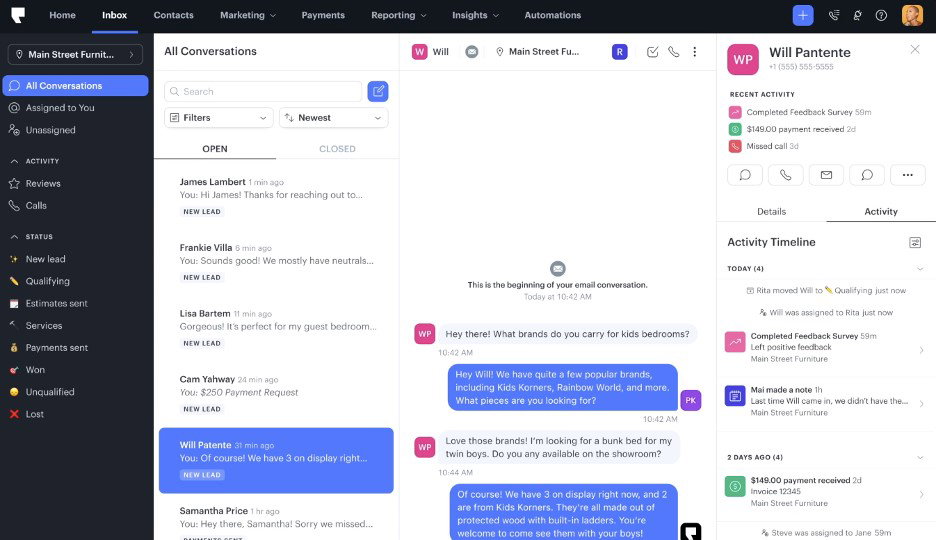
What really seals the deal is how everything comes together in one place. Web chat, text messages, and customer interactions from multiple platforms land in one shared inbox. With branded chat widgets, AI-powered replies, and 24/7 availability, Podium helps businesses stay responsive, capture more leads, and convert interest into long-term customers.
Pricing
Podium has three flexible pricing plans. Core gives you all the essentials to get started, Pro adds extra tools to help you capture more leads, and Signature is perfect for bigger, multi-location teams. Every plan comes with easy onboarding and support, plus optional add-ons as your business grows. Pricing is quote-based and customized to your business needs and chosen add-ons.
What Works And What Doesn’t
| Pros | Cons |
| Centralized messaging | Limited integrations |
| Easy to use | Limited customization |
| Fast customer follow-up | Requires learning time |
Our Final Take
Podium is best suited for local businesses looking to centralize customer messaging and improve lead follow-ups. It might feel pricey for smaller teams, but it’s a great pick if you want simpler, smoother, and more organized communication.
Tidio: Best Value
Returning to this year’s top picks, Tidio is used by over 300,000 businesses across ecommerce, services, and tech to streamline customer communication. It's an all-in-one platform that combines live chat, help desk, chatbot automation, and AI agents, enabling teams to respond faster and manage multiple channels from a single dashboard. A Fall 2025 G2 Leader, Tidio helps turn real-time conversations into more sales and loyal customers.
Why We Chose Tidio In 2026
Tidio makes customer conversations simple, fast, and personal. Teams can manage live chat across Instagram, WhatsApp, Messenger, and email from a single easy dashboard. Its ready-to-go replies and proactive messages help respond quickly, while smart ticketing keeps emails organized so no conversation slips through the cracks.

Tidio is built for real-life business needs. You can chat in multiple languages, see customer details instantly to make responses more personal, and stay connected on any device, like a browser, desktop, or mobile. With support and sales automation, Tidio helps you handle routine questions, keep leads moving, and turn everyday conversations into real sales.
Pricing
Tidio Live Chat pricing plans are pretty flexible. Free Forever plan lets you handle up to 50 conversations a month. Paid plans include Starter at $29/month, Growth at $59/month, Plus at $749/month, and Premium at customized quotes. Each plan grows with your team, from small businesses to larger teams needing extra features and support.
What Works And What Doesn’t
| Pros | Cons |
| Easy conversation handling | Takes time to learn |
| Multi-channel inbox | Limited customization |
| Quick automated replies | High pricing |
Our Final Take
Tidio is best for small to mid-sized businesses looking to manage live chat, email, and social messages in one place, respond faster, and automate routine questions. It may not be ideal for very small teams on a tight budget or those needing deep customization. It’s a great choice if you want simple, organized, and real-time customer communication that scales as your business grows.
Birdeye: Best AI Features
Birdeye is debuting this year with over 200,000 trusted local businesses. Birdeye’s conversational AI chats with website visitors 24/7, answers questions, books appointments, and hands off to live agents when needed, which makes it easier for businesses to convert visitors into loyal customers. Recognized as one of G2’s Top 100 Best Software Products of 2025, Birdeye is known for streamlining customer interactions and turning every visitor into a potential customer.
Why We Chose Birdeye In 2026
Birdeye stands out for keeping customer conversations flowing smoothly 24/7. Its AI-powered chat answers questions, books appointments, captures leads and can hand off to live agents whenever needed. Teams can manage all conversations from a single inbox, filter chats by type or location, and respond quickly with smart suggestions and instant notifications.

Setting up and customizing Birdeye is simple. You can train your chatbot using website content, create a branded chat widget, and set rules for replies based on business hours. With AI handling routine interactions, Birdeye helps businesses engage visitors, convert more leads, and provide a seamless, professional experience for every customer.
Pricing
Birdeye doesn’t publicly list pricing, but businesses can reach out to the Birdeye team for a customized plan according to their needs and team size.
What Works And What Doesn’t
| Pros | Cons |
| Easy to use | Plan can feel restrictive |
| Efficient review management | Updates not clearly notified |
| Responsive customer service | Setup can take time |
Our Final Take
Birdeye is a powerful review management and customer engagement platform, best suited for businesses looking to streamline online reputation, capture leads, and respond quickly. It may not be ideal for those looking for a simpler setup. If you want an all-in-one solution to improve reviews and customer interactions, you can pick Birdeye as a live chat software.
Topics for more insights
HubSpot: Best For Integration
Back on this year’s list, HubSpot makes connecting with website visitors effortless by offering live chat to capture leads, provide support, and close deals in real time. Trusted by over 278,000 customers in 135+ countries, HubSpot continues to help businesses grow. Recognized as one of G2’s Top 50 Customer Service Products of 2025, it remains a go-to choice for teams of all sizes.
Why We Chose HubSpot In 2026
HubSpot makes it easy to connect with website visitors and turn conversations into opportunities. Its live chat lets your team connect with prospects in real time, route inquiries to the right person, and capture leads without missing a beat. You can customize chat widgets, create targeted messages, and even set office hours so visitors always know when help is available.
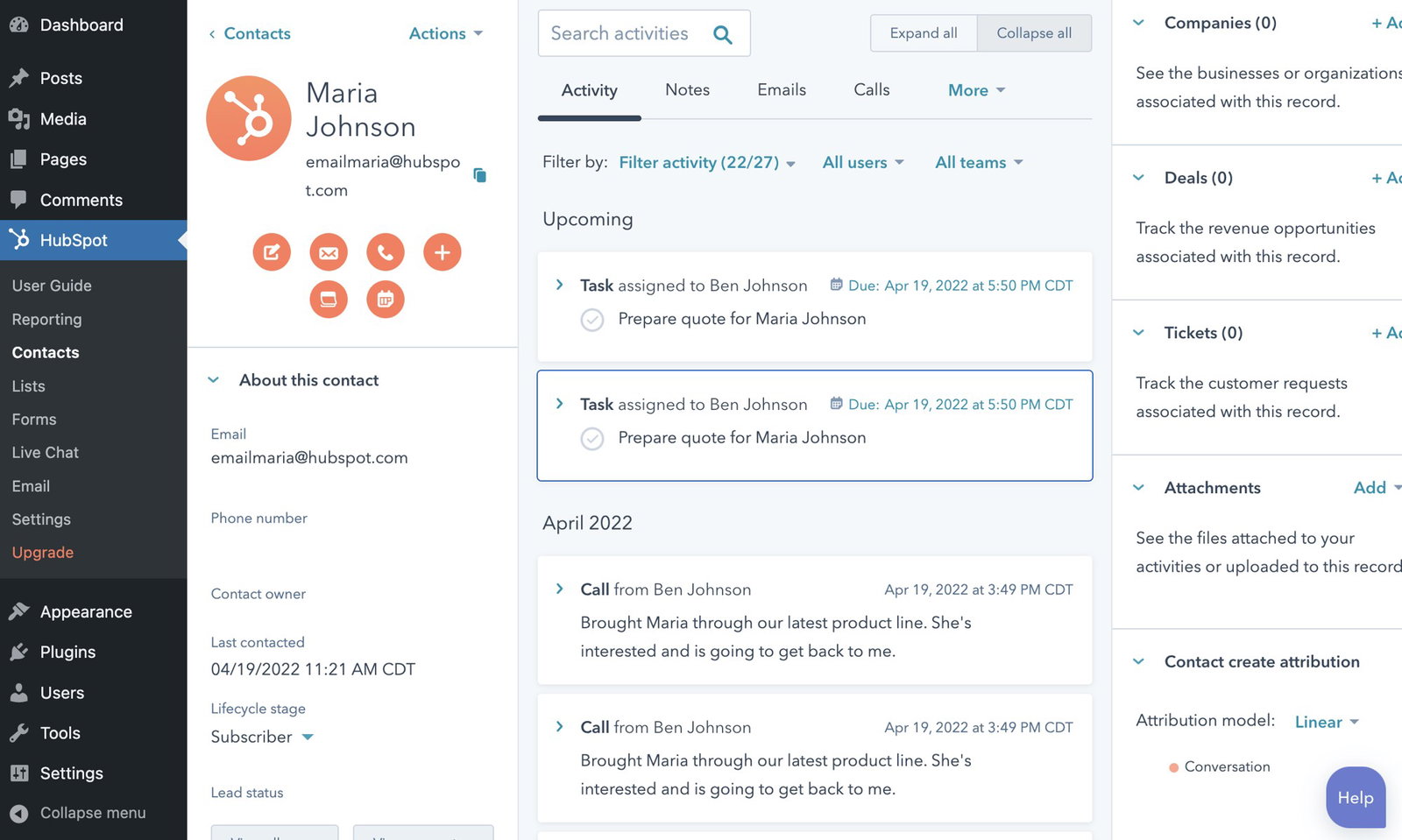
Beyond that, HubSpot’s built-in chatbot builder handles routine questions, qualifies leads, and automatically books meetings, giving your team more time to focus on meaningful conversations. Every interaction is logged in the free CRM inbox, so your team has full context to respond faster, track history, and turn chats into deals from desktop, Slack, or mobile.
Pricing
HubSpot’s pricing plans are for every business stage. It starts with the Free plan, moves to Starter at $20/month for added productivity, scales to Professional at $100/month for advanced automation and insights, or chooses Enterprise at $150/month for full-featured, sophisticated service management and team capabilities.
What Works And What Doesn’t
| Pros | Cons |
| Centralized customer info | Limited customization |
| Streamlined ticketing system | Rising costs |
| Easy team collaboration | Integration issues |
Our Final Take
HubSpot Service Hub is the best-suited live chat system for businesses and service teams looking for a centralized system to manage customer communication, tickets, and follow-ups. It may not be ideal for those needing extensive customization or tight integrations. It can be a great choice if you want a reliable, easy-to-use platform that keeps your team aligned.
Qualified: Best For Enterprise
Qualified is a B2B-focused live chat and marketing platform trusted by over 500 companies worldwide. Its AI SDR agent, Piper, helps teams engage website visitors, qualify leads in real time, and increase inbound pipeline efficiency. Recognized as a Fall 2025 G2 Leader, it’s a top choice for modern B2B marketing teams.
Why We Chose Qualified In 2026
Qualified helps B2B teams connect with website visitors the moment they arrive. With Piper Conversations, you can engage prospects through live chat, voice, or video, guiding them through your website, answering questions, and turning high-intent visitors into real pipeline. Personalized greetings and real-time routing ensure the right conversation reaches the right person, every time.
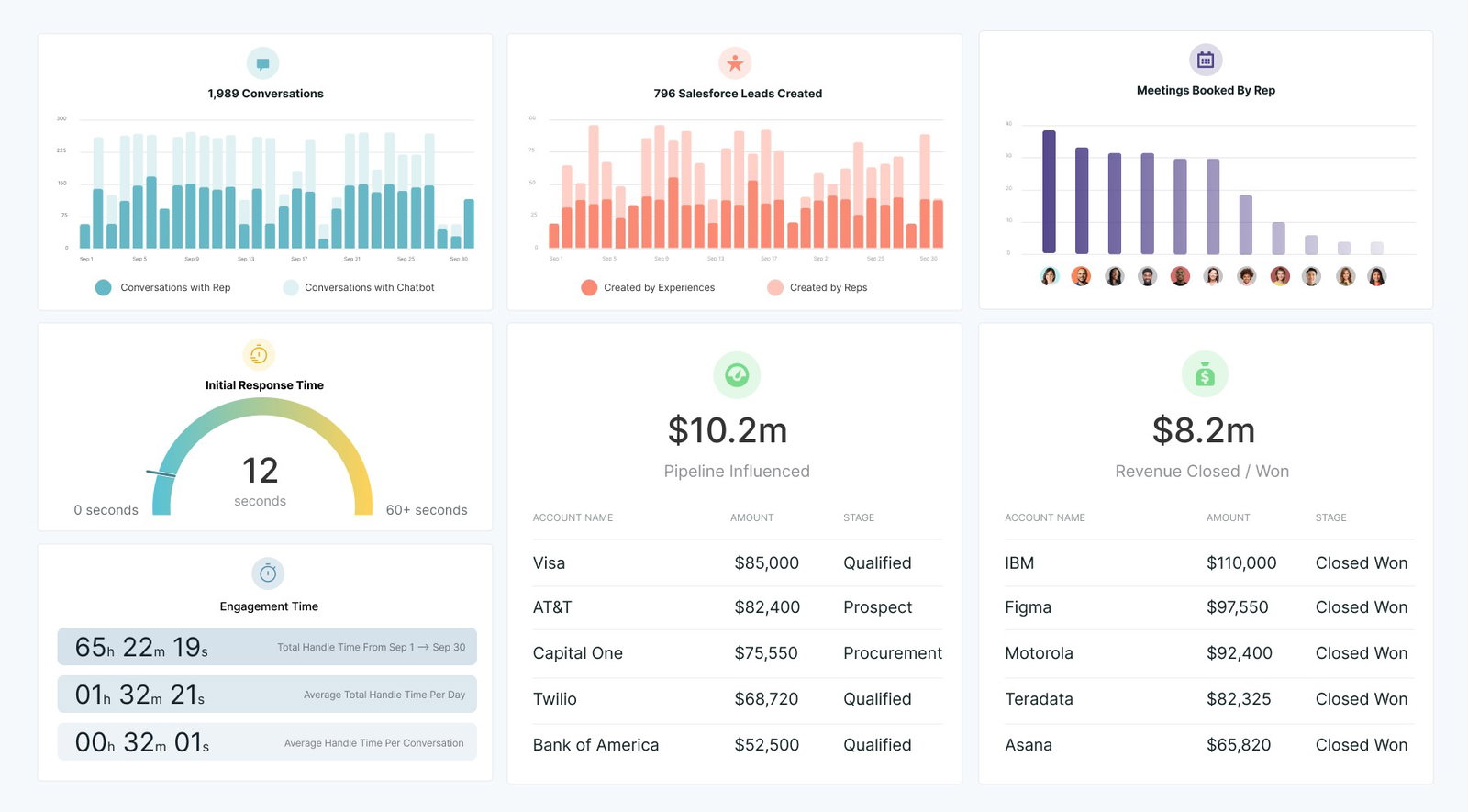
The platform is especially built for modern marketers who want to maximize inbound opportunities without missing a beat. Piper identifies target accounts, opens conversations with buyers, and helps sales reps focus on the most valuable leads. With compliance and visitor consent built in, Qualified keeps interactions secure while driving measurable results.
Pricing
Qualified offers flexible plans to suit businesses of all sizes. The Premier plan covers essential features for most B2B teams, while the Enterprise plan adds advanced security, reporting, and multi-language support. The Ultimate plan is built for high-volume websites and complex setups, providing maximum scalability and customization. Businesses can reach out to Qualified directly to explore pricing and qualify the plan that fits their needs.
What Works And What Doesn’t
| Pros | Cons |
| Easy to use | Workflow complexity |
| Strong customer support | Minor routing limits |
| Deep integrations | Limited feature visibility |
Our Final Take
Qualified is one of the best live chat platforms for B2B teams looking to convert website visitors into sales opportunities with real-time chat, voice, or video. It may not be ideal for smaller businesses needing simpler setups. Well, if you want streamlined, high-intent lead engagement, Qualified can be a good choice.
Top 5 Live Chat Software Comparison
Choosing the right live chat solution can be tricky. This comparison breaks down the top tools, showing their strengths, features, and ideal use cases so you can pick the best fit for your team and customers.
P.S.: Always remember to visit the vendor's site for the latest information!
| Criteria |  |
 |
 |
 |
 |
| Starting Price | NA | $29/month | NA | $20/month | NA |
| Avg. User Rating | 4.6 | 4.6 | 4.7 | 4.4 | 4.9 |
| Free Trial/Demo | Free Demo | 7-Day Free Trial | 30-Day Free Trial | NA | Free Demo |
| Key Features | Centralized messaging, text and call support, and shared inbox | Multi-channel inbox, AI automation, and quick replies | 24/7 chat support, appointment booking, and lead capture | Live chat, chatbot automation, and CRM integration | Real-time chat, lead qualification, and voice and video |
| Integrations | Mailchimp, Outlook, Square, and more | Instagram, Shopify, WordPress, and more | Zoho, ADP, Denticon, and more | Slack, Zapier, Salesforce, and more | Microsoft Office 365, LinkedIn, Google Calendar, and more |
Wrapping Up
In today’s fast-moving digital world, live chat is a way to start real conversations, capture leads, and make your customers feel heard.
Well, selecting the right live chat software can make a big difference in how your team connects with customers. Each tool has its strengths, whether it’s fast responses, seamless integrations, or smarter lead management. Consider your business needs, team size, and goals to choose the platform that helps you engage visitors, convert leads, and provide better support.
Sometimes, the right platform is all it takes to really chat up your customer experience.
Frequently Asked Questions
Which Are The Top 5 Live Chat Software In 2026?
Podium, Tidio, Birdeye, HubSpot, and Qualified are the top Live Chat Software in 2026. They offer a mix of multi-channel support, automation, lead management, and seamless integration to help businesses engage visitors and convert leads effectively.
How Does Live Chat Improve Customer Support?
Live chat enables instant responses, organized conversations, and proactive engagement, helping teams solve queries faster, reduce wait times, and enhance overall customer satisfaction.
Can Live Chat Software Integrate With Other Tools?
Yes, most live chat platforms integrate with CRMs, email marketing, and team collaboration tools. With them, you can manage team conversations, track leads, and automate workflows without switching between systems.
Tue, Feb 24, 2026

Enjoyed what you've read so far? Great news - there's more to explore!
Stay up to date with the latest news, a vast collection of tech articles including introductory guides, product reviews, trends and more, thought-provoking interviews, hottest AI blogs and entertaining tech memes.
Plus, get access to branded insights such as informative white papers, intriguing case studies, in-depth reports, enlightening videos and exciting events and webinars from industry-leading global brands.
Dive into TechDogs' treasure trove today and Know Your World of technology!
Disclaimer - Reference to any specific product, software or entity does not constitute an endorsement or recommendation by TechDogs nor should any data or content published be relied upon. The views expressed by TechDogs' members and guests are their own and their appearance on our site does not imply an endorsement of them or any entity they represent. Views and opinions expressed by TechDogs' Authors are those of the Authors and do not necessarily reflect the view of TechDogs or any of its officials. While we aim to provide valuable and helpful information, some content on TechDogs' site may not have been thoroughly reviewed for every detail or aspect. We encourage users to verify any information independently where necessary.
Loading comments...