
Manufacturing Technology
Top 5 Digital Twin Software Of 2026
Share
TL;DR
-
aPriori Manufacturing Intelligence Platform: Best for transforming CAD models into live production views to find cost-saving opportunities.
-
Forward Enterprise: Best for providing precise network modeling and end-to-end visibility across multi-vendor cloud environments.
-
SAP Business Technology Platform: Best for integrating IoT and business data to enable predictive maintenance and live monitoring.
-
Twinzo: Best for offering real-time 3D facility visualizations accessible from any mobile device for logistics tracking.
-
Tecnomatix: Best for simulating complex manufacturing workflows and robot automation to boost plant-wide efficiency.
Introduction
Imagine if you could create a virtual version of your entire world, where every daily routine and interaction is mirrored in real-time. This concept is like having a dress rehearsal for your life, allowing you to tweak and optimize every aspect before the big show. By simulating these moments, you can test novel ideas and predict outcomes without any real-world risk. Digital Twin technology makes this possible by creating a digital replica where you can analyze and experiment without consequences.
For businesses, this means moving beyond simple models to a sophisticated ecosystem that mirrors physical systems perfectly. Using these virtual counterparts allows organizations to monitor performance and solve problems before they even occur in the physical space. It is a powerful way to bridge the gap between digital data and tangible results, ensuring that every decision is backed by simulation. This evolution is transforming industries by making complex processes more transparent and manageable than ever before. Explore these Top 5 Digital Twin Software Solutions that are mirroring the future of smarter enterprise decisions.
What Is Digital Twin Software?
Digital Twin Software is a technology that creates a virtual replica of a physical object, system, or process. This virtual model mirrors the real-world counterpart in real-time, allowing businesses to simulate, monitor, and analyze its performance without any physical risk or cost. In 2026, we are seeing innovative Digital Twin Software emerge, pushing the boundaries of what’s possible.
Let’s explore the Top 5 Digital Twin Software of 2026.
Top 5 Digital Twin Software Of 2026
Curious about which Digital Twin Software is shaping the future? We’ve got you covered with the best digital twin software list! Explore the top 5 options and go for the one that perfectly aligns with your business goals!
 |
 |
 |
 |
 |
aPriori Manufacturing Intelligence Platform: Best Value
Returning to this year’s list is c. It transforms your digital twin CAD models into a live view of your production process, with all the information teams need to plan and optimize effectively. Recognized as a Spring 2025 Leader on G2 and the 2nd Easiest to Use in Digital Twin software, aPriori’s Digital Factories give product designers, cost engineers, and sourcing teams the insights they need to make better decisions, faster. From finding cost-saving opportunities to improving production planning, aPriori makes complex manufacturing data easy to use and helps teams work more efficiently while driving innovation.
Why We Chose aPriori Manufacturing Intelligence Platform In 2026
aPriori Manufacturing Intelligence Platform makes digital twins simple, practical, and incredibly useful. You can create realistic models of physical assets, use a functional and intuitive interface, and take advantage of a variety of tools to enhance your designs. Pre-built templates help teams get started quickly without reinventing the wheel. Beyond just building models, aPriori’s digital twins connect teams and operations, giving everyone the insights they need to optimize the entire product development lifecycle, including manufacturing processes and production capabilities.
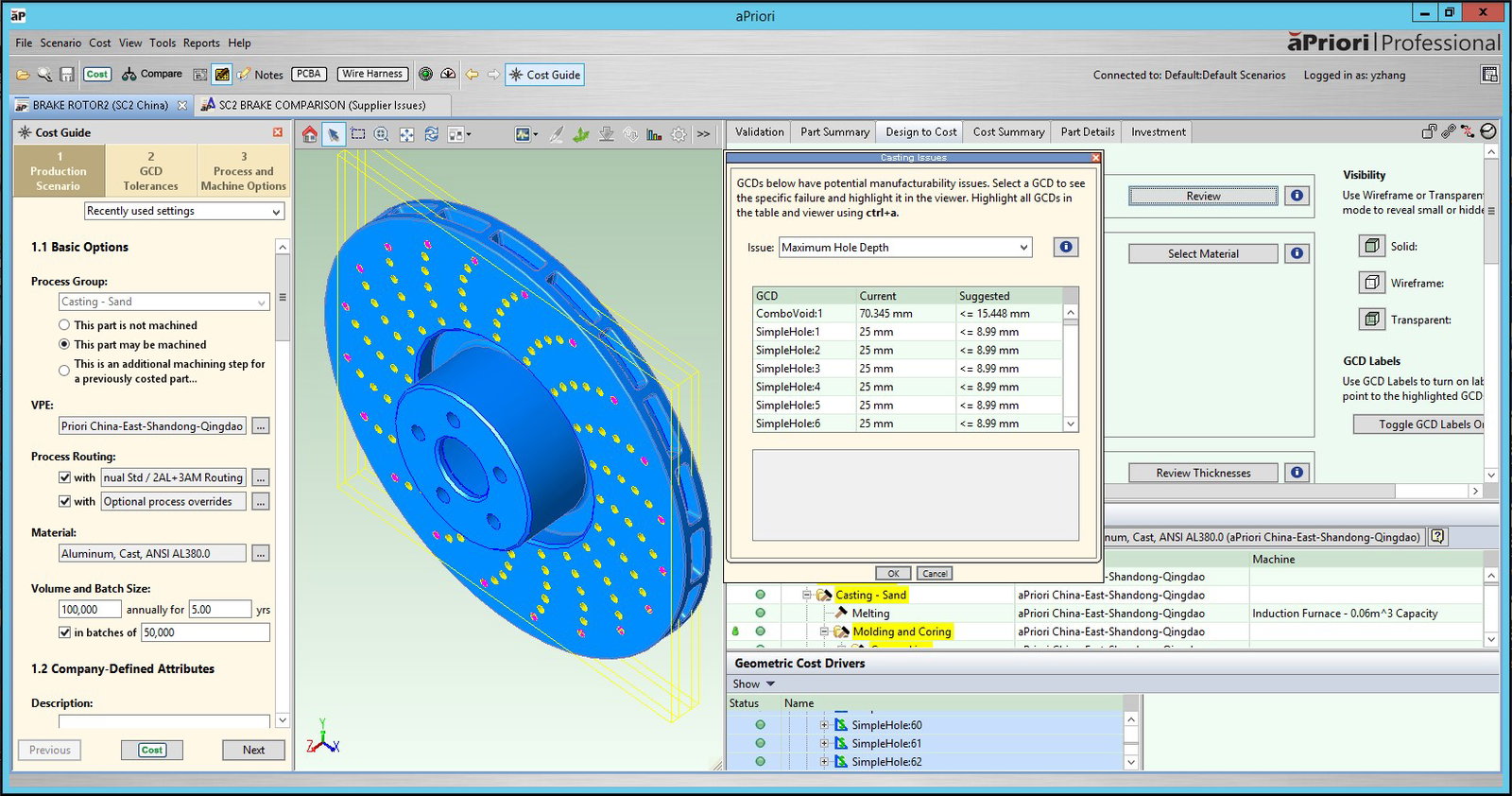
What really sets aPriori Manufacturing Intelligence Platform apart is how it lets manufacturers run “what if” scenarios with its suite of digital twins. The Digital Product Twins, Digital Process Twins, and Digital Factory Twins work together to simulate changes and show the impact on cost, carbon footprint, manufacturing steps, and even factory location. It gives teams a clear picture of their production process and makes it easier to spot opportunities and improve efficiency.
Pricing
Though exact pricing isn’t published publicly, the APriori Manufacturing Intelligence Platform offers an annual subscription where each user needs their own license to access the platform. Costs vary based on deployment size and selected features. Businesses can contact their team to get a personalized quote.
What Works And What Doesn’t
| Pros | Cons |
| Provides cost insights | Outdated interface |
| Supports quick iterations | Missing features |
| Flexible and adaptable | Limited costing models |
Our Final Take
aPriori Manufacturing Intelligence Platform is ideal for product designers, cost engineers, and manufacturing teams looking to optimize production and reduce costs. It may not suit casual users due to its complexity, but it’s a strong choice for teams needing detailed, actionable insights.
Forward Enterprise: Best for Security
Making its debut this year, Forward Enterprise by Forward Networks is trusted by Fortune 500 companies to keep their networks secure and reliable. It creates a precise digital twin of your network, giving IT teams full visibility and control across multi-vendor environments and major clouds like AWS, Azure, and Google Cloud. Winner of over 20 industry awards and recognized as a Winter 2026 High Performer on G2, Forward Enterprise is a best-in-class network modeling solution that customers rely on.
Why We Chose Forward Enterprise In 2026
Forward Enterprise makes managing large, complex networks easier. From Universal IT tasks like change control and compliance audits to Network Security functions like incident response and zero-trust, the platform gives teams the tools to keep networks secure and reliable. Hybrid multi-cloud environments are fully supported, letting IT teams gain end-to-end visibility, continuously audit services, and ensure smooth operations across AWS, Azure, Google Cloud, and more.
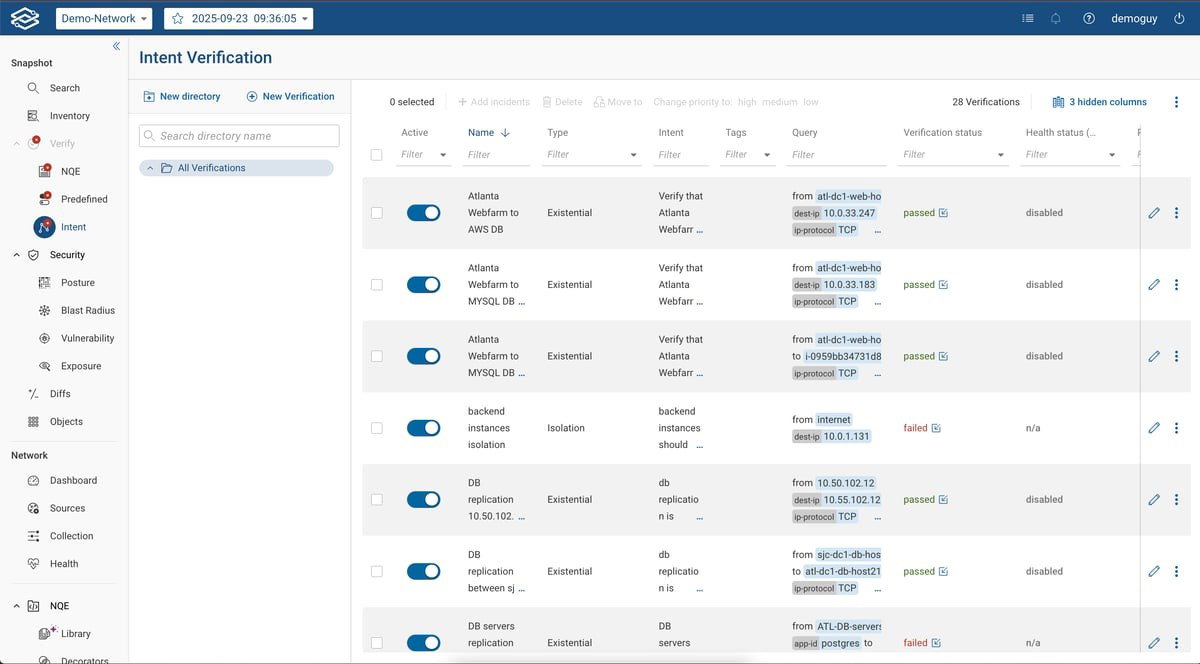
Daily network tasks are easier with features like checking network paths, preventing outages, troubleshooting issues, and keeping configurations consistent. Workflow automation brings it all together, helping teams work faster and stay on top of problems. With better visibility, control, and automation, Forward Enterprise helps organizations reduce risks, stay compliant, and keep their networks running smoothly.
Pricing
Forward Enterprise offers customized pricing based on your organization’s size, network complexity, and the features you need. Exact costs aren’t published publicly, so the best way to get an accurate quote is to contact their team directly. They can guide you through the options and help set up a plan that fits your network and IT requirements perfectly.
What Works And What Doesn’t
| Pros | Cons |
| Clear network visibility | Complex setup |
| Accurate network mapping | Regular updates required |
| Granular access control | Onboarding takes time |
Our Final Take
Enterprises looking to simplify network management and gain end-to-end clarity will find Forward Enterprise invaluable. It may not be an ideal digital twin solution for smaller or simpler setups, but teams that focus on security, compliance, and reliable network management can pick Forward Enterprise.
SAP Business Technology Platform: Best for Integration
SAP Business Technology Platform (SAP BTP) makes its comeback this year. The software builds virtual versions of your physical assets, processes, or products by bringing together IoT, business, and contextual data all in one place. That means you can monitor systems live, run simulations, and even plan predictive maintenance before problems pop up. From equipment and manufacturing processes to entire supply chains, SAP BTP helps teams work smarter, cut downtime, and stay ahead. With over 33,000 customers worldwide already seeing the benefits, SAP BTP is also recognized as a Fall 2025 Leader on G2.
Why We Chose SAP Business Technology Platform In 2026
SAP BTP makes creating digital twins feel surprisingly simple. You can build realistic models of physical assets using an intuitive interface, a variety of tools, and pre-built templates that get teams started quickly. By bringing together data from across your enterprise, SAP BTP breaks down silos and creates a single, unified view of assets, processes, and operations. This makes it easier to visualize systems, run predictive analyses, and plan maintenance without juggling multiple tools or platforms.
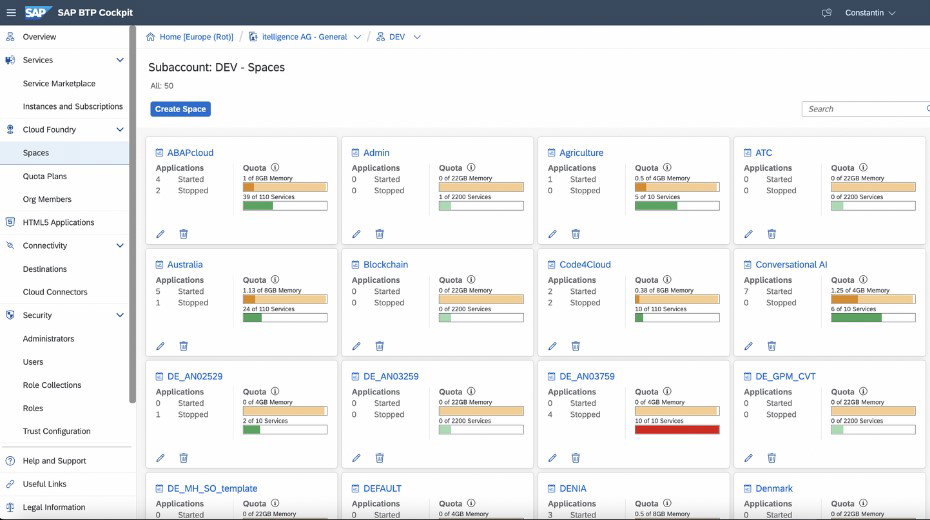
The platform also keeps teams connected in real time. With monitoring that works anywhere, you can track system performance, respond to incidents faster, and make informed decisions on the spot. SAP BTP supports 2D, 3D, CAD, BIM, and GIS data in one browser-based interface, working alongside tools like SAP Intelligent Asset Management for a more integrated experience. With clear insights and flexible tools, SAP BTP helps organizations improve uptime, simplify operations, and make smarter decisions across equipment and supply chains.
Pricing
SAP BTP offers flexible pricing to fit different needs, from subscription plans to Pay-As-You-Go or enterprise agreements. Whether you’re a customer or partner, you can pick the option that works best and upgrade as needed. For full details, you can reach out to the SAP team.
What Works Best And What Doesn’t
| Pros | Cons |
| Strong integration capability | Overwhelming setup |
| Centralized workflow | Fragmented documentation |
| Flexible and scalable | Expensive |
Our Final Take
If your organization wants to bring SAP and other systems together smoothly while getting real-time insights, SAP BTP is a strong choice. It might feel a bit complex for smaller teams, but for enterprises looking to run operations more efficiently and make smarter, data-driven decisions, it’s a great fit.
Twinzo: Best Mobile Functionality
A fresh entry on this year’s list, Twinzo is a real-time 3D digital twin platform that gives manufacturing and logistics teams a clear, live view of their operations. By bringing together data from ERP, MES, IoT sensors, RTLS, and spreadsheets, Twinzo creates a 3D view of your facility, making it simple to understand and manage complex operations from any device. With over 25 years of experience, Twinzo is one of the top-ranked digital twin software on G2, built for anyone looking to simplify operations without losing accuracy or control.
Why We Chose Twinzo In 2026
Twinzo makes it effortless to understand what’s happening across your manufacturing floors and logistics processes in real time. It brings together real-time data from ERP, MES, IoT sensors, RTLS, and spreadsheets, and presents it in a 3D model of your facility. This way, teams can quickly see production KPIs, track OEEs, monitor energy usage, and even dive deep into detailed web analytics from a single dashboard accessible on any device. Customizable visualizations and alerts help you spot issues as they arise, so problems can be addressed before they escalate.
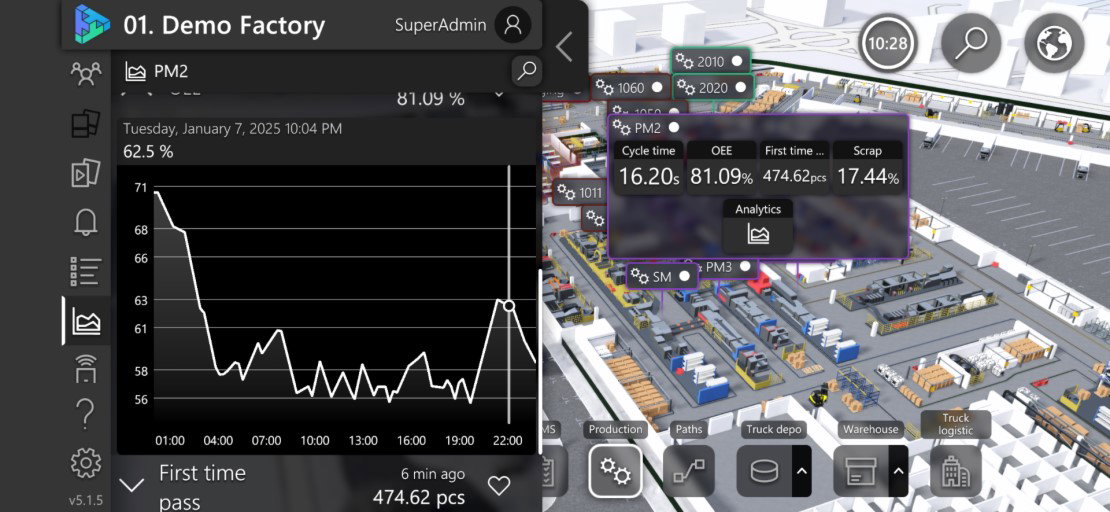
For logistics, Twinzo is equally powerful. It monitors material flow in real time, highlights “no-go” zones, and helps avoid micro-stoppages. Spaghetti charts, heatmaps, and order processing insights make it easy to optimize workflow across multiple sites. Whether deployed on the cloud, on-premise, or on iOS, Android, or Windows, Twinzo keeps all your data visible under one roof. With 24/7 monitoring and an intuitive notification system, it ensures teams can act quickly, stay informed, and make operations more efficient every day.
Pricing
Twinzo offers a flexible approach to getting started. Users can try it free for testing or small Proof of Concept projects by creating an account, uploading a 3D model, and connecting their data. For customized plans or larger implementations, businesses can reach out directly to the Twinzo team.
What Works And What Doesn’t
| Pros | Cons |
| Easy feature integration | Limited notification options |
| Strong customer support | Data analysis takes time |
| Real-time logistics tracking | Occasional flexibility limits |
Our Final Take
If you’re running manufacturing or logistics operations and want a real-time, easy-to-understand view of everything happening on the floor, Twinzo makes it simple. Smaller setups might not need all the bells and whistles, but for teams looking to boost efficiency and keep workflows running smoothly, it’s a smart, reliable choice.
Tecnomatix: Best for Enterprise
Tecnomatix by Siemens is back on this year’s list. The software brings complex manufacturing processes into one digital twin, covering robots, automation, material handling, and human workflows. Teams can test changes, optimize operations, and boost efficiency before hitting the shop floor. r. Recognized as the Best Software of 2025 on G2 and ranked #48 among Best Global Brands, it’s a go-to platform for manufacturers looking to make their operations more agile and reliable.
Why We Chose Tecnomatix In 2026
Tecnomatix makes managing complex manufacturing processes easier and more practical. It lets teams build realistic models of equipment, robots, and entire plants through a simple, easy-to-use interface. It also comes with built-in design tools for 3D modeling, drawing, and editing, plus strong simulation options for manufacturing processes. With helpful templates and a variety of tools, creating a digital twin of your plant is straightforward. These virtual copies let you test changes, simulate processes, and even give virtual tours to stakeholders, all without touching the real equipment.
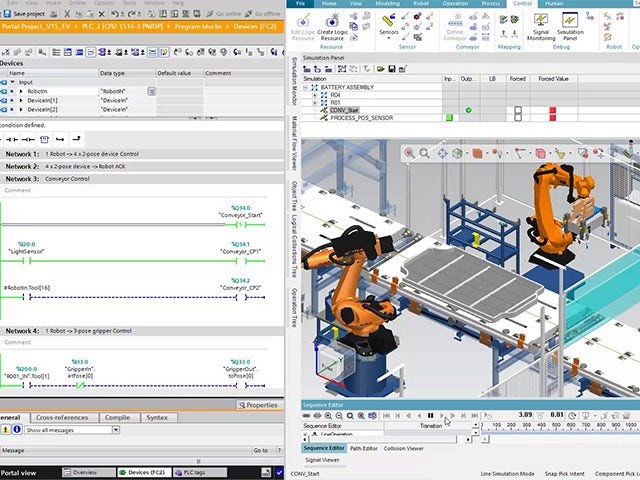
Tecnomatix doesn’t stop at modeling. It helps you see potential bottlenecks, improve safety, and optimize workflows across manufacturing and logistics. From simulating individual tasks to analyzing plant-wide operations, it gives engineers and managers the confidence to make decisions that save time, reduce errors, and boost efficiency. In short, Tecnomatix turns complex manufacturing into a process you can plan, visualize, and improve before making changes in the real world.
Pricing
Tecnomatix offers flexible pricing to suit different needs. Organizations can start with a free trial or choose from Plant Simulation X Essentials at $418.95/month, Standard at $1,048.95/month, or Advanced at $2,089.50/month per user. Teams can contact Tecnomatix for a custom plan for their setup.
What Works And What Doesn’t
| Pros | Cons |
| Reliable process testing | Requires learning time |
| Supports VR walkthroughs | Complex setup |
| Streamlined production design | High software cost |
Our Final Take
Tecnomatix is perfect for manufacturing teams wanting to plan, test, and optimize production lines and robot workflows. It might be too complex or costly for smaller teams, but it’s a great choice for improving efficiency, accuracy, and overall operations.
Top 5 Digital Twin Software Comparison
Choosing the right digital twin software platform can feel overwhelming with so many advanced platforms available today. To help you decide, we have compared five top solutions that make it easier to visualize, simulate, and optimize operations across manufacturing and logistics.
P.S.: Always remember to visit the vendor's site for the latest information!
| Criteria |  |
 |
 |
 |
 |
| Starting Price | NA | NA |
NA |
NA | $418.95/month |
| Avg. User Rating | 4.5 | 4.6 | 4.4 | 4.6 | 4.4 |
| Free Trial/Demo | Demo | Demo | 90 Days | 30 Days | 30 Days |
| Key Features | Cost insights, quick iterations, flexible modeling | Network visibility, workflow automation, multi-cloud support | Unified data view, predictive maintenance, real-time monitoring | 3D operational view, real-time tracking, customizable alerts | Process simulation, VR walkthroughs, production optimization |
| Integrations | Ecoinvent, Configure, SolidWorks | Tenable, Rapid7, NetBox | Google Cloud, MQTT | Quuppa, Slamcore, Rest API | Ansys, NX CAM, Designcenter NX |
Wrapping Up
Understanding digital twins doesn’t have to feel complicated. Whether it’s aPriori helping teams save costs, Forward Enterprise keeping networks under control, SAP BTP giving a full picture of operations, Twinzo turning your factory into a real-time 3D dashboard, or Tecnomatix letting you test and optimize production before touching the shop floor, there’s a solution for every need.
Sure, some tools may take time to learn or come with a higher price tag, but the benefits in efficiency, visibility, and smoother operations are worth it. Pick the right digital twin, explore its possibilities, and watch your complex processes become easier to manage and even a little fun!
Frequently Asked Questions
Which Are The Top Digital Twin Software Solutions Of 2026?
The top Digital Twin Software for 2026 includes aPriori Manufacturing Intelligence Platform, Forward Enterprise, SAP Business Technology Platform, Twinzo, and Tecnomatix. Each tool excels in specific areas, from cost optimization and network modeling to real-time factory visualization and process simulation.
Who Can Benefit From Using Digital Twin Software?
Manufacturing teams, logistics managers, product designers, cost engineers, and IT operations professionals can all benefit from using digital twin software. Essentially, anyone looking to improve efficiency, reduce errors, and get clear, real-time insights into their processes will find value.
How Do Digital Twin Tools Improve Efficiency?
Digital twin tools let you test scenarios, spot bottlenecks, simulate production changes, and track key metrics before implementing them in the real world. This reduces errors, saves time, and ensures smoother, smarter operations across teams and sites.
Fri, Mar 13, 2026

Enjoyed what you've read so far? Great news - there's more to explore!
Stay up to date with the latest news, a vast collection of tech articles including introductory guides, product reviews, trends and more, thought-provoking interviews, hottest AI blogs and entertaining tech memes.
Plus, get access to branded insights such as informative white papers, intriguing case studies, in-depth reports, enlightening videos and exciting events and webinars from industry-leading global brands.
Dive into TechDogs' treasure trove today and Know Your World of technology!
Disclaimer - Reference to any specific product, software or entity does not constitute an endorsement or recommendation by TechDogs nor should any data or content published be relied upon. The views expressed by TechDogs' members and guests are their own and their appearance on our site does not imply an endorsement of them or any entity they represent. Views and opinions expressed by TechDogs' Authors are those of the Authors and do not necessarily reflect the view of TechDogs or any of its officials. While we aim to provide valuable and helpful information, some content on TechDogs' site may not have been thoroughly reviewed for every detail or aspect. We encourage users to verify any information independently where necessary.
Loading comments...