
Data Management
Top 5 Data Cleansing Tools Of 2026
Share
TL;DR
-
Demand Tools: Offers powerful bulk handling and preventative cleaning specifically optimized for Salesforce CRM environments.
-
Melissa: Provides a flexible user experience for standardizing and verifying global contact data across various workflows.
-
Monte Carlo: Delivers enterprise-grade reliability by using machine learning to monitor data pipelines and detect anomalies.
-
WinPure Clean & Match: Features AI-powered pattern detection to simplify complex deduplication and data enrichment tasks without coding.
-
ZoomInfo: Scales B2B data accuracy by automatically enriching CRM records with real-time technographic and intent insights.
Introduction
Are you a book lover? If yes, we bet you must love the joy of seeing a perfectly organized bookshelf with every book in its place. With everything neatly arranged, it is easy to sort through the collection and find the next book to enjoy, which just feels right. This sense of order transforms a chaotic pile of paper into a curated library where stories are easy to find and appreciate. Imagine instead trying to read a novel where every page is out of order or missing entirely. You would spend more time flipping through the mess than actually enjoying the narrative, much like how disorganized data creates a frustrating and time-consuming hurdle for any business.
When data is cluttered with errors and inconsistencies, it stops being a resource and starts being a liability. Data cleansing tools act as the ultimate librarians for your digital files, automatically spotting and fixing mistakes to ensure your system is ready to deliver reliable insights. By tidying up these digital bookshelves, you can stop scrambling for information and start making decisions with total confidence. Here are the Top 5 Data Cleansing Tools to help you turn your messy datasets into a well-ordered superpower.
What Is A Data Cleansing Tool
A Data Cleansing Tool is like having a librarian for your data, sorting out the mess and putting everything in its rightful place, whether you’re managing a data cleansing tools list or optimizing CRM records. It automatically spots and fixes errors, inconsistencies, and missing pieces, ensuring your data is accurate and ready for action. This allows you to spend less time searching for information and more time making decisions based on reliable insights.
By automating the detection and correction of errors, these data cleansing tools ensure that data is accurate, consistent, and ready for analysis. Looking ahead, the top Data Cleansing Tools of 2026 are set to build upon these advancements, offering even more sophisticated features to tackle the growing complexities of data management. Read on!
Top 5 Data Cleansing Tools Of 2026
Get ready to explore the top data cleansing software of 2026, your go-to solutions for perfecting your data quality and streamlining your workflows. We have listed them in no order; so, find the best fit for your needs!
 |
 |
 |
 |
 |
DemandTools: Best For Small Business
DemandTools, developed by Validity, helps teams clean, organize, and maintain data quickly that used to take months. This means your reports stay accurate and your teams can actually trust the data they are working with. Recognized by G2 for strong ROI and easy setup, especially for mid-market businesses, the tool balances power with simplicity. DemandTools makes it easier to treat your data like the valuable asset it’s meant to be without adding complexity to your workflow.
Why We Chose DemandTools In 2026
DemandTools simplifies the way teams handle CRM data by bringing powerful cleaning and management capabilities into one place. It connects easily with multiple data sources, especially Salesforce, and makes it easier to access and work with your data without friction. Tasks like identifying duplicates, merging records, and managing large datasets can be done in bulk, saving hours of manual effort.
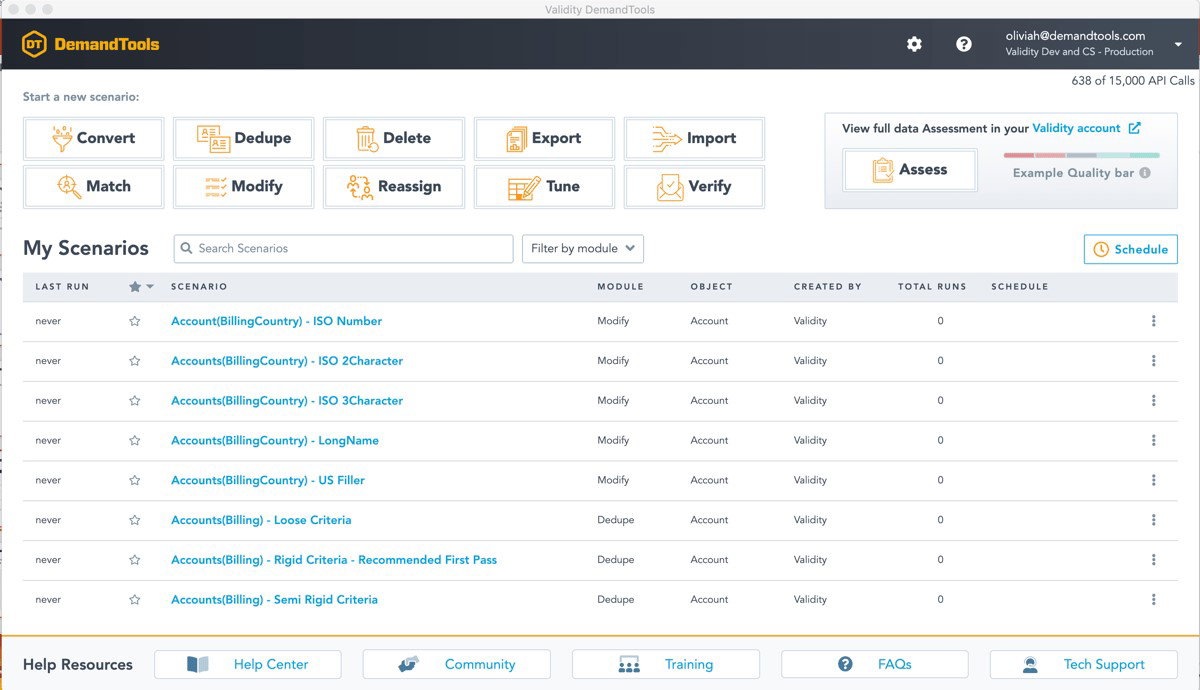
Beyond cleanup, it streamlines everyday data operations such as importing, updating, exporting, and even restoring records, while automatically formatting data to keep everything consistent. With built-in preventative cleaning and smart data matching, issues can be addressed before they grow. Its dashboard offers a clear view of data health, while governance controls help maintain accuracy, consistency, and compliance across your CRM.
Pricing
DemandTools keeps its pricing simple, with the Elements edition starting at $2.67 per Salesforce license per month. If you need more details or a plan that fits your setup, you can easily reach out to their team or request a demo to explore your options.
What Works And What Doesn’t
| Pros | Cons |
| Easy to use | No record errors |
| Fast data cleanup | Weak history tracking |
| Bulk data handling | Repetitive tagging |
Our Final Take
DemandTools is ideal for teams using Salesforce that want faster and more reliable CRM data management. It may not be the best fit for organizations working heavily outside the Salesforce ecosystem. Overall, it’s a strong choice for businesses looking to improve data quality while keeping processes simple and scalable.
Melissa: Best User Experience (UX)
Melissa brings a clear focus on keeping contact data accurate and usable from the start. The tool helps teams clean and enrich data in real time, ensuring details like names, emails, phone numbers, and addresses stay reliable. Trusted by over 10,000 businesses, Melissa helps reduce errors, improve efficiency, and build a more complete view of customers, earning recognition as a G2 Winter 2026 Momentum Leader and for Fastest Implementation among small businesses.
Why We Chose Melissa In 2026
Melissa makes data cleansing feel far less like a chore and more like a process you can actually stay on top of. It helps teams clean, standardize, and reformat all kinds of data without getting stuck in repetitive manual work. With support for tools like Pentaho and SSIS, it fits neatly into existing workflows and makes it easier to prepare data before it’s used for reporting or analysis. You can also set your own rules to handle inconsistencies, giving you better control over how your data is shaped and maintained.
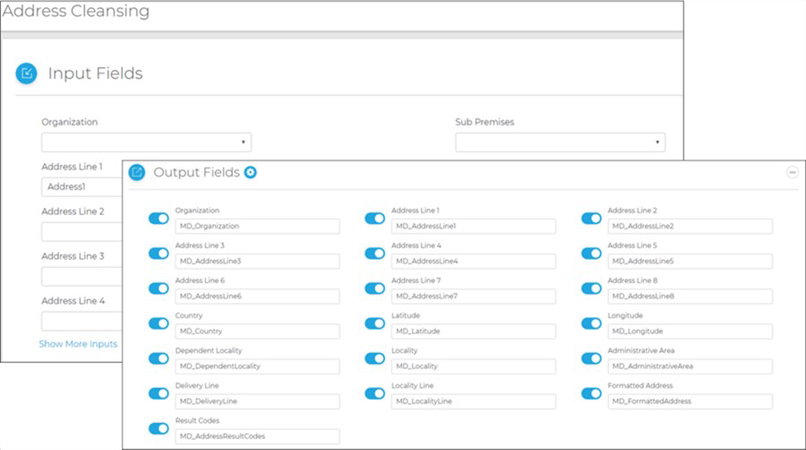
What really stands out is how flexible the cleansing process is. Whether it’s fixing punctuation, expanding abbreviations, running search-and-replace tasks, or using regex for more complex patterns, the tool gives you multiple ways to handle messy data. It’s built to work across integration and warehousing tasks, so you’re not just cleaning data once but improving how it flows across systems. The result is cleaner, more consistent data that’s easier to trust and actually use.
Pricing
Melissa follows a flexible pricing approach based on your usage needs. Businesses can start with free credits and scale as required or opt for enterprise plans for higher volumes and predictable usage. For exact pricing, businesses can request details directly from their team.
What Works And What Doesn’t
| Pros | Cons |
| Easy to use | Integration complexity |
| Accurate validation | Occasional downtime |
| Fast implementation | Limited automation |
Our Final Take
Melissa works best for teams focused on keeping contact data accurate and actionable. It may be less suited for organizations without structured data processes, but it’s a dependable choice for businesses looking to reduce errors and gain a complete view of their customers.
Monte Carlo: Best For Enterprise
Monte Carlo makes data reliability simple for large organizations. It automatically monitors data across warehouses, lakes, and ETL pipelines, spotting and fixing quality issues before they cause downtime. With millions of tables tracked and thousands of incidents resolved daily, teams can trust their data is accurate and ready for analysis. Trusted by over 400 enterprise customers, Monte Carlo is recognized as a G2 Winter 2026 Leader and is a practical choice for companies looking to maintain reliable, high-quality data across complex systems.
Why We Chose Monte Carlo In 2026
By automatically identifying the root cause of data issues and pipeline failures, Monte Carlo helps teams resolve problems quickly and collaborate without confusion. The platform also provides field-level lineage and a centralized data catalog, so you always know where your data is, who owns it, and how healthy it is. This makes it easier to maintain strong data governance and understand your entire data landscape.
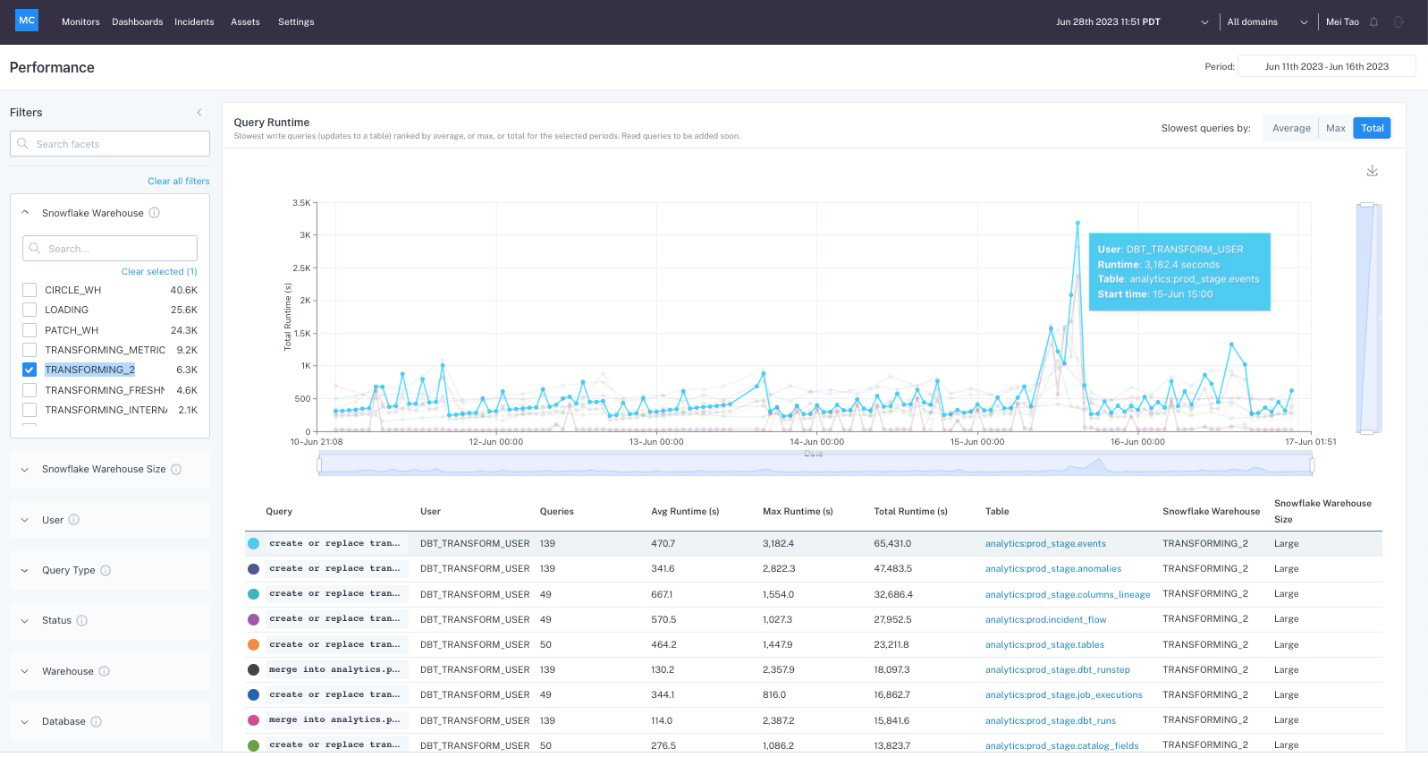
What sets Monte Carlo apart is how seamlessly it fits into existing workflows. Its machine learning monitors patterns and catches anomalies without needing manual setup or thresholds, while the no-code onboarding gets teams up and running fast. With real-time alerts, automated cataloging, and a secure architecture built to scale, Monte Carlo helps data teams prevent broken pipelines and ensures their analytics and reporting stay reliable, accurate, and trustworthy.
Pricing
Monte Carlo offers flexible pricing to fit different team sizes and needs. The Start plan is for small teams, Scale supports all teams and domains with expanded capabilities, and Enterprise provides full end-to-end coverage for large organizations. Businesses can choose the plan that fits their usage and reach out to the Monte Carlo team for detailed pricing.
What Works And What Doesn’t
| Pros | Cons |
| Easy anomaly detection | Complex setup |
| ML-powered monitoring | Navigation challenges |
| Accurate pipeline alerts | Alert formatting issues |
Our Final Take
Monte Carlo is ideal for enterprises looking to keep their data accurate, trustworthy, and ready for analysis across multiple systems. Smaller teams may find it a bit more complex than needed, but it’s perfect for organizations that prioritize complete data reliability and governance.
WinPure Clean & Match: Best For Integration
WinPure Clean & Match is a powerful data cleansing platform built to make data cleaning and deduplication simple and efficient. With 20+ years of experience and trusted by over 5,000 customers, WinPure Clean & Match helps teams keep their data accurate, consistent, and ready to use. With its AI-powered data matching, WinPure Clean & Match quickly fixes and organizes messy records across spreadsheets, databases, mailing lists, and CRMs.
Why We Chose WinPure Clean & Match In 2026
WinPure Clean & Match combines intuitive, step-by-step workflows with powerful AI pattern detection and allows users to quickly identify duplicates, fix inconsistencies, and enrich missing information without needing any programming skills. From merging and purging duplicate records to creating final master datasets with just a click, it simplifies tasks that usually take hours into minutes, giving teams confidence that their data is accurate and complete.
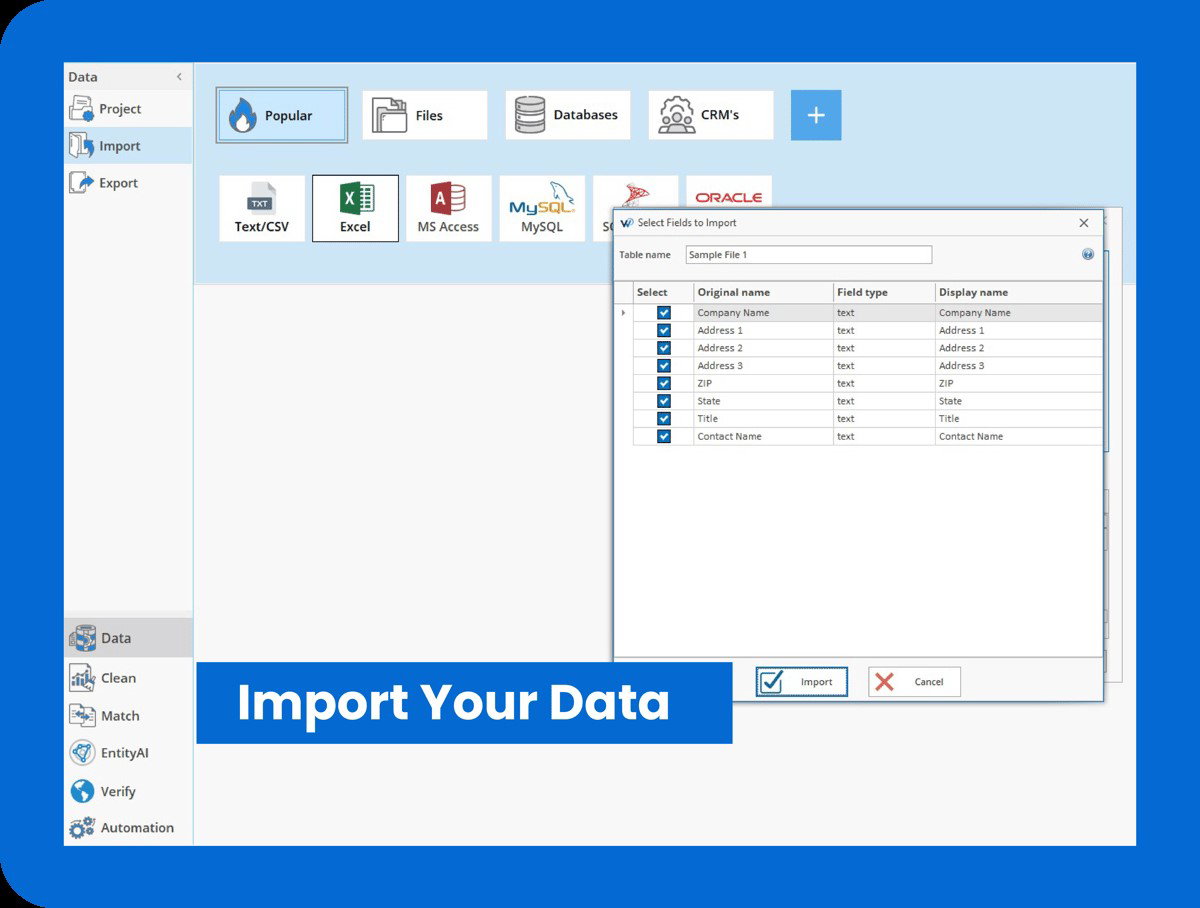
What really sets it apart is the level of control it offers. Users can set custom rules, define match criteria, and maintain a personalized knowledge library to ensure data is treated exactly how they want. Whether it’s cleaning a mailing list, spreadsheet, or CRM database, WinPure Clean & Match makes the process faster, smarter, and more reliable, giving businesses clean, usable data they can trust for every decision.
Pricing
WinPure Clean & Match does not publicly list pricing for its platform. For the most accurate and up-to-date details, businesses can reach out directly to WinPure’s team to discuss their requirements and obtain a personalized quote.
What Works And What Doesn’t
| Pros | Cons |
| Fast and accurate | Outdated UI |
| Handles large datasets | Complex feature set |
| Easy data consolidation | Limited online guidance |
Our Final Take
WinPure Clean & Match is best suited for teams and businesses looking to quickly clean, deduplicate, and enrich data across spreadsheets, databases, and CRMs. It may not fit organizations needing a simpler tool, but it’s ideal for those seeking fast, reliable, and accurate data management.
ZoomInfo: Best For Scalability
ZoomInfo helps revenue teams keep their B2B data accurate and actionable. The platform continuously verifies emails, phone numbers, and job titles across over 100 million companies, keeping contact and company records up to date. It syncs directly with Salesforce and HubSpot, automatically enriching new records as they enter your CRM. Trusted by more than 35,000 fast-growing companies, ZoomInfo makes it easier for sales and marketing teams to reach the right prospects and maintain a clean database that supports every stage of business growth.
Why We Chose ZoomInfo In 2026
ZoomInfo earns its place on this list for making B2B data not just accurate but truly actionable. From identifying duplicates to enriching CRM records automatically, it helps teams stay confident that every contact and account is up-to-date and reliable. The platform goes further by giving teams a deeper understanding of their targets.
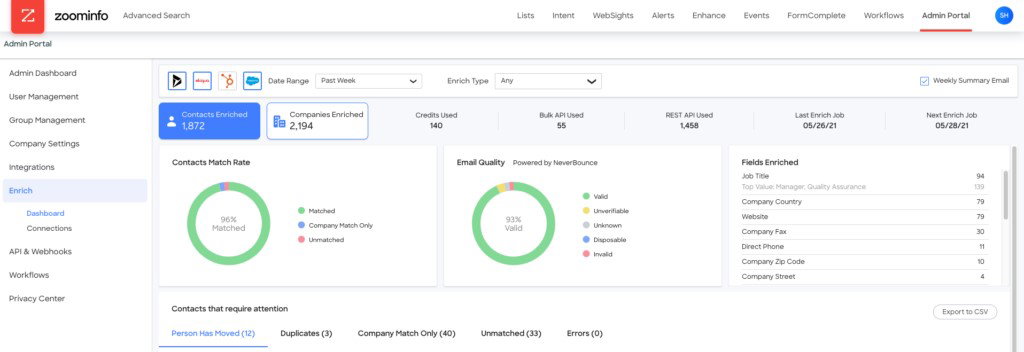
Technographic insights reveal the technology stack used by prospects, intent signals highlight accounts ready to engage, and organizational charts show reporting structures and decision-making hierarchies. These features allow revenue teams to prioritize efforts, make smarter outreach decisions, and focus on the opportunities that matter most, all while keeping their data clean and organized.
Pricing
ZoomInfo does not list pricing publicly, but businesses reach out to their team to get a tailored quote based on their company’s specific requirements.
What Works And What Doesn’t
| Pros | Cons |
| Accurate contact data | Occasional outdated info |
| Efficient prospecting | Limited trial period |
| Strong CRM integration | High premium pricing |
Our Final Take
ZoomInfo is best suited for revenue and sales teams looking to keep B2B contact and company data accurate, actionable, and enriched automatically. It may not fit companies needing a free or low-cost solution, but it’s a strong choice for teams aiming to prioritize leads and streamline outreach efficiently.
Top 5 Data Cleaning Tools Comparison
Choosing the right data cleaning solution can be tough with so many options available. To help you decide, we’ve compared five top tools that make it easier to clean, deduplicate, and enrich your data, ensuring it’s accurate, reliable, and ready for use across your business.
P.S.: Always remember to visit the vendor's site for the latest information!
| Criteria |  |
 |
 |
 |
 |
| Starting Price | $2.67/license/month | NA | NA | NA | NA |
| Avg. User Rating | 4.6 | 4.4 | 4.3 | 4.7 | 4.5 |
| Free Trial/Demo | Free Demo | Free Demo | Free Demo | 30-Day Free Trial | Free Demo |
| Key Features | Easy Salesforce integration, bulk data handling, and preventative data cleaning | Real-time data cleaning, flexible rule setting, and workflow integration | Pipeline issue detection, field-level lineage, and automated cataloging | AI pattern detection, duplicate record merging, and custom rule control | CRM auto-enrichment, technographic insights, and intent signal tracking |
| Integrations | Salesforce CRM, MySQL, and Dynamics 365 | Microsoft 365, Shopify, and Talend | Cohere, Perplexity, and Clickhouse | Zoho, Oracle, and Snowflake | HubSpot, Marketo Engage, and Pardot |
Wrapping Up
Cleaning up data doesn’t have to feel like digging through a never-ending attic of mismatched files. With tools like DemandTools, Melissa, Monte Carlo, WinPure Clean & Match, and ZoomInfo, even the messiest datasets can be tamed, organized, and made actionable.
Whether you’re merging duplicates, enriching missing info, or keeping your CRM spotless, these platforms turn hours of tedious work into a few clicks of confidence. Each has its own strengths, so the right pick depends on your team, your workflow, and your data ambitions.
Well, one thing’s for sure. With the right tool in hand, messy data is no longer a headache, but a superpower waiting to fuel smarter business decisions!
Frequently Asked Questions
Which Are The Top Data Cleansing Tools Of 2026?
Top data cleansing tools in 2026 include DemandTools, Melissa, Monte Carlo, WinPure Clean & Match, and ZoomInfo. Each excels in cleaning, deduplicating, enriching, or managing large datasets to make data actionable and reliable for businesses.
What Is Data Cleansing Software Used For?
Data cleansing software helps clean, organize, and maintain accurate records by removing duplicates, fixing errors, and enriching missing information. It ensures your datasets are reliable and ready for reporting, analysis, and smarter business decisions.
How Do I Choose The Right Data Cleaning Tool?
While choosing the right data cleansing tool, consider your team size, workflow, and the type of data you manage. Look for features like deduplication, CRM integration, automation, and real-time enrichment to match your business needs and save time.
Wed, Mar 25, 2026

Liked what you read? That’s only the tip of the tech iceberg!
Explore our vast collection of tech articles including introductory guides, product reviews, trends and more, stay up to date with the latest news, relish thought-provoking interviews and the hottest AI blogs, and tickle your funny bone with hilarious tech memes!
Plus, get access to branded insights from industry-leading global brands through informative white papers, engaging case studies, in-depth reports, enlightening videos and exciting events and webinars.
Dive into TechDogs' treasure trove today and Know Your World of technology like never before!
Disclaimer - Reference to any specific product, software or entity does not constitute an endorsement or recommendation by TechDogs nor should any data or content published be relied upon. The views expressed by TechDogs' members and guests are their own and their appearance on our site does not imply an endorsement of them or any entity they represent. Views and opinions expressed by TechDogs' Authors are those of the Authors and do not necessarily reflect the view of TechDogs or any of its officials. While we aim to provide valuable and helpful information, some content on TechDogs' site may not have been thoroughly reviewed for every detail or aspect. We encourage users to verify any information independently where necessary.
Loading comments...