

Artificial Intelligence
Firefox Lets Users Block All GenAI Features
Updated on Wed, Feb 4, 2026
Share
While AI and GenAI make processes easier to execute, not everyone wants them everywhere. More importantly, people want to be offered the choice of picking the option or not.
This is exactly what prominent internet browser Mozilla has aimed for with its latest move.
Mozilla has announced that Firefox will soon allow users to block all current and future GenAI features, or manage them individually, directly from browser settings.
The change reflects growing divergence in how users feel about AI being embedded into everyday software.
Starting with Firefox 148, rolling out on February 24, a new AI controls section will appear in desktop browser settings. This section acts as a single control panel for managing Firefox’s AI capabilities, allowing users to browse without AI entirely, or selectively turn on features they find useful.
AI controls will first be available to early testers through Firefox Nightly, before reaching the broader user base with Firefox 148.
According to Mozilla, the controls are designed to persist across updates, meaning once preferences are set, they remain in place until changed manually.
TL;DR
- Firefox 148 introduces a dedicated AI controls section in browser settings
- Users can block all generative AI features with one toggle
- Individual AI features can also be enabled or disabled separately
- Preferences persist across updates and can be changed anytime
As Firefox moves to make GenAI optional at every level of the browser experience, it provides users with a centralized way to block or selectively enable AI-powered features, balancing innovation with user choice and transparency.
How To Block Or Customize Firefox’s AI Features
Users who want to completely avoid AI in Firefox can enable the “Block AI enhancements” toggle. When switched on, Firefox will stop showing pop-ups or reminders related to existing or upcoming AI features.
For users who prefer a more tailored approach, Firefox will allow granular control over individual AI tools.
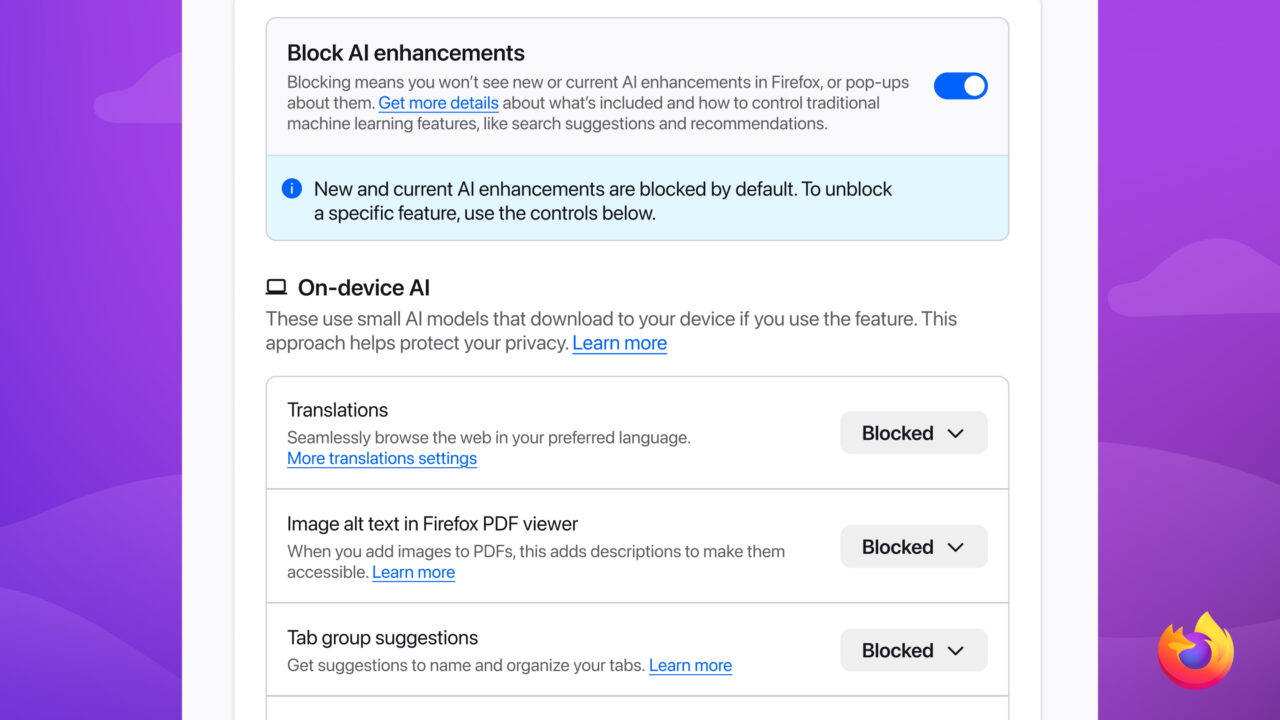
Users will be able to manage the following features individually at launch:
- Translations for browsing the web in a preferred language
- Alt text generation in PDFs to improve accessibility
- AI-enhanced tab grouping
- Link previews that surface key points before opening a page
- AI chatbot embedded in the sidebar, which allows users to choose their preferred assistant while browsing. The sidebar chatbot supports multiple third-party services such as Anthropic Claude, ChatGPT, Microsoft Copilot, Google Gemini, Le Chat Mistral, and more.
Mozilla said these features are optional by design and intended to enhance everyday browsing without being mandatory.
Why Is Mozilla Allowing Users To Control AI Enhancements?
“AI is changing the web, and people want very different things from it,” Mozilla wrote in the blog post announcing the move. “We’ve heard from many who want nothing to do with AI. We’ve also heard from others who want AI tools that are genuinely useful. Listening to our community, alongside our ongoing commitment to offer choice, led us to build AI controls.”
The company emphasized that the goal is not to push AI adoption, but to give users meaningful control over how much AI they interact with inside the browser.
The announcement also follows Mozilla’s appointment of Anthony Enzor-DeMeo as CEO, which occurred in December.
At the time, he said Mozilla would continue investing in AI while keeping such features optional.
“Privacy, data use, and AI must be clear and understandable. Controls must be simple. AI should always be a choice—something people can easily turn off. People should know why a feature works the way it does and what value they get from it,” said Enzor-DeMeo at the time.
His comments come as Mozilla adapts to a more competitive browser landscape.
Industry veterans such as Firefox and Google Chrome now face pressure from newer entrants such as Perplexity, Arc, and OpenAI, many of which position AI as a core component.
Topics For More Insights
Transparency And Mozilla’s Broader AI Strategy
While Mozilla plans to continue developing AI features, it has also stressed transparency and accountability.
As per reports, Mozilla President Mark Surman is working to build what he described as a “rebel alliance” of startups, developers, and public-interest technologists that are focused on making AI more trustworthy and limiting the unchecked power of major AI players.
As such, Mozilla is expected to invest around $1.4 billion to support technology companies and nonprofits, including its own initiatives. These investments are aimed at promoting AI transparency and countering rapid growth in the sector that comes with limited oversight.
First published on Wed, Feb 4, 2026

Enjoyed what you've read so far? Great news - there's more to explore!
Stay up to date with the latest news, a vast collection of tech articles including introductory guides, product reviews, trends and more, thought-provoking interviews, hottest AI blogs and entertaining tech memes.
Plus, get access to branded insights such as informative white papers, intriguing case studies, in-depth reports, enlightening videos and exciting events and webinars from industry-leading global brands.
Dive into TechDogs' treasure trove today and Know Your World of technology!
Disclaimer - Reference to any specific product, software or entity does not constitute an endorsement or recommendation by TechDogs nor should any data or content published be relied upon. The views expressed by TechDogs' members and guests are their own and their appearance on our site does not imply an endorsement of them or any entity they represent. Views and opinions expressed by TechDogs' Authors are those of the Authors and do not necessarily reflect the view of TechDogs or any of its officials. While we aim to provide valuable and helpful information, some content on TechDogs' site may not have been thoroughly reviewed for every detail or aspect. We encourage users to verify any information independently where necessary.
Loading comments...