

Artificial Intelligence
Real Vs. AI: How To Spot Fake AI-Generated Video?
Share
Overview
Get it?
People who didn’t, don’t worry. We’ll get the scoop.
In early 2003, a viral video of Will Smith eating spaghetti surfaced. It was everywhere. People soon realized that it was an AI video. However, it made people laugh.
Today, AI has gone so far that it is so real that you can’t distinguish it. Facial expressions are fluid. Eye movements feel intentional. Lighting behaves as it does in real phone-shot footage.
This rapid leap is driven by advanced generative video tools such as OpenAI’s Sora and Google’s Veo, which can create realistic scenes, people, and motion from simple prompts. While this unlocks massive creative potential, it also breaks a long-standing assumption: that video equals proof.
From scams and impersonation to misinformation and reputational damage, AI-generated videos are already being misused. Knowing how to tell real footage from AI-generated video is no longer optional; it’s essential digital literacy.
However, to spot fake AI-generated videos, you first need to understand what they are—and how they’re created.
TL; DR
-
Deepfake technology is increasingly being used for scams, impersonation, and financial fraud.
-
Video content can no longer be treated as definitive proof of reality.
-
Subtle inconsistencies in visuals, audio, and context often reveal AI involvement.
-
Verifying sources and pausing before sharing is the most effective defense against deception.
What Are AI-Generated Videos?
AI-generated videos are created or manipulated using artificial intelligence rather than traditional filming. Unlike real footage, these videos are often synthesized frame by frame using patterns learned from vast datasets of images and videos.

If you see, early AI videos were mostly deepfakes, where a person’s face was digitally swapped onto another body using Generative Adversarial Networks (GANs). These were easier to detect, often giving off signs such as awkward blinking, distorted facial features, or inconsistent lighting. The Alan Turing Institute puts it: deepfakes typically mimic “a real-life person or scene,” either by creating content from scratch or by manipulating existing content.
Today’s AI video generation has moved beyond face swaps. Modern systems like OpenAI’s Sora and Google’s Veo use diffusion models and text-to-video frameworks to generate entire scenes, people, backgrounds, motion, and lighting, directly from text prompts.
However, AI still relies on prediction, not understanding. It guesses what a scene should look like, which is why subtle errors persist. While these videos are widely used for creative and commercial purposes, the same technology is increasingly exploited for scams, misinformation, and impersonation. This makes detection more important than ever.
Why Does Detecting Fake Videos Matter?
Today, AI-generated videos are actively being used to deceive and defraud. Scammers are using realistic video clips to impersonate executives, family members, and public figures, making fraud far more convincing than text or audio alone.
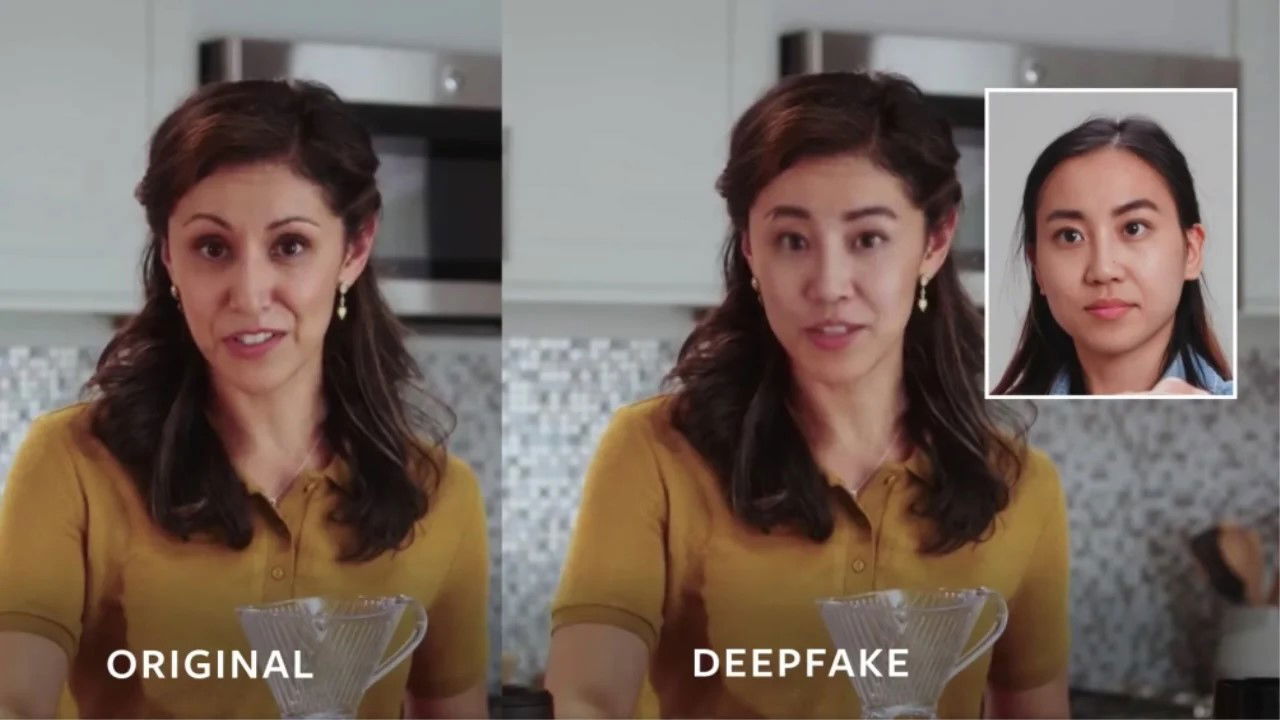
For example, scammers have used AI-generated deepfake videos and messages of actor Steve Burton (best known from General Hospital) to convince a 66-year-old Los Angeles woman that she was in a romantic relationship with him. The victim sent over $81,000 and then sold her family condo for about $350,000 before realizing it was a scam. Burton later confirmed the deepfake audio “sounded like my voice, 100%.”
The scale alone is a red flag. Entrust’s 2025 Identity Fraud Report found that a deepfake attempt occurred every five minutes in 2024 and that there was a 244% year-over-year surge in digital document forgeries.
Law enforcement is also flagging the real-world impact. The FBI has warned about criminals using AI-generated media for sophisticated social engineering and voice/video cloning scams. In December 2025, Axios reported on the FBI’s warning around AI-powered “virtual kidnapping” scams, where fake photos or videos are used as “proof” to demand ransom.
The risk extends into public discourse as well.

Microsoft President Brad Smith put it plainly: “We have to recognize the risks that AI can create in the context of creating abusive content, and one form of abusive content would be AI-generated deep fakes.”
The World Economic Forum frames the broader shift clearly: deepfakes challenge the old assumption that “seeing is believing.”
This is why video literacy now matters as much as media literacy once did. Video was once treated as evidence. Today, it is just another format that demands verification.
Detecting fake AI-generated videos is not just about being smart. It is about protecting trust, credibility, and informed judgment in a world where seeing is no longer believing.
Now, understanding the risk is one thing. Spotting the signs is where it gets practical.
How To Spot An AI-Generated Video?
As AI videos improve, the giveaways have become subtler—but they haven’t disappeared. Most fake videos still reveal themselves through small inconsistencies that don’t align with how the real world behaves. Here’s how:
-
Visual Inconsistencies And Artifacts
Faces may look realistic at first glance but fall apart on closer inspection. Watch for unnatural facial expressions, stiff movements, or eye behavior that feels off, such as irregular blinking or unfocused eye contact.
Lighting is another giveaway. Shadows may not match the environment, and textures (skin, hair, fabric) can appear overly smooth or oddly distorted.
-
Audio And Lip Sync Issues
AI-generated speech often sounds clean but emotionally flat. Lip movements may lag slightly behind the audio or do not match pronunciation exactly, especially during fast speech or complex words.
-
Metadata Clues
Video files often carry hidden data. Missing camera information, unusual creation timestamps, or references to AI tools can indicate a synthetic origin. However, metadata alone shouldn’t be treated as proof.
-
Watermarks And Digital Markers
Some AI-generated videos include invisible or visible markers, such as SynthID, designed to signal AI involvement. These markers are becoming part of emerging industry standards.
-
Plausibility And Source Evaluation
Apply a reality check. Does the scenario make sense? Is the source credible? If the video feels sensational and the origin is unclear, skepticism is called for.

No single clue confirms that a video is fake, but when multiple inconsistencies stack up, visual, audio, contextual, or source-related, the likelihood of AI involvement rises sharply.
So, when human judgment isn’t enough, the right tools and techniques can help confirm what you’re seeing. Let’s see how.
Topics For More Insights
What Are The Tools And Techniques For Detecting Fake AI Videos?
As AI-generated videos become more convincing, detection increasingly relies on a mix of technology, forensic methods, and manual verification. Here’s what you should know:
-
Automated Detection Tools
Specialized AI detection platforms analyze videos for synthetic patterns, manipulation artifacts, and model-specific fingerprints. Tools such as Deepware, Amped Authenticate, and Vastav AI are commonly used to scan suspected deepfake content.
-
Community And Digital Forensics Methods
Digital forensics techniques, such as frame-by-frame inspection, lighting analysis, and metadata examination, help identify inconsistencies that automated tools may miss. Cross-checking videos against trusted databases or known footage can further confirm authenticity.
-
Manual Investigation Tips
Simple checks still matter. Reverse-search key frames, look for earlier versions of the video, and verify the source. If a clip appears suddenly without context or attribution, that absence itself can be a signal.
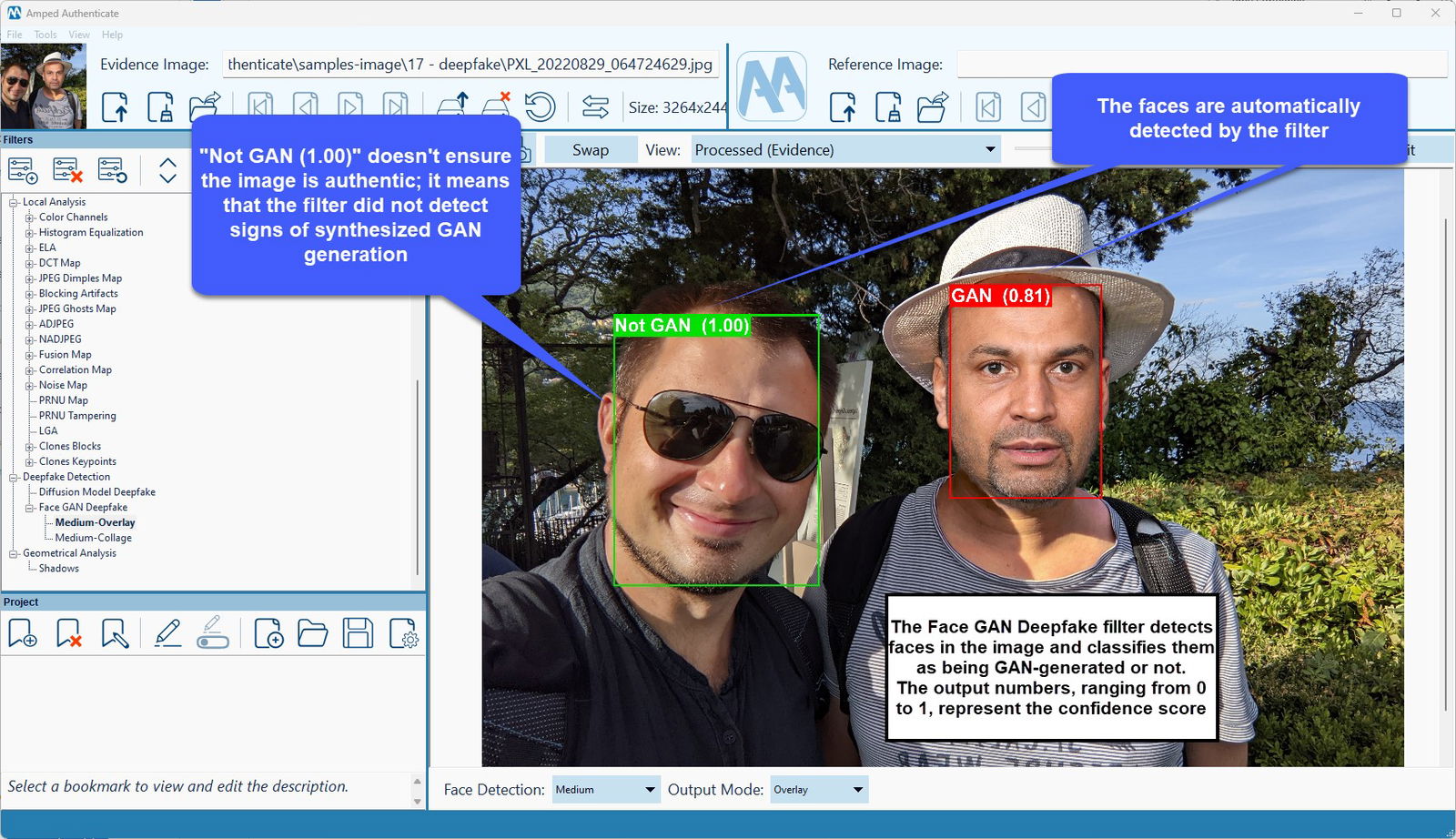
Together, these methods turn suspicion into informed verification, helping separate real footage from synthetic media with greater confidence.
As we wrap this up, we can conclude that even with better tools and sharper instincts, the challenge of AI-generated video will only intensify.
Key Takeaways
AI-generated videos are improving faster than most people realize. What once looked obviously fake now blends seamlessly into social feeds, news cycles, and everyday conversations. Spotting fake AI-generated videos requires a mix of critical thinking, technical awareness, and verification habits. Look for inconsistencies, question the source, and use detection tools when instinct alone isn’t enough. No single method guarantees certainty, but layered skepticism dramatically reduces the risk of being misled.
Looking ahead, the industry is responding. Efforts around content labeling, watermarking, and detection standards aim to make AI-generated media more transparent. Still, technology alone won’t solve the problem. Human judgment remains the final filter.
So, the next time a sensational video grabs your attention, pause before sharing or reacting. In an era where AI can fabricate reality convincingly, the most powerful skill you can develop is the ability to question what you see.
Frequently Asked Questions
Is Making An AI Video Of Someone Illegal?
It depends. Creating AI videos of someone without consent can be illegal if it involves impersonation, fraud, defamation, or violates privacy and likeness laws. Laws vary by country, but misuse is increasingly regulated.
How to Check If A Video Is AI-Generated?
Look for visual or audio inconsistencies, unnatural motion, metadata anomalies, and missing source context, and use AI detection tools to identify them. Always verify the source before trusting or sharing the video.
What Tools Create Fake AI Video?
Common tools include Sora, Veo, Runway, Pika, Synthesia, and DeepFaceLab. These tools can generate or manipulate videos using text prompts, face synthesis, or AI-driven animation.
Tue, Dec 23, 2025

Enjoyed what you've read so far? Great news - there's more to explore!
Stay up to date with the latest news, a vast collection of tech articles including introductory guides, product reviews, trends and more, thought-provoking interviews, hottest AI blogs and entertaining tech memes.
Plus, get access to branded insights such as informative white papers, intriguing case studies, in-depth reports, enlightening videos and exciting events and webinars from industry-leading global brands.
Dive into TechDogs' treasure trove today and Know Your World of technology!
Disclaimer - Reference to any specific product, software or entity does not constitute an endorsement or recommendation by TechDogs nor should any data or content published be relied upon. The views expressed by TechDogs' members and guests are their own and their appearance on our site does not imply an endorsement of them or any entity they represent. Views and opinions expressed by TechDogs' Authors are those of the Authors and do not necessarily reflect the view of TechDogs or any of its officials. While we aim to provide valuable and helpful information, some content on TechDogs' site may not have been thoroughly reviewed for every detail or aspect. We encourage users to verify any information independently where necessary.
Loading comments...