Cyber Security
Cyber Hygiene Best Practices For 2025
Share
Overview
Dexter's Laboratory was such a cool cartoon show, right? The cartoon featuring the super-smart kid with the secret lab below his house may be familiar to those who watched cartoons as kids in the 1990s. Dexter was always coming up with crazy gadgets and inventions, battling his naughty sister Dee Dee and fixing projects that went wrong.
In one episode, Dexter starts his day being woken up ridiculously early. Now, Dexter is more of a "the best ideas strike at midnight" type of guy. He's not really a morning person. He ends up using a comb to brush his teeth and a toothbrush to clean his hair as he is half asleep.

Classic Dexter moment, right?
It’s a funny scene but there’s a lesson hidden in the humor: routines matter. Just as you would follow a routine for brushing your teeth the right way, following the right digital habits—or cyber hygiene—can keep your online world safe from digital germs like malware, phishing attacks and viruses.
Let’s face it, as we head into 2025, cyber threats are going to get smarter, sneakier and way more dangerous!
Whether you're simply managing a social media account or running a multi-million-dollar business, cyber hygiene isn’t optional—it’s essential. So, we insist you explore this guide - think of it as your digital self-care checklist!
However, let's first understand what Cyber Hygiene really means.
Practice #1: Understanding Cyber Hygiene
As the name suggesysrs, cyber hygiene is about keeping your digital environment clean and secure to protect your data from cyber risks. According to Statista, cybercrime costs are predicted to hit $10.29 trillion annually by 2025. Yikes!
Naturally, this means that keeping your digital space tidy is going to be more critical than ever before.
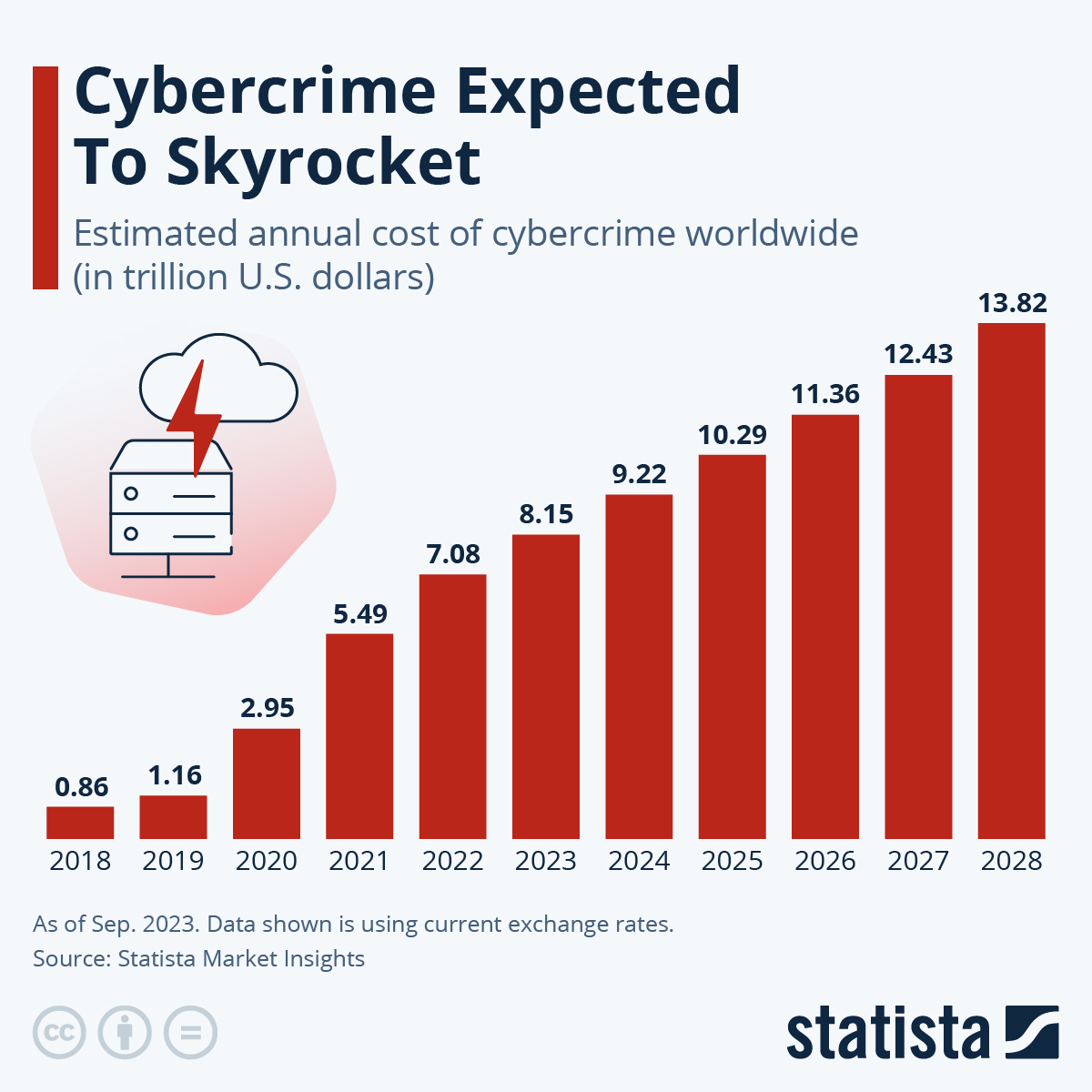
Here are some reasons why:
-
Rising Cyber Threats: Cybercriminals are like Mandark from Dexter's Laboratory—they are always plotting, scheming and finding ways to sneak in and cause chaos.
-
Data Breaches: According to an analysis by ConsumerAffairs, over 100 million victims of data breaches were reported only in 2024. Can you imagine how much worse it might get in 2025!
-
Artificial Intelligence (AI) In Cybersecurity: If you work in cybersecurity, you know that AI can be a gift and a threat. It makes things harder but also helps fight fraud.
Thus, adopting cyber hygiene's best practices in 2025 is like having a daily vitamin boost for your digital life. Everybody and every business needs to do more to protect themselves from online threats. In the end, it's about being proactive instead of reactive!
As we move in 2025, the need for robust cyber hygiene practices will only grow. So, what next?
Practice #2: Implement Strong Password Management
Passwords are like the keys to Dexter's laboratory. He wouldn't use a flimsy key for his lab, right? So, in that sense, why settle for a weak password? As strong as Dexter's lab door, let's make sure you can manage your passwords!
This is how you'd do it:
-
Mix It Up: Use a mix of numbers, letters (both capital and small) and symbols. You could think of it as making a password for Dexter's lab so Dee Dee can't get in.
-
Length Matters: Aim for at least 12 characters. The longer, the better! It's like a long, winding road that hackers hate to travel.
-
Avoid The Obvious: No use of birthdays, pet names, "123456" or personal stuff that someone else may know. You might as well just leave the door open.

You see, a strong password is your first line of defense in the wild west of the internet. The statistics back this up too!
According to a study by NordPass, "123456" and "password" remain some of the most common passwords. It's like choosing a password from the Stone Age!
Well, moving on...
Practice #3: Keep Software Regularly Updated
Well, your personal computer may not have as many innovative ideas as Dexter but its software still need to be updated. It's really one of the most recommended activities for maintaining your digital well-being.
Why are these updates so important? Let’s break it down:
-
Security Patches: Updating software fixes holes that hackers can use.
-
New Features: They often have new features that make them work better.
-
Bug Fixes: They resolve bugs that may cause software to crash or become unstable.
You may think "who remembers to update their software regularly?"
Well, a little reminder never hurts, right?
Practice #4: Adopt Multi-Factor Authentication (MFA)
Ever wonder why superheroes have sidekicks? Even Dexter, too! Yes, he usually worked alongside his Computer and together, they made a formidable team - similar to what multi-factor authentication (MFA) does for your online security.
It's not just another password but a backup that adds an extra layer of protection!

What makes MFA so great is that it requires more than one piece of evidence to verify a user's identity. Typically, it involves:
-
Something You Know - like a password or PIN.
-
Something You Have - like a smartphone or a security token.
-
Something You Are - like a fingerprint or facial recognition.
This combination makes it tougher for cybercrooks to break in. Even Microsoft mentions that MFA can block over 99.9% of account hacks. So why not get your security the friend it needs?
While you may think MFA is a hassle, the alternative is spending weeks cleaning up after a cyber-attack. So what would you prefer?
Exactly!
Practice #5: Always Backup Your Data
An essential practice in cyber hygiene, backing up data helps in recovering after a cyber-attack or data breach. Following the 3-2-1 Backup Rule can be especially helpful.
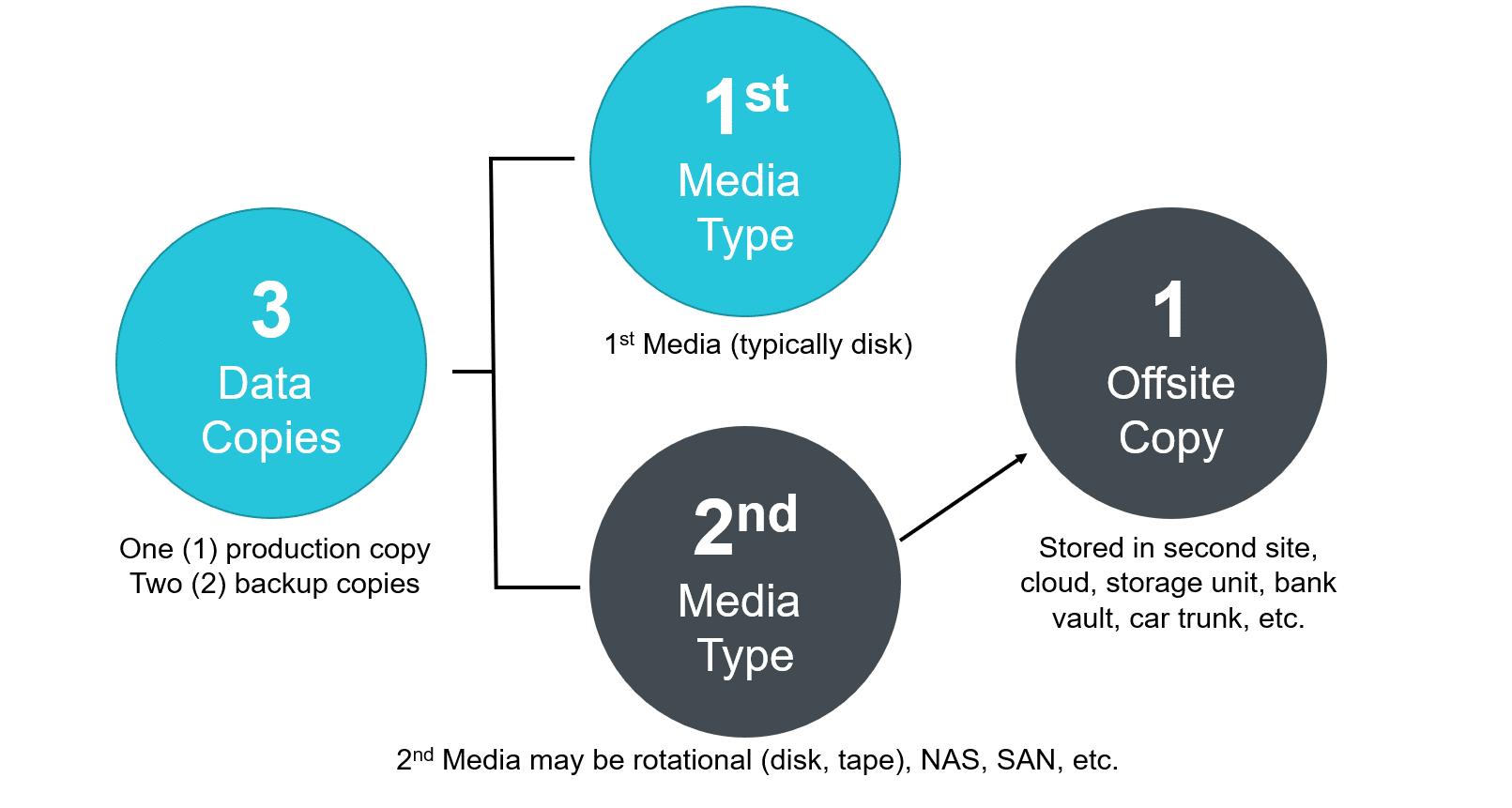
It's easy - just follow these steps:
-
3 Copies: Keep three separate copies of your data, that is, your original data and two backups.
-
2 Different Media: Store these copies on at least two different types of storage media. For example, you could use both a USB drive and cloud storage.
-
1 Offsite: Make sure one of these copies is stored offsite. It’s like having a backup in the cloud or at a friend’s house.
Another way is to back up your data regularly, which is very important, too! Follow these steps to save copies of your files:
-
Schedule Backups: Set a schedule for regularly backing up data, whether it’s hourly, daily or weekly.
-
Automate The Process: Use software that automates data backups to give you time to focus on more interesting things!
-
Verify Backups: Make sure your backups are working every so often, so it is actually there to help you in case of a data disaster.
Skipping regular data backups is having only one key to the house. Sure, nothing might happen but the day you lose the key....
Practice #6: Cultivate Safe Browsing Habits
In a world where the internet is as essential as morning coffee, having safe browsing habits is critical. However, what does it mean to browse safely? Well, it's about being smart online, just like you would be cautious crossing a busy street.
Here's how you ensure safe browsing:
-
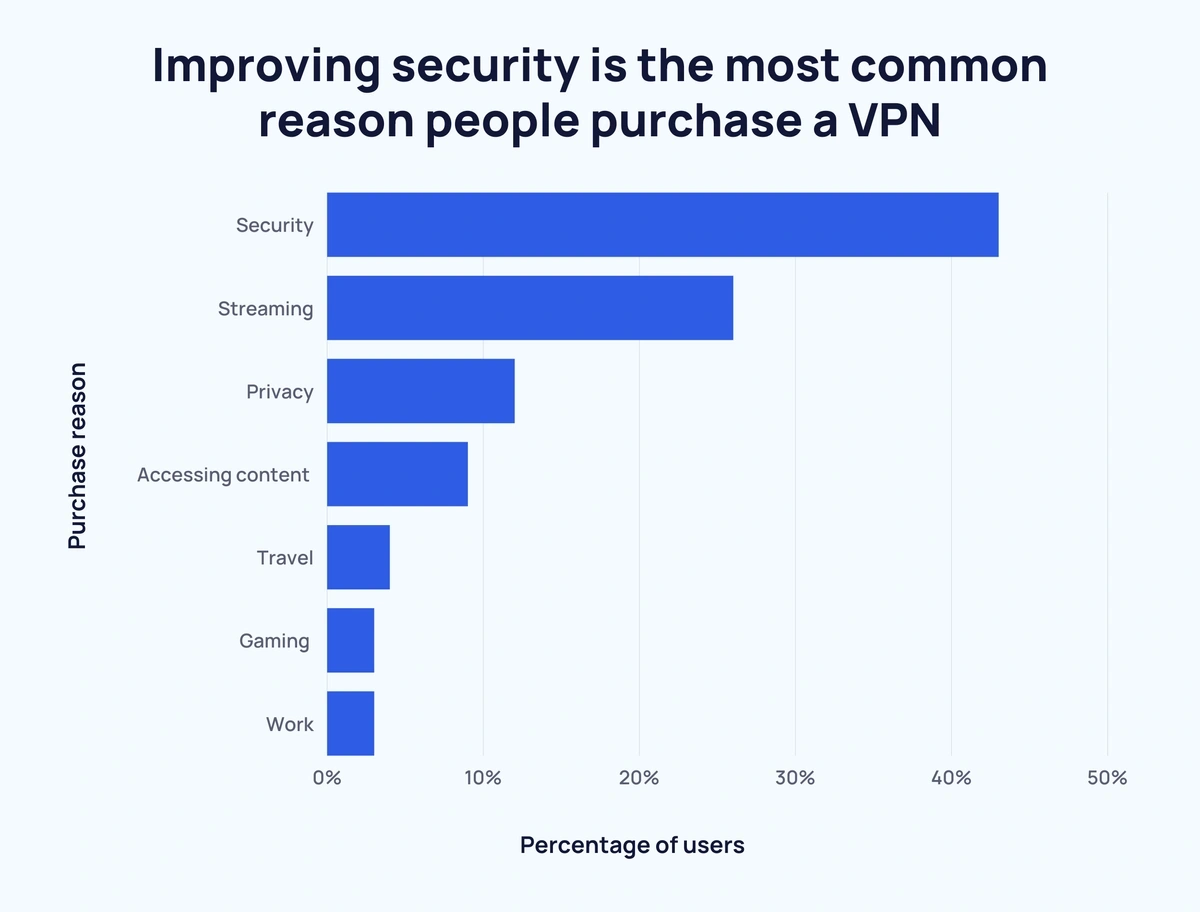
Use A Virtual Private Network (VPN): A VPN encrypts your internet link using a "safe tunnel," making it harder for hackers to steal your information.
-
Avoid Accessing Sensitive Information: When using public Wi-Fi, steer clear of logging into bank accounts or entering personal information.
-
Enable Two-Factor Authentication: We've said it before but we'll say it again! MFA adds an extra layer of security by requiring a second form of verification. Think of it as having a double lock on your front door!
Safe browsing isn't just about avoiding scams or identity theft. It also helps keep your data safe and your internet footprint small.
Practice #7: Use Antivirus And Anti-Malware Solutions
Anti-virus and anti-malware solutions are like digital bodyguards that fend off every nasty malware and virus attack. A report from Keepnet Labs revealed that 81% of businesses experienced malware attacks in 2024, highlighting the importance of adopting this defense mechanism.

These software are hence designed to prevent such digital rebellions by scanning and removing malicious software before it can cause harm.
Here's how they benefit:
-
Real-Time Security: Antivirus solutions offer real-time scanning, so they’re always looking for suspicious activity.
-
Automatic Updates: Just like we never missed the latest episode of Dexter's Lab, make sure you never miss your antivirus software's updates.
-
Comprehensive Scans: Regular deep scans can help in identifying and eliminating hidden threats in your system.
Plus, antivirus solutions are not just for computers. With mobile malware growing each year, you need to protect your smartphones, too!
Practice #8: Securely Use Public Wi-Fi
Most of us use public Wi-Fi networks when we want to work outdoors on a weekend, right? Well, this can be risky as hackers can grab personal data on your device. According to a recent Forbes news, 40% of consumers have potentially put their information at risk while using public Wi-Fi. So, why gamble with your data when the stakes are so high?
First, let's list the risks of using public Wi-Fi:
-
Data Interception: It's easy for hackers to read data that's being sent over public networks, like passing notes in class that the teacher catches.
-
Man-In-The-Middle Attacks: Cybercriminals can secretly relays and possibly alter the communication between two parties who believe they are directly communicating with each other.
-
Malware Distribution: Some malicious networks are set up to automatically distribute malware to connected devices.
Here, adopting a zero-trust security model is necessary to fight these threats. You should never trust someone and should always check them out. To do that would be like thinking that every stranger is an alien in disguise until proven otherwise. This model requires strict identity verification for every individual and device accessing resources on the network, whether from inside or outside the organization.
Pretty smart, right?

As we connect more gadgets to the Internet, securing the Internet of Things (IoT) devices will become critical. Think about your smart fridge becoming a spy!
Keeping your IoT gadgets away from public Wi-Fi can help avoid this risk. Use private, safe networks and make sure to update the software on your devices often.
Following this will help protect your digital life, not just your information. The most important thing is to stay alert and safe when using public Wi-Fi networks.
Practice #9: Train Employees For Threat Awareness
Fun Fact: IBM Security says that 95% of cybersecurity breaches are due to human error. Well, it's not so fun, we guess.
This is like Dexter losing control of his entire lab because Dee Dee pressed the one big red button labeled “Do Not Push.” Thus, threat awareness becomes crucial and employee training even more so when it comes to potential disasters.
Why is this important? Here's why:
-
Understanding Threats: Employees learn to identify threats like phishing, malware and cyberstalking.
-
Building Confidence: Knowledgeable employees are confident and less likely to fall for scams.
-
Creating A Security Culture: A well-trained team fosters a culture of security, making everyone an active part of the defense strategy.
You see, training isn't just about knowing what to do; it's about knowing what not to do. as well
Remember that being aware is only the first step. You should teach your employees how to spot possible threats and react accordingly. This will help keep your workplace safe and secure!
Wrapping It Up!
As we wrap up our chat on cyber hygiene for 2025, let's keep it real. We shouldn't slow down when we're trying to stay safe in the modern world. A good dose of doubt, stronger passwords, regular updates and employee training can go a long way.
If you ever feel overwhelmed, just remember: even the best of us have accidentally sent a text to the wrong person. So, keep learning, stay curious and don't be afraid to ask for help when you need it.
Let's make our digital lives better, safer and smarter in 2025!
Frequently Asked Questions
What Is Cyber Hygiene And Why Is It Important?
Cyber hygiene is like keeping your computer and online activities clean and safe, just like you wash your hands to stay healthy. It's important because it helps protect your personal information from hackers and keeps your devices running smoothly.
How Can I Create A Strong Password?
To make a strong password, use a mix of letters, numbers and symbols. Try to make it at least 12 characters long. Avoid using easy-to-guess words like your name or 'password'.
Why Should I Update My Software Regularly?
Updating your software is important because it fixes security holes that hackers might use to gain access to your device. It also ensures that your apps and programs run better.
Mon, Dec 30, 2024

Enjoyed what you've read so far? Great news - there's more to explore!
Stay up to date with the latest news, a vast collection of tech articles including introductory guides, product reviews, trends and more, thought-provoking interviews, hottest AI blogs and entertaining tech memes.
Plus, get access to branded insights such as informative white papers, intriguing case studies, in-depth reports, enlightening videos and exciting events and webinars from industry-leading global brands.
Dive into TechDogs' treasure trove today and Know Your World of technology!
Disclaimer - Reference to any specific product, software or entity does not constitute an endorsement or recommendation by TechDogs nor should any data or content published be relied upon. The views expressed by TechDogs' members and guests are their own and their appearance on our site does not imply an endorsement of them or any entity they represent. Views and opinions expressed by TechDogs' Authors are those of the Authors and do not necessarily reflect the view of TechDogs or any of its officials. While we aim to provide valuable and helpful information, some content on TechDogs' site may not have been thoroughly reviewed for every detail or aspect. We encourage users to verify any information independently where necessary.
AI-Crafted, Human-Reviewed and Refined - The content above has been automatically generated by an AI language model and is intended for informational purposes only. While in-house experts research, fact-check, edit and proofread every piece, the accuracy, completeness, and timeliness of the information or inclusion of the latest developments or expert opinions isn't guaranteed. We recommend seeking qualified expertise or conducting further research to validate and supplement the information provided.
Loading comments...