

Artificial Intelligence
AI-Enabled vs. AI-Native platforms: The key differences
Share
TL;DR
-
AI-Enabled platforms add AI features on top of an existing product (often via APIs, add-on modules, or copilots).
-
AI-Native platforms are built with AI as the foundation, so workflows, data flow, and interfaces are designed around model behavior from day one.
-
McKinsey’s 2024 State of AI reports 65% of organizations now use generative AI in at least one business function, nearly double the prior year.
-
AI-Enabled is typically faster to roll out with lower change-management risk, but AI depth is constrained by legacy architecture.
-
AI-Native typically delivers stronger real-time context and tighter feedback loops, but carries higher migration, integration, and governance ramp-up risk.
-
The best choice depends on your current stack, your risk tolerance, and whether AI is an enhancement or the core engine of the business.
Introduction
If you’ve ever watched Iron Man suit up, you know the difference between bolting a gadget onto a normal system and building the whole thing around intelligence. One approach adds smart as an accessory. The other makes intelligence the operating system.
Imagine a historic heritage building. It’s sturdy and full of character, but to make it smart, you run external wires for Wi-Fi and plug in smart bulbs. It works, but the bones of the house weren’t designed for it. Now imagine a modern living skyscraper designed from the first blueprint to regulate its own temperature, optimize energy flow, and adapt to the people inside.
That’s the difference between AI-Enabled and AI-Native platforms. One adds intelligence as a feature. The other uses intelligence as its foundation. At today’s adoption levels, knowing what sits under the hood is a business decision, not just a technical one.
Where Does AI Live In The System?
Most platform comparisons get distracted by features: how many copilots, how many chat windows, how many AI workflows. That’s not the real line.
The real difference is where AI lives in the system:
-
AI-Enabled: The product is still the product. AI is added as an assistant, a module, or an integration. It can be powerful, but it’s ultimately constrained by the legacy data model, workflow logic, and how much context the core system can expose.
-
AI-Native: The platform is designed around model behavior from day one. Data pipelines, context handling, permissions, and user flows are built for AI to operate continuously, not occasionally.
Now that we have understood where AI falls, let’s understand both the platforms.
What Are AI-Enabled Platforms?
AI-enabled platforms are typical software solutions that have been enhanced with AI or machine learning capabilities added on top of an existing architecture. The core product was created and built before AI was even on the roadmap. AI was then overlaid on top of the original system by developers via APIs, third-party model connections, or purpose-built modules.
It was first built on top of an underlying infrastructure for workflow management, data storage, or user interaction. The structure itself is not AI; AI is an add-on to that framework. It is like putting a smart assistant into a building that existed long before the assistant arrived.
Understanding what they actually deliver for a business is where the real conversation begins.
Key Features And Benefits Of AI-Enabled Platforms
The major advantage here is continuity. Companies that are already using a platform won’t need to disrupt their workflows or retrain their people to get AI capabilities.
A PwC October 2024 Pulse Survey found that 49% of technology leaders have AI fully integrated into their core strategies, and for the remaining 51%, AI-enabled tools offer a low-friction on-ramp.
Key characteristics of AI-Enabled platforms include:
-
Backward compatibility with existing data, workflows, and user habits.
-
Faster enterprise adoption because teams already know the product.
-
Vendor-managed AI updates that do not require system overhauls.
-
Established compliance, security, and audit frameworks proven over years of use.
The limitation is that the original architecture establishes an upper bound. AI can only go as deep as the platform is built. Since the data pipelines and logic layers were not created for AI, the model does less than it would on a dedicated system.
Now, let's look at the other side of the coin and meet platforms that were never anything other than AI from day one.
What Are AI-Native Platforms?
AI-Native platforms are created from the beginning with AI as a core design principle. There is no product before AI. Every data pipeline, interface, and processing layer was designed to accommodate AI operations from day one.
As of late 2024, at least 47 AI-native applications were generating over $25 million in annual revenue, backed by $8.5 billion in total category investment. The more important question is what that foundation actually makes possible for the businesses that use it.
Key Features And Benefits Of AI-Native Platforms
AI-native systems bypass the constraints of legacy software by building directly on modern hardware. Rather than processing data in batches, they use real-time pipelines to ensure the product logic is always powered by the most current model insights.
Key characteristics of AI-Native platforms include:
-
Real-time model integration without workarounds or added latency.
-
Higher processing speed due to purpose-built data pipelines.
-
Better context retention across sessions and user interactions.
-
Flexibility to update AI capabilities without touching unrelated legacy code.
-
Built on modern cloud-native infrastructure from the very beginning.
The trade-off is that these platforms are newer. Smaller track records, fewer out-of-the-box business integrations, and less mature compliance frameworks are serious problems for regulated industries or organizations with complicated procurement and security requirements.
The clearest way to see those differences is to put them side by side and compare what actually changes between them.
Head-To-Head: AI-Enabled vs. AI-Native - Core Differences
It doesn't matter which platform's product page has more AI tools. It has to do with the depth of the architecture and where AI lives in the system.
| Key Aspect | AI-Enabled Platforms | AI-Native Platforms |
| Processing speed | Often depends on API calls to external models, which can introduce latency and inconsistent context. | Built for real-time pipelines, so model outputs can stay closer to live data and workflows. |
| Risk profile | Lower operational risk due to mature product history, existing controls, and familiar procurement paths. | Higher adoption risk due to newer tooling, evolving best practices, and heavier enablement needs. |
| Integration depth | AI is typically layered on top of existing workflows and data structures. | AI is embedded across layers, shaping workflow design, data flow, and UX from the start. |
| Switching costs | Lower upfront disruption because teams stay on the same core system and add AI features incrementally. | Higher upfront investment due to migration, change management, and integration work before compounding value shows up. |
| Governance and auditability | Usually inherits established security, audit trails, and admin controls, but AI governance may be uneven across modules. | Can offer stronger native AI governance, but maturity varies, and regulated buyers may need more validation. |
| Context and memory | Context is often limited to what the legacy system exposes; continuity across sessions can be fragmented. | Better support for persistent context, feedback loops, and continuity across workflows (if designed responsibly). |
| Failure modes | When AI fails, the core product still runs; AI features degrade, but the platform remains usable. | If AI is central, outages or model/API failures can affect the product’s core value unless resilience is designed in. |
Differences in the real world are where those choices actually matter, so let's look at the companies already living inside both models.
Real-World Examples
Below are some examples of both platforms:
AI-Enabled In Practice
-
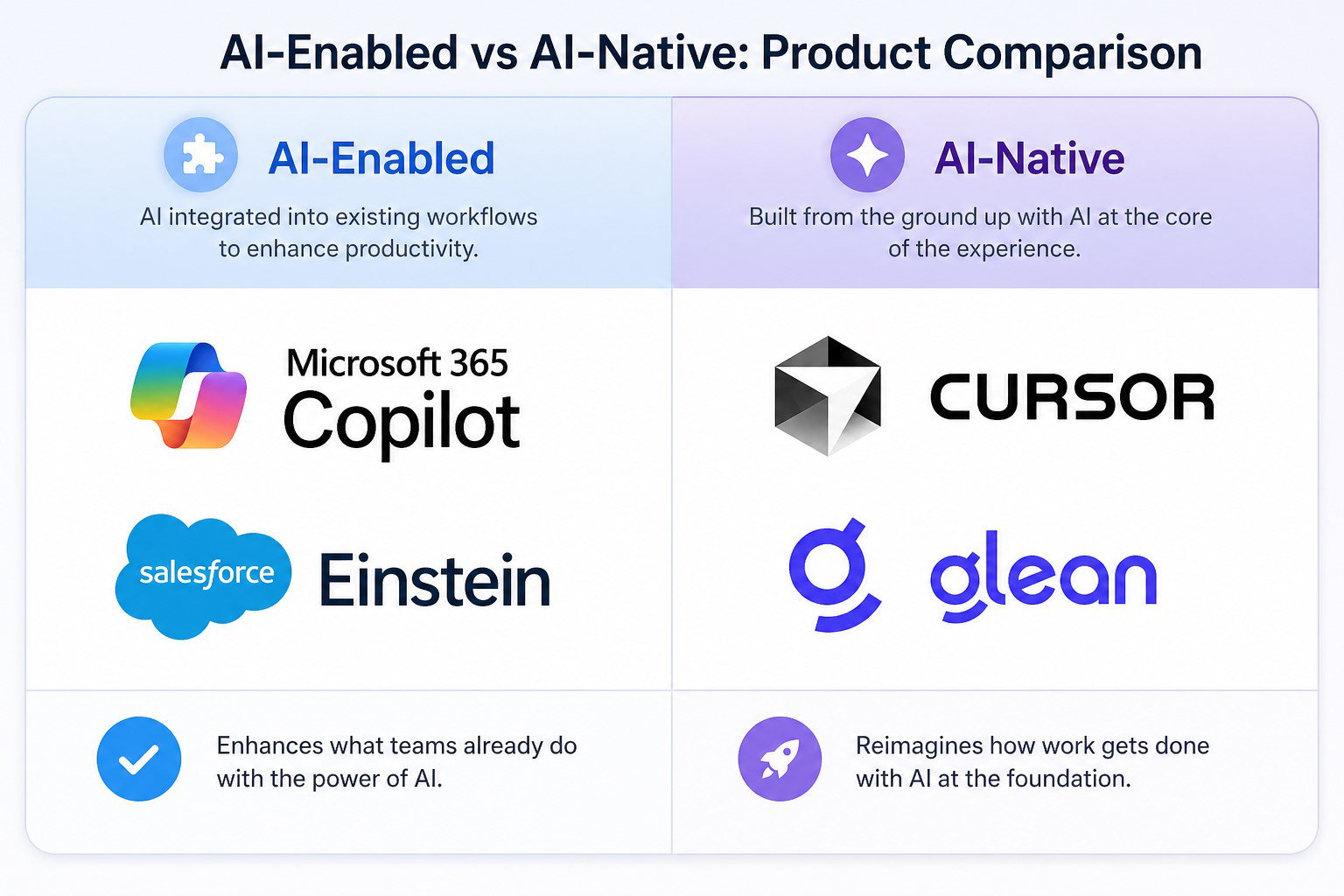
Microsoft launched Copilot for Microsoft 365 in 2023 and expanded its capabilities through 2024 and into 2025. Word, Excel, and Teams did not change structurally.
-
Copilot was layered on as an assistant that connects to Azure OpenAI services running in the background.
-
Salesforce Einstein works the same way, adding predictive analytics and generative summaries to a CRM platform that has operated for over two decades without restructuring its core.
AI-Native In Practice
-
Glean was built entirely to index and surface enterprise knowledge using AI. There is no pre-AI version of Glean. By early 2025, the company had surpassed $100 million in annual recurring revenue.
-
Harvey, designed for legal professionals, uses large language models as the foundation for every feature it offers, from contract review to legal research, and reached $100 million in annual revenue by early 2025.
-
Cursor, the AI-native code editor, was built around the assumption that AI and developers work together on every line of code. By mid-2025, it was in use across more than half of the Fortune 500.
Understanding how the underlying architecture of each type shapes what those businesses actually achieve brings the picture into full focus.
How Architecture Shapes Business Outcomes
Architecture is not a technical detail to leave to engineers alone. It has direct consequences for output quality, speed of iteration, and total cost over time.
AI-Enabled platforms reduce the change management burden significantly. Teams already know the product. Rollouts are faster, and training costs stay lower. The trade-off is that AI output quality is limited by how much the legacy system can expose to the model and on what timeline.
AI-Native platforms allow for tighter feedback loops. When data flows are built for AI in real time, outputs are more accurate and context-aware. Gartner’s August 2025 forecast predicts that 40% of enterprise applications will include task-specific AI agents by the end of 2026.
The useful summary: Platforms that use AI help you get started faster. Platforms that are built with AI help you get farther.
The limits of what AI can do for your business tomorrow will depend on the design you choose today.
Which Should Your Business Choose? A Decision Framework
There is no single right answer. The decision depends on where your business is today and where it needs to be in the next few years.
Choose An AI-Enabled Platform If
-
Your team is deeply invested in an existing product, and a full migration is not practical.
-
Your goal is to enhance current workflows rather than redesign them.
-
You need proven compliance and security certifications that take years to establish.
-
Speed of deployment matters more than depth of AI performance.
Choose An AI-Native Platform If
-
You are building a new product or business function from the ground up.
-
AI performance and accuracy are central to your competitive edge.
-
Your technical team can manage newer, less proven infrastructure.
-
Long-term AI scalability is a strategic business priority.
In 2026, the answer for most medium-sized to big businesses will be a mix of both: AI-Native tools are used in new, high-value use cases where speed and accuracy are most important, while AI-Enabled systems handle routine tasks.
Let’s wrap up.
Conclusion
Going back to our original comparison, you can certainly live comfortably in a heritage home with smart upgrades. It serves its purpose and feels familiar. But as the climate of the business world changes, the limitations of those old bones will become more apparent.
Not every business needs a living skyscraper today. AI-enabled platforms provide vital value for those not ready for a total shift. However, as global AI spending hits $2.5 trillion, the goal should be to move toward an architecture that doesn't just accommodate growth but actively accelerates it.
We believe the future belongs to those who build on a foundation of intelligence, not just those who add it as a finishing touch.
Frequently Asked Questions
How Do You Tell If A Platform Is AI-Native Or AI-Enabled?
A platform is usually AI-enabled if AI is added as a layer (copilot, plugin, API integration) and the core product still works normally without it. A platform is usually AI-native if AI is foundational, meaning workflows, data pipelines, and user experiences are designed around model behavior from day one. A quick test: remove the AI layer. If the product’s core value collapses, it’s likely AI-native.
Is An AI-Native Platform Always Better Than An AI-Enabled Platform?
Not always. AI-native platforms can deliver better real-time context, faster iteration loops, and deeper automation, but they often come with higher migration effort and governance ramp-up. AI-enabled platforms are usually faster to deploy with lower change-management risk, but their AI capabilities are constrained by legacy architecture. The better choice depends on whether AI is an enhancement or the operating core of the workflow.
What Should Enterprises Evaluate When Choosing AI-Native Vs AI-Enabled Platforms?
Enterprises should evaluate the architectural and operational factors that drive long-term cost and performance: latency and real-time data flow, context handling and memory boundaries, permissioning and audit trails, model governance (versioning, evals, rollback), integration depth, and failure modes. If a vendor can’t clearly explain these, the platform is likely an AI-enabled add-on rather than truly AI-native.
Thu, Apr 30, 2026

Enjoyed what you read? Great news – there’s a lot more to explore!
Dive into our content repository of the latest tech news, a diverse range of articles spanning introductory guides, product reviews, trends and more, along with engaging interviews, up-to-date AI blogs and hilarious tech memes!
Also explore our collection of branded insights via informative white papers, enlightening case studies, in-depth reports, educational videos and exciting events and webinars from leading global brands.
Head to the TechDogs homepage to Know Your World of technology today!
Disclaimer - Reference to any specific product, software or entity does not constitute an endorsement or recommendation by TechDogs nor should any data or content published be relied upon. The views expressed by TechDogs' members and guests are their own and their appearance on our site does not imply an endorsement of them or any entity they represent. Views and opinions expressed by TechDogs' Authors are those of the Authors and do not necessarily reflect the view of TechDogs or any of its officials. While we aim to provide valuable and helpful information, some content on TechDogs' site may not have been thoroughly reviewed for every detail or aspect. We encourage users to verify any information independently where necessary.
Loading comments...