

Audio and Visual Technology
What Is Auracast And How Does It Revolutionize Audio Streaming?
Share
Introduction
Yes? Then you'll easily understand what Auracast is and how it works.
No? Then we'll tell you what a silent disco is and how it relates to Auracast.
A silent disco is just like any other disco, except that attendees listen to music through headphones rather than speakers blaring around the disco. Such events often feature multiple DJs or radio channels, each with a range of music for partygoers to choose from.
These headsets can come with LED lights that indicate which channel they're connected to. The music is broadcast via radio transmitters to wireless headphones, which usually offer a range of up to 1,000 feet.
The benefits here include personalized music choices, reduced noise pollution, and a fun experience that could turn really strange if you take off your headphones. Imagine people dancing to silence, and all you hear is feet tapping the dance floor and the occasional "Woo," "Yeah," or "This is my jam!"
It is not even coordinated. What if one group is doing the Macarena and the other is hopping around in Gangnam Style! #ChaosAtTheDisco
Either way, it forms the base for an awesome technology: Auracast.
Auracast is like a silent disco or an age-old radio standard, FM radio broadcasts, where multiple users can tune into one radio channel. It uses Bluetooth technology, brings in high-quality listening, and does not require complex or expensive equipment.
Just one device that can connect to many audio receivers.
Of course, there are a lot more benefits than just collaborative listening, and that is what we are about to explore. Dive in now!
TL;DR
-
Auracast is a Bluetooth broadcast feature that lets one device stream audio to multiple compatible devices simultaneously.
-
It works like a radio station, allowing users to tune into available audio streams without traditional one-to-one pairing.
-
Powered by Bluetooth LE Audio, it offers better range, lower battery consumption, and improved sound quality.
-
It enhances public spaces such as airports, gyms, cinemas, and lecture halls by enabling private, high-quality listening.
-
Auracast also advances assistive listening by providing clearer, more accessible audio for people with hearing challenges.
What Is Auracast?
Auracast broadcast audio is a new Bluetooth capability that allows users to share audio and enhance the way they engage with others and the world around them, delivering "life-changing audio experiences."
It's Bluetooth-enabled, so, of course, experiences are delivered wirelessly. Also, it's powered by Bluetooth LE, which allows for wider reach, lower battery consumption, and better connectivity.
According to the makers, an unlimited number of in-range Auracast receivers can join in a broadcast if they're in range of an Auracast transmitter.
This isn't restricted to phones or speakers; people can connect their headphones to laptops and televisions in public and private spaces. Imagine you're watching a movie with your friends at home, but you don't have to strain to hear the dialogue over talkative viewers (aren't they just annoying?).
Working professionals, you can groove to the latest songs with your favorite colleagues even if you're sitting at separate desks while working (like I'm doing now!)
They even connect to hearing aids to stream high-quality, low-latency audio.
Basically, users can connect headphones, earbuds, or hearing aids to a TV, smartphone, tablet, laptop, or a PA system.
That is, if all included components are Auracast-compatible and within range of an Auracast transmitter to receive an Auracast broadcast.
Sounds too complicated? Let's simplify it by checking out how it works.
What Are The Important Terms Related To Auracast?
Auracast this. Auracast that.
Here are the key terms you need to know before we dive into how it works.
-
Auracast Broadcast Audio
A type of Bluetooth audio that lets one device send sound to many devices at the same time.
-
Auracast Transmitter
A Bluetooth device that can transmit an Auracast broadcast. These could be TVs, smartphones, tablets, laptops, public announcement (PA) systems, and more.
-
Auracast Receiver
A Bluetooth device that can receive a broadcast. This spans headphones, earbuds, hearing aids, and more.
-
Auracast Assistant
A Bluetooth device that assists an Auracast receiver in receiving a broadcast. These include smartphones, smartwatches, hearing aid remotes, and more.
-
Auracast Broadcast
A Bluetooth audio signal sent from one device to multiple devices. It can include one or more audio streams.
-
Auracast Stream
An individual audio feed within an Auracast broadcast.
-
Auracast Advertisement
Bluetooth signals that share one or more audio streams (left and right stereo audio streams) and announce an Auracast broadcast and share details so devices can discover and connect to it. These details include name, content, codec configuration, etc.
How Does Auracast Work?
Auracast here. Auracast there.
There are three steps to how Auracast works. "Joining an Auracast broadcast will be as easy as 1, 2, or 3," says its website, and it really is that easy!
-
Step 1: An Auracast transmitter begins broadcasting advertisements that include information such as the name, content, and codec configuration.
-
Step 2: Auracast assistants scan for such ads, providing users with a selection of broadcasts to join.
-
Step 3: Once a broadcast option is selected, the assistant provides the receiver the information needed to join the broadcast.
It's similar to how you scan for available Wi-Fi networks when connecting to the internet.
After turning on your device's Wi-Fi, your phone scans for nearby networks. From that list, select the one you want to connect to, then enter the password. Behind the scenes, your device and the router perform a secure handshake to authenticate each other and exchange encryption keys needed to establish a protected connection.
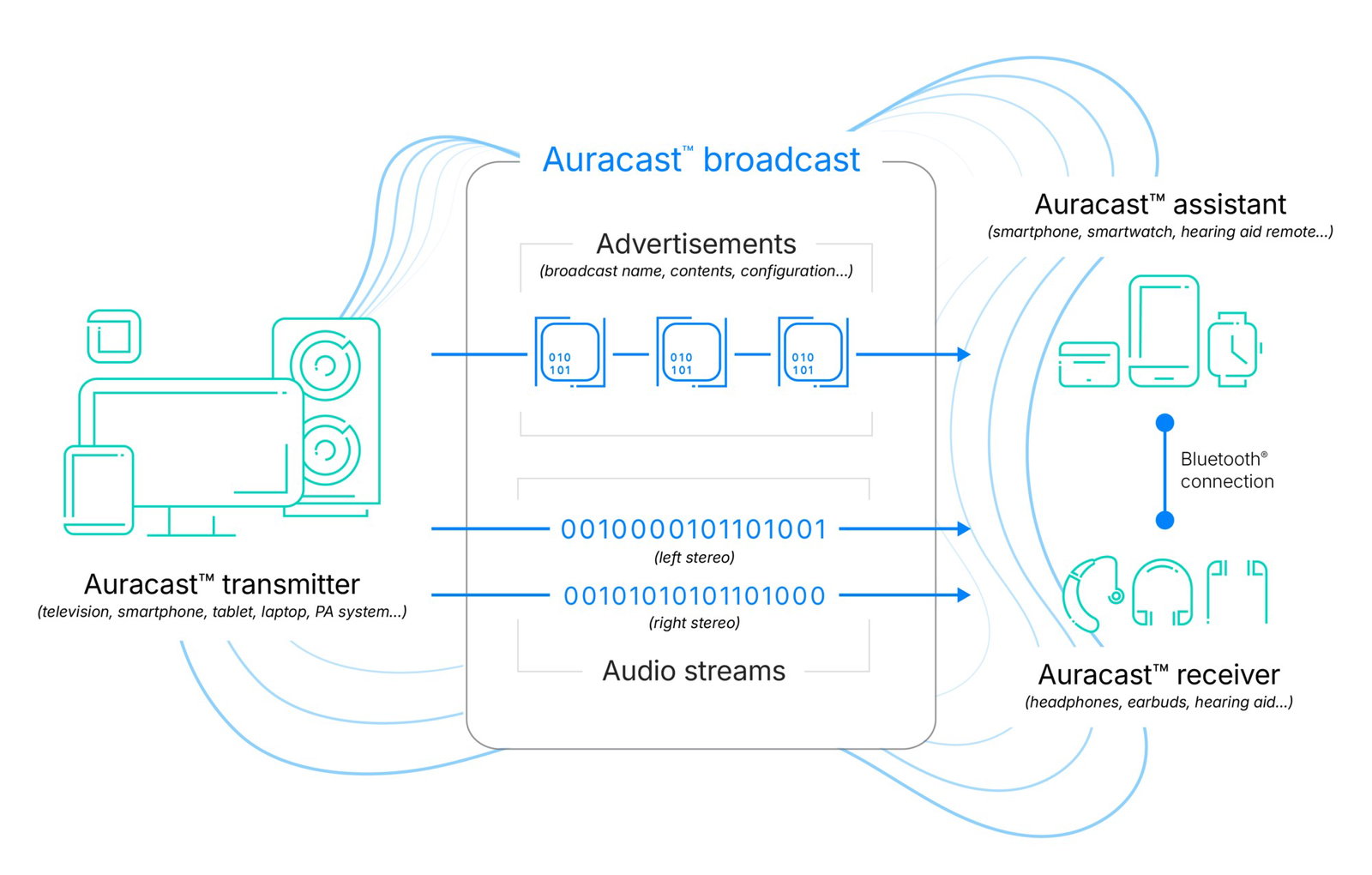
It's also similar to how traditional FM radio stations work. The Auracast transmitter is the radio station; the radio antenna and radio deck are the assistants; the signal sent between the two is the broadcast; and your car speakers are the receiver.
Get it?
Auracast Revolution In Bluetooth Audio Broadcasting
Auracast up. Auracast down.
Auracast is touted as the next generation of assistive listening technology, improving audio accessibility and promoting better living through better hearing.
Its specialty lies in its wide range of use cases.
-
Use Case 1: Public Spaces
Auracast can be used in public spaces that cater to small and large crowds (unlimited connectivity, remember?). This means it can be used at places ranging from airports and exhibitions to gyms, cinemas, and even your own house.
You're probably thinking, "Wait! These places could just use PA systems!"
You'd be right in thinking that way, and a lot of them do. However, those are used for messages that everyone NEEDS to hear. Blaring music, podcasts, or announcements from those systems may not be what everyone WANTS. This is why many of these places have silent screens.
However, if people could connect their own listening devices to the silent screens at such locations, they could enjoy a high-quality visual and audio experience!
Such places include airports, waiting rooms, lecture halls, gyms, and business meetings. It also extends to places that offer tours, such as museums, convention centers, and tourist attractions. With the option of hosting multiple channels, people can listen to broadcasts in their preferred language.
Et voilà! -
Use Case 2: Assistive Listening Systems (ALS)
The Bluetooth SIG (Special Interest Group), a not-for-profit, member-driven organization, worked closely with the hearing aid industry to help overcome challenges observed in traditional assistive listening systems (ALS).
This is where Auracast comes in as the next generation of ALS technology, enabling broader deployment and increased availability of ALS for people with hearing loss. Not just an advanced ALS with enhanced audio capabilities and improved privacy; it's also easier and cheaper to deploy. -
Use Case 3: Advocates And Developers
Interested parties can check out how to advocate for Auracast in public locations.
To further push this, the Bluetooth SIG has published documents to advocate the benefits of Auracast with stakeholders in public locations across numerous location-based use cases.
Furthermore, developers looking to include the technology in their Auracast products can leverage implementation guides published by the SIG to create a consistent, satisfying user experience. This includes insights on how to build, qualify, and brand their products.
Who Has Auracast Helped?
Auracast in. Auracast out.
Auracast has helped numerous people around the world, from tech giants and CTOs to researchers and hearing loss advocates.
What better way to learn about its benefits than hearing it straight from the horse's mouth?
"The ability to pair your smartphone to your earbuds or headphones using Bluetooth technology has brought new levels of enjoyment and convenience to personal audio and is now a part of the fabric of our lives. The introduction of Auracast broadcast audio will enable us to move from personal wireless listening experiences to shared wireless listening experiences, unlocking the full potential of wireless audio and bringing even more value and delight to our customers."
- Zeng Xuezhong, SVP and President of the Smartphone Department, Xiaomi Corporation.
"There are a lot of people who either don't have diagnosed hearing loss or hear normally but they still have difficulty understanding speech in reverberant rooms like a cathedral or like a meeting facility. Now they can just pop in a set of earbuds and tune to the Auracast channel and get that crystal clear audio even though they don't own hearing aids."
- Andrew Bellavia, Hearing Industry Professional and Hearing Loss Advocate.
"While current assistive listening systems, such as inductive loops, have been providing great benefit to people with hearing loss, they suffer from a number of challenges that have limited their deployment, including poor quality, high cost, and lack of privacy. Auracast™ broadcast audio is well positioned to become an advanced, new assistive listening system that will be significantly easier and lower cost to deploy while offering higher audio quality and greater privacy, improving audio accessibility and promoting better living through better hearing."
- Nick Hunn, CTO of WiFore
Topics For More Insights
Conclusion
Auracast isn't just another Bluetooth upgrade. It's a shift from personal listening to shared, seamless audio experiences with privacy intact. From silent discos to airports and boardrooms, it removes wires, noise, and complexity from the equation. As devices become compatible and adoption grows, this technology could quietly redefine how we connect, communicate, and enjoy sound, music, and other audio experiences.
FYI, there are 54 mentions of Auracast in this article's main body copy (including the one in this line).
Frequently Asked Questions
What Is Auracast, And How Is It Different From Regular Bluetooth Audio?
Auracast is a new Bluetooth broadcast feature that allows one device to stream audio to multiple devices simultaneously. Unlike traditional Bluetooth, which pairs two devices in a one-to-one connection, Auracast works like a radio station. A single transmitter, such as a TV or smartphone, can broadcast audio to many compatible headphones, earbuds, or hearing aids within range. This makes it ideal for shared listening in public spaces, workplaces, homes, and events, without the need for complicated pairing.
Which Devices Support Auracast, and Do I Need Special Equipment?
To use Auracast, you need devices that are Auracast-compatible and support Bluetooth LE Audio. A transmitter can be a TV, laptop, smartphone, tablet, or public address system that supports the feature. Receivers can include compatible headphones, earbuds, or hearing aids. In some cases, a smartphone or smartwatch can act as an assistant to help discover and join available broadcasts. You do not need expensive or complex infrastructure, but all participating devices must support Auracast to connect successfully.
How Does Auracast Improve Audio In Public And Professional Environments?
Auracast enhances audio experiences in places like airports, lecture halls, cinemas, gyms, museums, and offices by allowing people to tune into specific audio streams directly on their personal devices. Instead of relying on loudspeakers or traditional assistive listening systems, users can receive clear, high-quality sound privately through their own headphones or hearing aids. This improves accessibility, reduces background noise challenges, supports multiple language channels, and offers greater privacy, making it especially valuable for business meetings, public announcements, and assistive listening use cases.
Wed, Feb 25, 2026

Liked what you read? That’s only the tip of the tech iceberg!
Explore our vast collection of tech articles including introductory guides, product reviews, trends and more, stay up to date with the latest news, relish thought-provoking interviews and the hottest AI blogs, and tickle your funny bone with hilarious tech memes!
Plus, get access to branded insights from industry-leading global brands through informative white papers, engaging case studies, in-depth reports, enlightening videos and exciting events and webinars.
Dive into TechDogs' treasure trove today and Know Your World of technology like never before!
Disclaimer - Reference to any specific product, software or entity does not constitute an endorsement or recommendation by TechDogs nor should any data or content published be relied upon. The views expressed by TechDogs' members and guests are their own and their appearance on our site does not imply an endorsement of them or any entity they represent. Views and opinions expressed by TechDogs' Authors are those of the Authors and do not necessarily reflect the view of TechDogs or any of its officials. While we aim to provide valuable and helpful information, some content on TechDogs' site may not have been thoroughly reviewed for every detail or aspect. We encourage users to verify any information independently where necessary.
Loading comments...